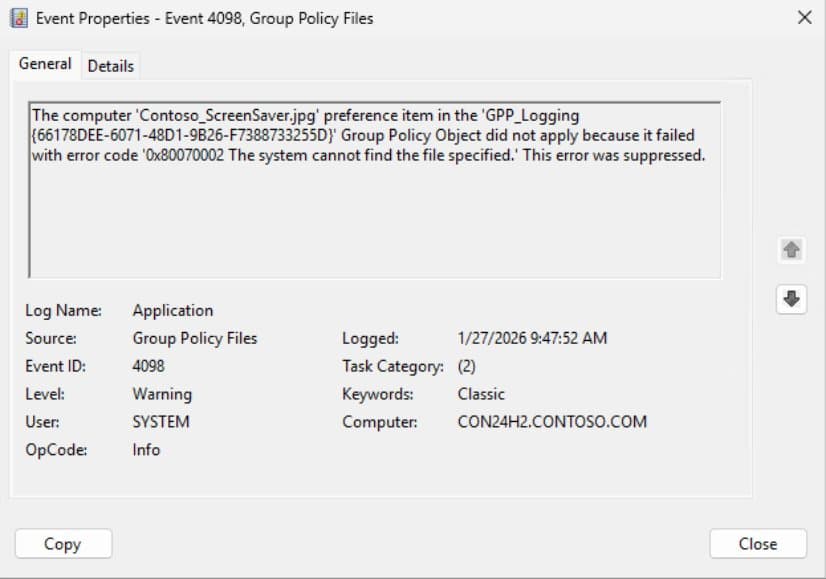
Windows Server 2025 and Windows 11 24H2 introduce Event ID 4117, providing detailed diagnostic information for Group Policy Preferences failures that previously left administrators guessing with only Event ID 4098.
Starting with the January 2026 update rollup for Windows 11 24H2 and Windows 11 25 H2, Microsoft has finally addressed one of the longest-standing frustrations in Group Policy Preferences (GPP) troubleshooting. The new Event ID 4117 provides the detailed diagnostic information that administrators have desperately needed for years.
The Problem That Plagued Administrators for Years
Before this update, when a GPP item failed, administrators would see only Event ID 4098 in the Application log. This single event would tell you something failed, but not what, where, or why. The error message typically read something like "The computer 'Contoso_ScreenSaver.jpg' preference item... did not apply because it failed with error code '0x80070002'."
This lack of context meant administrators had to enable debugging, search through logs, run ProcMon, and essentially guess which preference item failed and why. The process was time-consuming and often frustrating, especially when dealing with complex GPP configurations involving files, folders, drive maps, registry settings, and local users and groups.
What Changed: Event ID 4117
The new Event ID 4117 is logged in addition to the legacy Event ID 4098, which remains for compatibility. This means you'll now see both events when something goes wrong, but 4117 provides the missing context that makes troubleshooting actually possible.
Importantly, this update doesn't change how GPP processes policies - it only improves visibility when something goes wrong. There's no need to set any additional configuration to get the extended information.
Real-World Scenarios Made Clear
File Does Not Exist
Previously, Event 4098 would tell you a file was missing but not which one or where. Now, Event 4117 clearly identifies the source file and destination:
"Group Policy Preferences Diagnostic Data: Source file '\contoso.com\SYSVOL\contoso.com\Wallpaper\Contoso_ScreenSaver.jpg' was not found when copying to 'C:\Temp\Contoso_ScreenSaver.jpg'. Error: 0x00000002"
Access Denied Issues
When permissions prevent GPP from copying a file, Event 4117 now shows exactly which file and operation failed:
"Group Policy Preferences Diagnostic Data: Access denied when copying '\contoso.com\SYSVOL\contoso.com\Wallpaper\Contoso_ScreenSaver.jpg' to 'C:\Temp\Contoso_ScreenSaver.jpg'. Check file permissions. Error: 0x00000005"
Folder Delete Failures
For folder operations, Event 4117 identifies the exact folder that failed deletion:
"Group Policy Preferences Diagnostic Data: Access denied to folder 'c:\temp1' during delete. Check permissions. Error: 0x00000005"
Drive Map with Invalid Network Path
When a drive map attempts to connect to an invalid UNC path, Event 4117 removes all ambiguity:
"Group Policy Preferences Diagnostic Data: Network name '\Server1\BogusShare' is invalid for 'h:'. Error: 0x00000043"
Quick Reference: Event ID Decision Table
| Legacy Event | New Event | Diagnostic Meaning | Recommended Action |
|---|---|---|---|
| 4098 | 4117 | Source file missing | Make sure the file exists and matches the name and path as in the GPP settings |
| 4098 | 4117 | Access denied (file) | Fix NTFS/share permissions for policy context |
| 4098 | 4117 | Folder delete failed | Correct permissions, ownership, or locks |
| 4098 | 4117 | Drive Map path invalid | Fix UNC, DNS, targeting, or remove obsolete map |
Why This Matters
This change transforms GPP troubleshooting from a guessing game into a deterministic process. What previously took hours of investigation can now often be resolved in minutes. The clarity provided by Event ID 4117 means:
- Faster resolution times for GPP-related issues
- Reduced need for advanced troubleshooting tools
- More confidence when making changes to GPP configurations
- Better documentation of why policies failed
For organizations that rely heavily on GPP for configuration management, this update represents a significant quality-of-life improvement. No longer will administrators need to enable verbose logging or run process monitors just to understand basic GPP failures.
Looking Ahead
The January 2026 update rollup for Windows 11 24H2 and Windows 11 25 H2 marks the beginning of this improvement. When the Server operating system update becomes available, Microsoft plans to update their documentation accordingly.
This change brings Group Policy Preferences diagnostics in line with modern troubleshooting expectations without changing how policies apply. If you've ever stared at Event 4098 wondering "Which one?", this update is for you. The silence is officially over.
The Microsoft Community Hub article announcing these changes invites feedback from administrators who have struggled with GPP troubleshooting. As the authors note, "even GPP gets a character development arc" - and it's a welcome one for IT professionals everywhere.
Comments
Please log in or register to join the discussion