
Microsoft’s Teams check-in feature turns office Wi-Fi into presence metadata, which is exactly the kind of cross-platform privacy edge case mobile teams should design for before users revolt.

Platform update
Microsoft is bringing back its controversial workplace check-in feature for Microsoft Teams, after several delays and a round of privacy pushback. The feature updates a user’s work location when their device connects to configured corporate Wi-Fi, then reflects that location in Teams presence. In practical terms, Teams can show that someone is in a specific workplace building without the user manually updating their status.
The revised version is more constrained than the original description that caused the backlash. Microsoft is positioning the feature as a workplace coordination tool rather than an attendance system. The current behavior, as described in reporting and Microsoft’s roadmap language, is limited to configured workplace networks, shows only the current work location, and does not keep a movement history for managers to browse. Organizations can enable the feature and choose whether it is opt-in or opt-out, but Microsoft says users can disable it on their own device.
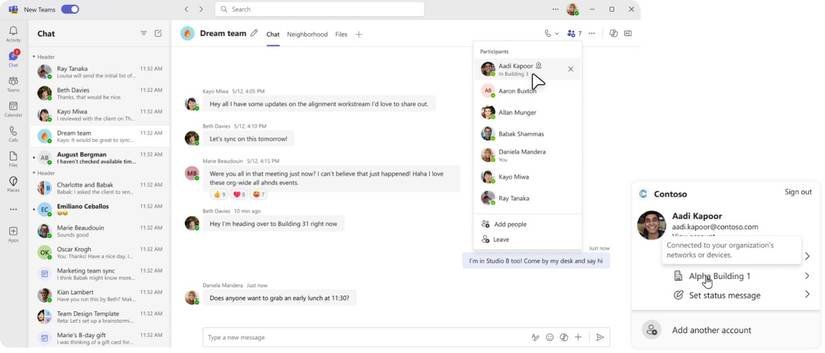
For platform teams, the real update is not a new mobile SDK release. It is a product-level signal about how presence, network state, and workplace policy are being tied together inside collaboration software. There is no announced Teams mobile SDK version bump, no new Android SDK dependency, and no iOS framework migration attached to this rollout. The feature appears to be a Microsoft 365 and Teams client capability, with earlier roadmap coverage pointing to Windows and macOS as the primary automatic update surfaces. Mobile Teams clients may still display location and presence state, but developers should avoid assuming that iOS and Android behave the same way unless Microsoft documents that support explicitly.
That distinction matters because Wi-Fi identity is treated very differently across platforms. On Android, apps that target Android 10, API level 29, or higher generally need ACCESS_FINE_LOCATION to access Wi-Fi scan results or current SSID data, and Android 13, API level 33, introduced NEARBY_WIFI_DEVICES for nearby Wi-Fi device access in specific workflows. Google’s Wi-Fi permissions documentation also separates cases where an app derives physical location from Wi-Fi information from cases where it does not. The platform treats nearby network information as sensitive because a Wi-Fi network can be a location proxy.
On iOS, Apple has long narrowed access to current Wi-Fi network details through APIs such as CNCopyCurrentNetworkInfo and the Access Wi-Fi Information entitlement. A normal App Store app cannot casually read SSID and BSSID data in the background and turn it into a workplace location signal. Enterprise-managed apps have more deployment options, but even there, the privacy model is built around entitlement, device management, user trust, and policy disclosure.
For cross-platform developers, Teams is a useful case study because the user experience sounds simple while the implementation and trust model are not. Detect corporate Wi-Fi, map it to a building, update presence. That is the product sentence. Underneath it are tenant controls, device settings, platform permissions, working-hours rules, network configuration, identity, admin policy, audit expectations, and local labor or privacy requirements.
Developer impact
The first developer impact is architectural. Presence used to mean activity state, such as available, away, busy, in a meeting, or offline. Work location adds a second dimension: where that state is being interpreted. A user who is available at home, available in Building 3, and available from a client site may have the same green dot but very different privacy expectations. Once location becomes part of presence, your app is no longer only showing availability. It is publishing workplace context.
That is especially relevant for teams building companion apps, internal workforce tools, HR integrations, room booking systems, desk reservation apps, field service products, or Microsoft 365 integrations. If your product reads Teams presence through Microsoft Graph presence APIs, you should treat location-adjacent signals as sensitive even when the API response looks ordinary. A string like Office, Remote, or Building A can become management data when combined with timestamps, schedules, badge records, VPN logs, or task activity.
The second impact is platform parity. A feature that feels clean on desktop can become uneven on mobile. Android gives developers more direct networking APIs, but it also requires runtime permission handling, clear user-facing permission prompts, and careful handling across API levels. iOS gives less ambient network visibility to third-party apps, which means the same feature may need a server-side signal, MDM-managed configuration, a manual check-in flow, or a different consent model.
A cross-platform codebase built with React Native, Flutter, Kotlin Multiplatform, .NET MAUI, or a shared C++ core cannot hide those differences behind a single boolean like isOnCorporateWifi. The abstraction should represent capability and confidence, not just state. A better model is something like workLocationSource, with values such as manual, adminConfiguredWifi, managedDeviceSignal, calendarDefault, unknown, and disabled. That gives product, policy, and support teams enough detail to explain behavior without leaking raw SSIDs or device identifiers through every layer of the app.
The third impact is consent design. Microsoft’s privacy tweaks are aimed at the obvious objections: the feature is not supposed to track movement history, it is limited to workplace Wi-Fi, and users can turn it off on their device. Those are meaningful limits, but they do not remove the social pressure problem. If an organization enables an opt-out location feature, employees may read the disable switch as a visible act of refusal. The software can technically offer control while the workplace culture makes that control expensive to use.
Mobile developers run into this pattern constantly. Location permissions, Bluetooth scanning, Wi-Fi discovery, background refresh, push notification tokens, and analytics all have legitimate uses. They also become surveillance primitives when joined together without restraint. The practical lesson is to design for the worst reasonable interpretation. If a user can plausibly think the app reports where they are to a manager, the product should explain what is shared, when it is shared, who can see it, how long it lasts, and how to disable it.
There is also a data minimization lesson. Teams reportedly shows current location without historical movement tracking. That is the right direction. For your own apps, avoid storing raw BSSID values, access point identifiers, scan lists, or high-frequency connection events unless there is a clear operational need. A building-level claim with an expiry time is much safer than a stream of network observations. If the product only needs to answer whether a user is available for an in-person meeting, it probably does not need a durable record of every network transition.
From an SDK perspective, the safe cross-platform stance is explicit separation. The mobile client can detect or request local state, the server can map approved signals to workplace labels, and the UI can publish only the minimum label needed for coordination. Android API level 33 and higher may involve NEARBY_WIFI_DEVICES for nearby Wi-Fi workflows, while older Android versions and scan APIs still bring ACCESS_FINE_LOCATION into the conversation. iOS should be treated as entitlement-limited from the beginning, not as a platform that will eventually match Android with enough native glue code.
Migration
For organizations adopting the Teams feature, migration starts in admin policy, not code. Tenant admins should review the Microsoft 365 Roadmap, Teams admin messaging, and internal privacy requirements before enabling workplace check-in. The safest rollout is opt-in, scoped to pilot buildings, with clear employee communication and a documented disable path. Treat opt-out as a policy decision that needs HR, legal, security, and worker representative input, not as a default IT toggle.
For developers maintaining apps on both iOS and Android, the migration work is mostly about inventory and boundaries. Search your codebase for SSID, BSSID, Wi-Fi scan, network callback, location permission, Bluetooth scan, beacon, geofence, presence, availability, desk, room, and check-in usage. The goal is to identify every path where a device-local signal becomes a workplace-visible status. Many teams find old helper code that was added for debugging network issues, captive portal checks, office-only feature flags, or VPN hints. Once Teams makes Wi-Fi location more visible to users, those old paths become harder to justify.
Next, update your platform permission matrix. For Android, document behavior by minSdk, targetSdk, and runtime OS version. Android 10, API level 29, tightened Wi-Fi scan access around precise location. Android 13, API level 33, added NEARBY_WIFI_DEVICES for apps that manage nearby Wi-Fi devices, while some APIs still require fine location. For iOS, document whether the app uses current Wi-Fi APIs, whether it has the required entitlement, whether it is App Store or enterprise distributed, and whether the signal works in foreground only or under management.
Then revise the product contract. A workplace check-in feature should say what source produced the status and when it expires. Current location should expire at the end of working hours or after a short TTL, not persist as a general activity log. Manual overrides should be respected across devices, because a user who disables sharing on mobile should not be surprised when desktop turns it back on through a different path. If admin policy can override part of the behavior, show that clearly in settings rather than hiding it behind a disabled switch.
API consumers need their own migration path. If your app consumes Teams presence, do not assume that location-like data is safe to mirror into dashboards, push notifications, manager views, or analytics tools. Add schema labels for sensitive presence attributes. Restrict access by role. Redact data in logs. Make sure test fixtures include disabled, unknown, manual, automatic, expired, and admin-restricted states. Presence code tends to be treated as lightweight UI plumbing, but workplace location turns it into privacy-sensitive business logic.
The rollout also deserves QA beyond the happy path. Test a user connecting before working hours, after working hours, while traveling between buildings, while using VPN, while on guest Wi-Fi, while switching between mobile data and Wi-Fi, and after disabling the feature on one device. Test the same account on desktop and mobile. The risk is not only incorrect location. The risk is inconsistent location, because that is what creates support tickets, manager confusion, and user distrust.
Microsoft’s updated Teams feature is more restrained than the version users feared, but it still sits on a sensitive line. It turns network attachment into workplace presence. For a mobile developer, that is the whole lesson in one sentence: platform APIs may expose a signal, enterprise policy may permit its use, and users may still reject the product if the sharing model feels unclear or coercive. Build the consent, expiry, platform differences, and admin controls as first-class parts of the feature, not as text added after the backlash.
Comments
Please log in or register to join the discussion