
MX Linux 25.2 is a practical maintenance release for teams that want a Debian-based desktop with fewer forced platform choices, especially around systemd, kernel selection, and Raspberry Pi compatibility.
MX Linux 25.2 is not a regulation, but it is the kind of platform change compliance teams should treat as a controlled endpoint update. The release refreshes the Debian-based distribution, restores more flexible init-system handling after earlier kernel changes, adds an optional newer Liquorix kernel path, and brings the Raspberry Pi edition closer to the main MX 25 base.
For organizations managing Linux desktops, lab machines, developer workstations, or Raspberry Pi systems, the compliance issue is straightforward: document the approved edition, init mode, kernel line, repository source, and support expectation before rollout. The effective date for operational purposes is the release availability reported in late May 2026, with this coverage published on June 12, 2026. No new statutory duty is created by MX Linux 25.2, but existing security and governance duties still apply under frameworks such as GDPR Article 32, HIPAA Security Rule technical safeguards where applicable, FTC Act Section 5 security expectations for unfair or deceptive practices, and internal software asset management policies.

Regulatory Action
The relevant action is a software platform release: MX Linux 25.2, an update to the MX 25 series. MX Linux is a Debian-based desktop distribution maintained by the MX Linux project, with official project information available at mxlinux.org and downloads through the project’s download links. The release matters because it affects system initialization, kernel selection, administrative tooling, and Raspberry Pi support, all of which can influence endpoint security controls.
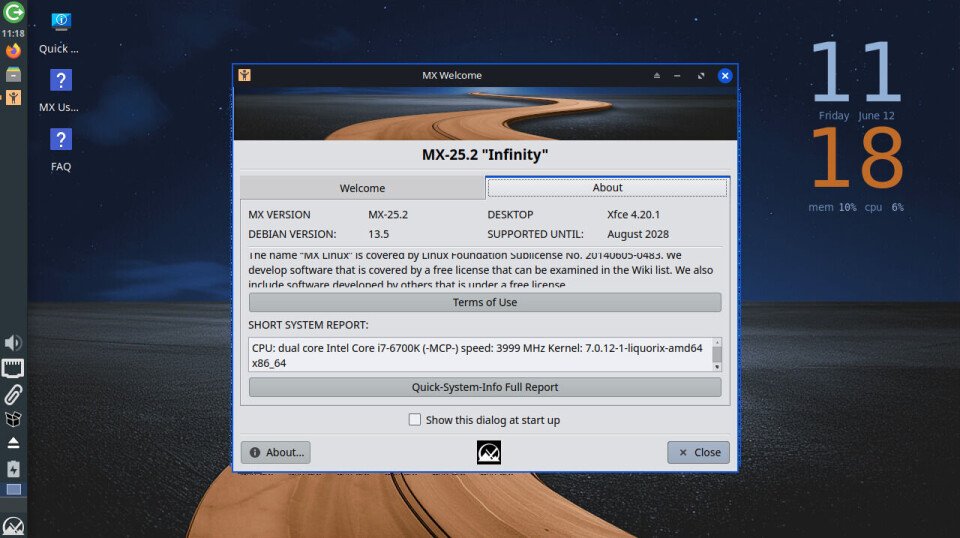
The most compliance-relevant change is the return of practical switchable init support in the MX 25 line. In earlier MX releases, users could choose between sysvinit and systemd at boot. That mattered for users who preferred sysvinit as the normal operating mode but occasionally needed systemd to install or run software that expected it. Kernel changes around Linux 6.12 and later disrupted the older MX method. MX 25.0 therefore required an install-time choice between systemd and sysvinit variants. MX 25.1 introduced a replacement dual-init method, and MX 25.2 continues the smoothing of that transition.
From a control perspective, this is not just a user preference. The init system governs how services start, stop, log, recover, and interact with dependencies. In regulated environments, service behavior must be predictable. Endpoint baselines often specify which daemons may run, which logs must be retained, which update services are permitted, and how privileged service changes are approved. A machine that can operate with either sysvinit or systemd needs a written standard explaining when each mode is allowed.
The second action is kernel choice. MX Linux 25.2 reportedly offers an optional kernel 7.0 path from the Liquorix project for users choosing the Advanced Hardware Support route, while standard editions continue to use Debian-oriented kernel packaging. The Xfce edition can be selected in standard or AHS form, KDE is available in AHS form, and Fluxbox remains aligned with the Debian kernel path. Kernel variance is a compliance concern because it changes driver support, attack surface, patch cadence, and compatibility with endpoint detection, disk encryption, VPN, and device management software.
The third action is the Raspberry Pi refresh. The Raspberry Pi edition had lagged behind the main MX release train and is now being brought to the newer MX 25 base. That edition is built partly from Raspberry Pi OS packages so that Pi-specific tooling, configuration commands, and EEPROM update workflows can continue to function. This makes the edition more useful for labs, kiosks, test benches, and lightweight desktop deployments, but it also means the package origin model is different from a standard Debian-only system.
What It Requires
For compliance officers and IT administrators, MX Linux 25.2 requires a managed deployment decision rather than a casual workstation upgrade.
First, define the approved init posture. If the organization uses MX Linux because it wants a non-systemd default, document sysvinit as the standard operating mode and define exceptions for booting with systemd. Exceptions should be linked to a business need, such as installing a package that requires systemd during setup or running a tool that depends on systemd services. If systemd is approved for daily use, record that choice and make sure service monitoring, logging, and hardening checks match systemd behavior.
Second, lock the edition choice. MX Linux 25.2 is not one uniform artifact. Xfce, Xfce AHS, KDE AHS, Fluxbox, and Raspberry Pi editions have different assumptions. Xfce standard is the conservative desktop path. Xfce AHS is better for newer hardware. KDE AHS brings a heavier desktop and newer hardware stack. Fluxbox is aimed at lower-resource machines. Raspberry Pi builds have special platform requirements. Treat each as a separate approved configuration item.
Third, approve the kernel line. A newer kernel can solve hardware support problems, especially on current laptops, graphics hardware, Wi-Fi adapters, and newer chipsets. It can also create validation work. Before approving the Liquorix or AHS path, test full-disk encryption, suspend and resume, external display handling, VPN clients, endpoint security agents, printer drivers, accessibility tools, and backup software. A compliance-ready rollout should include a rollback plan to the Debian kernel line where practical.
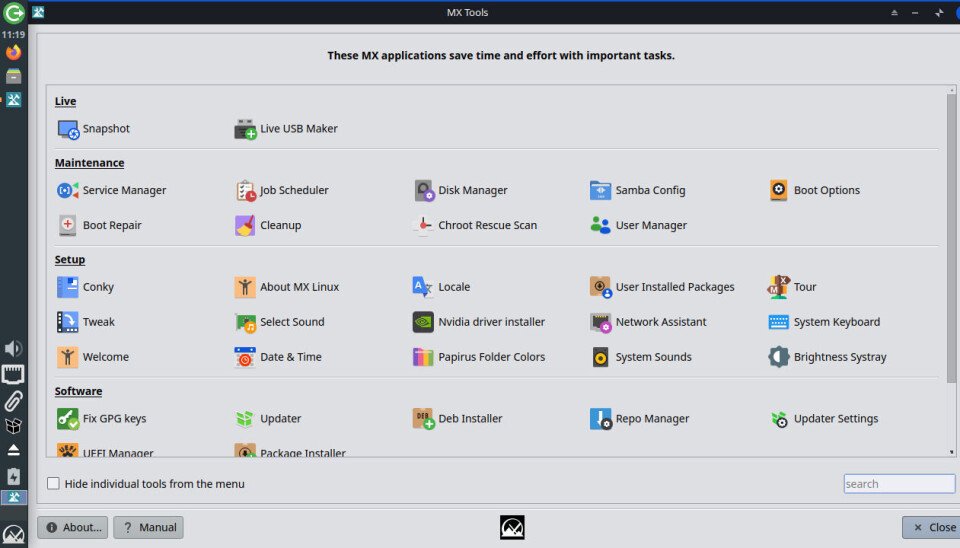
Fourth, validate MX Tools. The source article emphasizes that MX Tools are a major advantage of the distribution because they simplify repository selection, mirror switching, kernel management, third-party application installation, and driver setup. That convenience is useful, but it must be governed. Package installers and repository tools can introduce unapproved sources if users have broad administrative rights. Administrators should decide whether MX Tools are available to all users, restricted to IT, or permitted only in a managed admin session.
Fifth, define third-party application rules. The article mentions reinstalling applications such as Google Chrome and Slack, and using Flatpak to install Gear Lever and Panwriter. Each of those choices carries policy implications. Chrome may be required for enterprise browser management, Slack may involve retention and export rules, Flatpak changes the package distribution model, and AppImage-style workflows can bypass normal repository controls. The correct compliance response is not to ban every alternate package format. The correct response is to decide which formats are allowed, where they may be sourced, how updates are applied, and who owns vulnerability tracking.
Sixth, assess Raspberry Pi separately. Raspberry Pi systems are often treated as small appliances rather than managed computers. That is a mistake when they process personal data, authenticate to internal services, run dashboards, connect to production networks, or hold API credentials. For MX Linux on Raspberry Pi, administrators should record the board model, boot media, EEPROM update state, package sources, remote access configuration, encryption position, and patch process. Pi deployments used for signage, test labs, or operational monitoring should be placed into the same asset inventory as other endpoints.
Compliance Timeline
Immediate review, from June 12, 2026: classify MX Linux 25.2 as an endpoint platform update. Confirm whether MX Linux is already approved in the organization. If it is not, require a normal software intake review before installation on managed devices. Record the release source, edition, desktop environment, init mode, and kernel path.
Within 7 days: test installation and upgrade paths on non-production hardware. Include at least one standard Xfce system, one AHS system if newer hardware is in scope, and one Raspberry Pi if the Pi edition is being considered. Confirm that MX Tools function after installation or replacement over an older MX system. Verify update behavior, repository configuration, user account handling, swap or zram settings, disk layout, Secure Boot position where relevant, and backup restoration.
Within 14 days: complete security validation. Check service exposure under both sysvinit and systemd if dual-init use is permitted. Confirm firewall defaults, SSH status, browser policy, disk encryption, screen lock settings, logging, time synchronization, automatic update policy, and privileged user controls. Where GDPR Article 32 or comparable security rules apply, document how confidentiality, integrity, availability, and recovery are maintained on MX Linux endpoints.
Within 30 days: approve or reject each edition for defined use cases. A practical approval matrix might allow Xfce standard for general desktops, Xfce AHS for newer hardware after driver testing, Fluxbox for low-resource machines, KDE AHS only where the desktop stack is needed, and Raspberry Pi only for specific appliance-style roles. The matrix should also state whether systemd boot is allowed, whether Liquorix kernels are allowed, and whether Flatpak or AppImage workflows are permitted.
Within 60 days: migrate eligible MX 23 or MX 25.0 systems only after backup and restore testing. The article indicates that replacing an existing MX install can work, but may require manual follow-up such as re-enabling swap and recreating a matching user account. That makes it unsuitable as an unmanaged user-led upgrade. IT should provide a checklist, perform test restores, and confirm that user data and application settings remain available.
Ongoing: monitor MX Linux project notices, Debian security updates, Raspberry Pi OS package changes for the Pi edition, and Liquorix kernel updates if AHS systems are approved. Keep a record of every endpoint’s edition and kernel line. When a support ticket involves service behavior, package installation, or boot issues, capture whether the system was started with sysvinit or systemd.
The practical takeaway is simple: MX Linux 25.2 gives administrators more choice, but choice must be converted into policy. For individual users, switchable init and MX Tools are conveniences. For organizations, they are configuration variables that need ownership, testing, and written approval.
Comments
Please log in or register to join the discussion