A DIY enthusiast repurposes a decommissioned IBM 1U rack console into a self-contained, portable terminal for vintage computing projects, blending frugality with practical engineering to solve the persistent problem of hauling CRT terminals and tying up modern laptops for serial console work.
There is a particular kind of frustration that comes with maintaining vintage computing systems: the need to dedicate modern hardware to serve as a bridge to older machines. CRT terminals are heavy, fragile, and increasingly scarce. Modern laptops with serial ports are becoming rarer by the year, and even USB-to-serial adapters require a full operating system running terminal emulator software. The result is a constant juggling act where expensive or delicate equipment gets pressed into service for tasks that are, at their core, quite simple. This is the problem that prompted a recent project documented on the Old Vintage Computing Research blog, where the author set out to build a self-contained, portable "everything console" that could serve as both a serial terminal and a VGA display for vintage systems, all housed within a single unit.
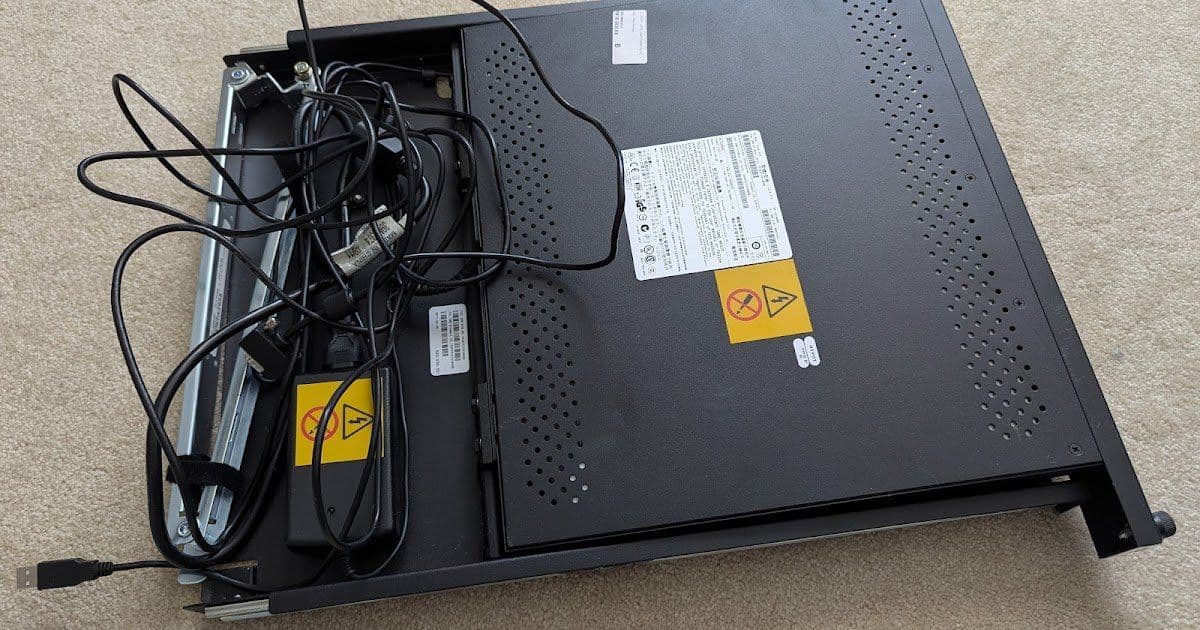
The foundation of the build is an IBM 7316-TF3 1U rack console, a device that was manufactured between 2004 and 2014 and was designed to slide into standard 19-inch server racks. These consoles feature a flip-up LCD screen and keyboard, providing a compact interface for server management. The author acquired a used unit from eBay for $120, choosing one with cosmetic damage to both the chassis and the LCD panel. The damage was deliberate: it reduced the price while leaving the screen sufficiently legible for terminal use. This kind of targeted procurement, looking for equipment that is "good enough" rather than pristine, is a hallmark of practical vintage computing work. As the author notes, similar units from Dell, HP, and other manufacturers are equally available and would serve the same purpose.
The keyboard that ships with the IBM console, the SK-8845RC USB Travel Keyboard with UltraNav, turns out to be a surprisingly competent input device. It offers both a TrackPoint and a trackpad, giving users a choice of pointing device, and it is implemented as a composite HID device on a single USB hub that also provides two additional USB ports. The keyboard's cable routes through an extensible folding arm that keeps everything connected when the console is pulled forward from the rack. The author expresses genuine appreciation for this keyboard, noting its space-saving design and reasonable tactile feel given its slim profile. This appreciation is not mere nostalgia; it reflects a broader pattern in computing where certain designs from specific eras achieved a balance of form and function that modern alternatives sometimes lack.
The core challenge of the project lies in choosing and integrating a terminal emulator. The author considered several options before selecting a device from Tattler Solutions, an off-the-shelf VT100 terminal emulator that ships in a self-contained case, runs up to 115200 bits per second, and can be powered directly from USB. At $86 shipped, it represents a reasonable investment for a device that will see regular use. However, the emulator has a significant limitation: its USB controller does not support composite devices, meaning the IBM keyboard's combined keyboard-and-trackpoint functionality cannot be used with it. This forced a compromise: the author had to source a simpler USB keyboard from Perixx, selecting a $20 slimline model after testing that all necessary function and control keys worked properly with the terminal emulator. The inability to use the preferred keyboard is a reminder that hardware compatibility remains a persistent challenge in DIY projects, where the intersection of different standards and implementations often produces unexpected constraints.
The assembly process is documented in considerable detail, revealing both the ingenuity required and the iterative nature of practical engineering. The author modified the console's lower tray to accommodate the new keyboard, using silane metal glue and black-painted mending braces as supports. The first attempt at gluing failed after 24 hours because the adhesive between the metal pieces had not fully cured; the second attempt, allowed to cure for a full week, proved stable. This kind of trial-and-error is common in hardware projects and underscores the importance of patience and empirical testing over theoretical planning. Additional modifications included Velcro strips to hold the keyboard in place, Z-brackets to prevent the keyboard from contacting the screen when the unit closed, and shims and bumpers to level the bottom of the unit.
The console is designed to operate in two modes. In one mode, the keyboard and VGA panel connect through the VT100 terminal emulator box, providing a self-contained serial terminal. In the other mode, the keyboard and VGA panel are available as pass-through connectors, allowing the console to be used as a display and input device for other systems. This dual functionality is achieved through manual USB and VGA switchboxes, which the author arranged symmetrically on the top of the console for easy access. The cable management alone required careful planning, with Velcro ties, cable guides, and strategic routing to keep everything organized within the limited space.
The final result is a portable, self-contained device that can serve as a console for systems ranging from a POWER9 Raptor Blackbird (using a VGA-to-HDMI adapter) to an AT&T 3B2/310 (using a direct serial connection). The author demonstrates both use cases, showing the console in operation with vintage hardware. The device folds flat for transport and, while lacking a latch and handle, represents a significant improvement over the previous setup of dragging around CRT terminals or tying up modern laptops.
The project raises several broader points worth considering. First, it highlights the enduring value of rack-mounted console hardware. These devices were designed for data centers and server rooms, but their compact form factor and integrated input/output capabilities make them well-suited for hobbyist and preservation work. As enterprise hardware cycles through, more of these units become available on the secondary market at reasonable prices. Second, the project demonstrates the trade-offs inherent in any DIY build. The author sacrificed the preferred keyboard for compatibility, accepted cosmetic damage for cost savings, and spent considerable time on iterative modifications to get the physical assembly right. These compromises are not failures; they are the reality of building something that does not exist as a commercial product.
The choice to build rather than buy also reflects a philosophical stance common in vintage computing circles: the belief that understanding how things work, and being able to modify them, is inherently valuable. The author could have purchased an all-in-one solution, but the DIY approach provides flexibility, knowledge, and the satisfaction of solving a problem with available materials. This is not merely frugality, though cost is certainly a factor. It is an assertion that the tools we use should be comprehensible and modifiable, a principle that connects vintage computing enthusiasts to the broader maker movement and to a long tradition of hands-on engineering.
The project also illustrates the persistent challenge of interfacing between different eras of computing technology. Serial ports, VGA connectors, and PS/2 interfaces are legacy standards by any measure, but they remain essential for working with older systems. The availability of adapter boxes like the Tattler Solutions terminal emulator and devices like the ps2x2pico for PS/2 conversion or a Wombat for ADB Macs shows that the community has developed practical solutions for bridging these gaps. These devices do not merely translate signals; they preserve access to systems that would otherwise become increasingly difficult to interact with as the hardware that originally served those roles continues to age and fail.
In the end, the project is a quiet example of the kind of work that keeps vintage computing alive. It is not glamorous or revolutionary. It is, instead, practical, iterative, and rooted in a deep understanding of both the constraints and the possibilities of existing hardware. The author has created a tool that will serve multiple projects over time, and in doing so, has demonstrated that the best solutions are often the ones you build yourself.
Comments
Please log in or register to join the discussion