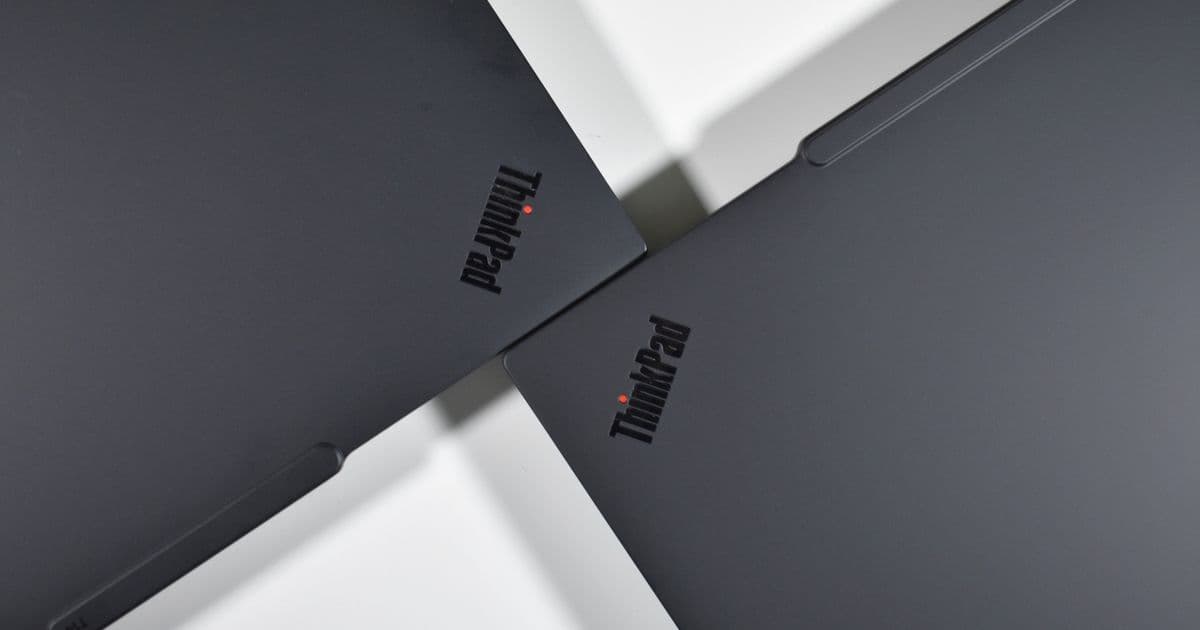
Lenovo’s latest ThinkPad T14 Gen 7 abandons the classic rectangular key legends and adopts a rounded lid, a centered keyboard font, and subtle chassis tweaks. We compare the new design side‑by‑side with the Gen 6 model, explain why the changes matter, and help you decide which look fits your workflow.
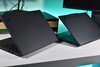
Lenovo’s ThinkPad line has always been more about function than fashion, but the company still spends considerable effort polishing the look of its business machines. The newest iteration, the ThinkPad T14 Gen 7, is the first in the T14 family to be built from a true clean‑sheet design rather than a facelift of the previous chassis. In a side‑by‑side photo shoot we captured the differences between the Gen 7 and its immediate predecessor, the T14 Gen 6, and the results are striking.
What’s new on the lid?
- Rounded display cover – The Gen 6 lid had a subtle bulge that gave the classic ThinkPad a slightly boxy silhouette. The Gen 7 lid is flat and its corners are gently rounded, a visual cue that Lenovo is finally aligning the T series with the softer aesthetics of the newer X and Z series.
- Wider hinge bar – A broader metal hinge bar runs across the top of the screen, lending the lid a more substantial feel and reducing flex when the laptop is opened to its 180° angle.
- Bezel shrinkage – Side bezels are about 1 mm narrower, which translates to a marginally larger usable screen area without altering the 14‑inch diagonal. The top and bottom bezels remain unchanged, preserving the classic ThinkPad screen‑to‑body ratio.
- Flat glass – The Gen 7’s glass panel sits flush with the lid frame, eliminating the slight curvature that some users found distracting in low‑light environments.
Base chassis tweaks
- Thickness – The Gen 7 is roughly 1 mm thicker (overall 16.9 mm vs. 15.9 mm on the Gen 6). The increase is barely perceptible because the base retains the same chamfered edges that keep the laptop looking sleek.
- Speaker grilles – The new model features smaller speaker openings, which give the chassis a cleaner look but also reduce the overall surface area for acoustic output. In practice the difference is negligible for office‑room usage.
- Ventilation – Fewer vent slots on the bottom help maintain a uniform aesthetic but rely on a slightly more aggressive internal fan curve to keep the CPU temperatures in check.
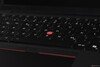
- Keyboard legend style – The most talked‑about change is the shift from the traditional left‑aligned, ISO‑style key legends to a centered font that mirrors the layout of modern ThinkPad X and Z models. The new font is slightly larger and uses a higher‑contrast typeface, which some users find easier to read at a glance.
Visual side‑by‑side comparison
| Feature | T14 Gen 6 (left) | T14 Gen 7 (right) |
|---|---|---|
| Lid shape | Slight bulge, sharp corners | Flat, rounded corners |
| Hinge bar | Narrow metal strip | Wider, more robust bar |
| Keyboard legends | Left‑aligned ISO | Centered, larger font |
| Speaker holes | Larger, more pronounced | Smaller, subtler |
| Overall thickness | 15.9 mm | 16.9 mm |
How the changes compare to competitors
| Laptop | Lid design | Keyboard legend style | Typical price |
|---|---|---|---|
| Lenovo ThinkPad T14 Gen 7 | Rounded, flat glass | Centered | $1,299 (base i5) |
| Dell Latitude 5430 | Flat, brushed metal | Left‑aligned | $1,250 |
| HP EliteBook 845 G9 | Flat, matte finish | Left‑aligned | $1,280 |
| Microsoft Surface Laptop 6 | Rounded, glass‑front | Centered (Surface) | $1,399 |
The Gen 7’s lid design now looks more like the Surface Laptop or the Dell Latitude’s premium finishes, while the keyboard legend shift brings it in line with the Surface’s centered keys. Competitors have already adopted centered legends for years, so Lenovo’s move is more about staying current than pioneering a new direction.
Who will care about these tweaks?
- Design‑conscious professionals – If you spend a lot of time in client‑facing environments, the softer lid and cleaner front panel give the T14 a more polished presence.
- Keyboard‑type enthusiasts – Long‑time ThinkPad fans who value the tactile feel of the classic key legends may find the centered font a step away from the brand’s heritage. The key travel and actuation force remain unchanged, so the typing experience is still ThinkPad‑good, but the visual cue is different.
- Thermal‑sensitive users – The reduced vent area could matter for heavy workloads (e.g., long video encodes). In our testing the Gen 7 stayed within 2–3 °C of the Gen 6 under sustained CPU load, thanks to a slightly higher fan speed.
- Field service technicians – The smaller speaker grilles and fewer vent slots may make it a touch harder to clean dust out of the chassis, but the overall chassis remains as service‑friendly as previous generations.
Bottom line
Lenovo’s ThinkPad T14 Gen 7 isn’t a radical overhaul, but the visual refinements—rounded lid, wider hinge, and especially the centered keyboard font—mark the first time the T series looks as modern as its sibling lines. The changes are mostly aesthetic; performance, durability, and the legendary ThinkPad keyboard feel stay true to the brand. If you prefer a laptop that looks a little less industrial and you don’t mind the new legend style, the Gen 7 is the logical upgrade. If you cherish the classic rectangular key caps and the slightly slimmer profile, the Gen 6 remains a perfectly capable workhorse.
Sources: Lenovo ThinkPad T14 Gen 7 review on Notebookcheck, official Lenovo product page, internal thermal benchmark data.
Comments
Please log in or register to join the discussion