
OpenAI has quietly launched ChatGPT Translate, a powerful new translation feature that challenges Google Translate with conversational AI capabilities, multimodal input, and style customization - all available for free without requiring a paid account.
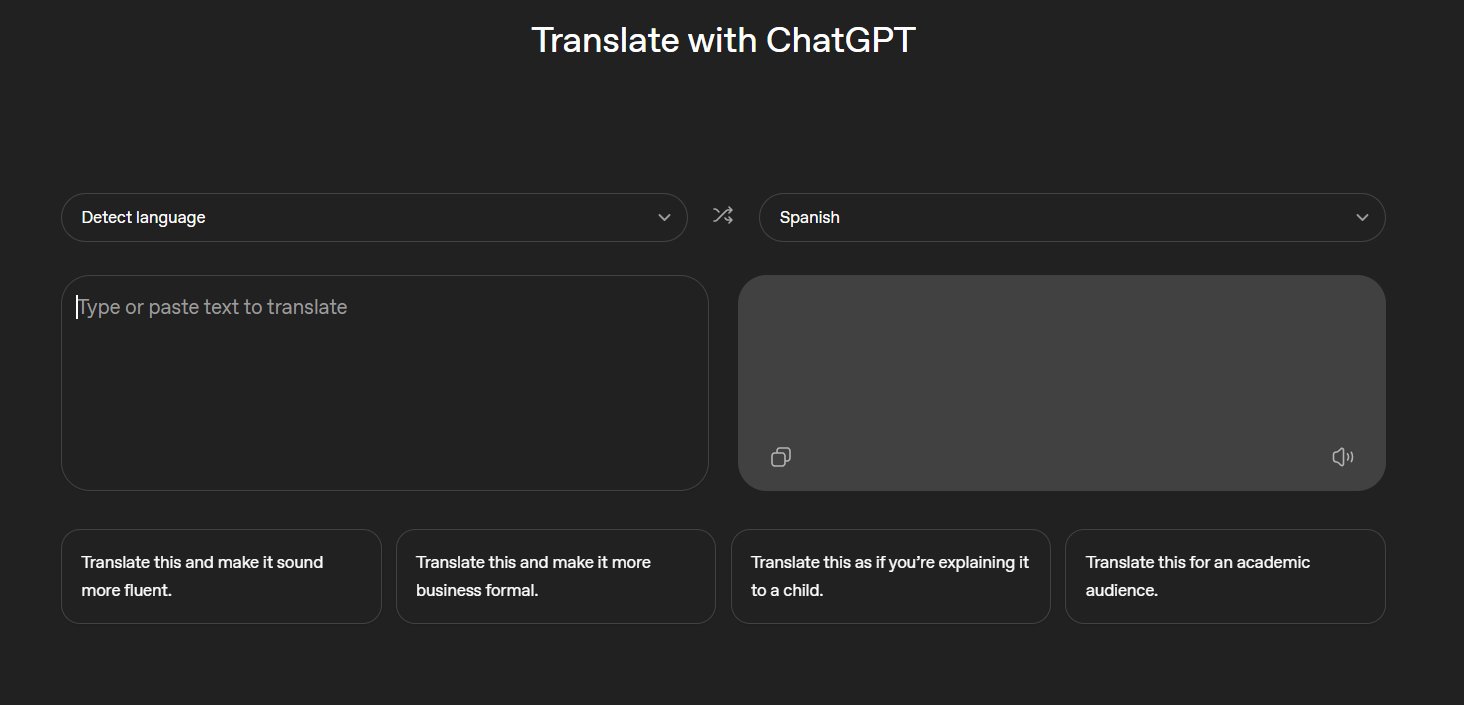
OpenAI has quietly rolled out a new ChatGPT feature called ChatGPT Translate, and it looks very similar to Google Translate on the web. 
The company has lately turned into a product company, specifically for consumers, while Anthropic is focusing more on enterprises and software programmers. With the ChatGPT Translate feature, you can translate anything using ChatGPT, but it's not yet clear which model OpenAI is using for the Translate feature. Is it GPT 5.2 Auto with a custom prompt for translation? We don't know. This feature is available for everyone and does not require a paid account.
What Makes ChatGPT Translate Different
OpenAI hasn't officially announced ChatGPT Translate, but you can access it from chatgpt.com/translate. While it looks a bit like Google Translate, ChatGPT's Translate is far more advanced in several key ways.
Multimodal Input Capabilities
In our tests, we observed that we can paste or type text (or even upload a photo of a sign/menu, speak, or attach a file), and it detects the language or lets you pick the source and target language. This multimodal approach means you can:
- Take a photo of a restaurant menu in Tokyo and get an accurate translation with cultural context
- Upload a PDF document in Spanish and receive a properly formatted English version
- Speak phrases in real-time for instant translation during conversations
- Attach technical documents that require specialized terminology handling
Context-Aware Translation
The tool translates while trying to keep the real meaning, not just word-for-word text. This is particularly important for languages with complex grammatical structures or cultural nuances that don't have direct equivalents.
For example, translating "I'm feeling blue" from English to Spanish requires understanding the idiom rather than literally translating "blue" as a color. ChatGPT Translate handles these nuances by maintaining semantic meaning across languages.
Style and Tone Customization
One of the most powerful features is the ability to adjust the output based on what you want:
- More fluent: Natural-sounding translation that reads like native content
- Business formal: Professional language suitable for corporate communications
- For an academic audience: Technical precision with appropriate terminology
- Explain it like a child: Simplified language that breaks down complex concepts
This level of customization is unprecedented in free translation tools and represents a significant advantage over traditional services.
Conversational Translation Workflow
The big difference is that you can keep the conversation going after the first translation. This fundamentally changes how translation work happens:
Traditional approach:
- Input text
- Get translation
- If unsatisfied, start over with different settings
ChatGPT Translate approach:
- Input text
- Get translation
- Refine through conversation: "Make this more formal," "Explain why you chose this word," "Translate this specific phrase differently"
- Iterate until perfect
This conversational nature means you can ask follow-up questions like:
- "Why did you translate this word this way?"
- "Can you make this sound more natural?"
- "What are alternative translations for this phrase?"
- "Is this appropriate for a business email?"
Technical Implementation Questions
While OpenAI hasn't disclosed the exact architecture, several clues suggest sophisticated implementation:
Model Selection: The feature likely uses GPT-5.2 Auto with specialized translation training. The "Auto" designation suggests it can switch between different model sizes based on complexity.
Custom System Prompt: Translation requires specific handling of language rules, cultural context, and maintaining meaning. OpenAI probably uses a carefully crafted system prompt that guides the model's translation behavior.
Multimodal Integration: The ability to process images, audio, and documents indicates a unified pipeline that can handle various input types before translation.
Language Detection: Automatic language detection requires classification capabilities that can identify dozens of languages with high accuracy.
Comparison with Google Translate
| Feature | Google Translate | ChatGPT Translate |
|---|---|---|
| Cost | Free | Free |
| Multimodal | Limited (text, camera) | Text, images, audio, files |
| Context | Word/phrase level | Full conversation context |
| Style Control | Basic formality | Multiple detailed styles |
| Follow-up | None | Full conversational refinement |
| Cultural Nuance | Limited | Strong |
| Technical Docs | Literal translation | Context-aware |
Current Limitations
At the moment, ChatGPT for Android or iOS does not have the toggle to start the translation feature. This suggests the rollout is still in progress, with web access prioritized.
Other potential limitations:
- Rate limits may apply for free users
- Some languages might have reduced quality compared to major ones
- Specialized technical jargon may require verification
- Character limits for single translations
Practical Use Cases
Business Communications
Translate emails, reports, and presentations while maintaining professional tone across languages. The business formal option ensures culturally appropriate business etiquette.
Academic Research
Translate research papers while preserving technical terminology. The academic audience setting maintains precision and appropriate citation formatting.
Travel and Daily Life
Upload photos of signs, menus, or documents while traveling. The conversational nature allows you to ask clarifying questions about cultural context.
Software Development
Translate documentation, comments, and technical specifications. The ability to maintain code blocks and technical formatting is crucial.
Content Creation
Translate marketing materials, social media posts, or creative content while adapting tone for different cultural audiences.
Privacy and Data Considerations
Since this is a ChatGPT feature, users should consider:
- Translations may be used to improve OpenAI models (unless you opt out)
- Sensitive business documents might be processed on OpenAI servers
- The feature follows ChatGPT's existing privacy policies
- For highly confidential content, consider enterprise solutions or offline tools
How to Access and Use
- Navigate to chatgpt.com/translate
- No login required for basic access
- Select source and target languages (or let it detect automatically)
- Input text, upload file, or provide image
- Choose your desired style/tone
- Refine through conversation as needed
The Bigger Picture
This release signals OpenAI's continued push into consumer-facing products. While Anthropic focuses on enterprise and developer tools, OpenAI is building everyday utilities that could replace multiple existing services.
Translation is a massive market dominated by Google, Microsoft, and specialized services. By integrating translation directly into ChatGPT's conversational interface, OpenAI creates a workflow that traditional translation tools cannot match.
The free availability is particularly strategic. It removes barriers to adoption while demonstrating capabilities that could drive premium subscriptions for advanced features.
Looking Ahead
As this feature matures, expect:
- Mobile app integration
- API access for developers
- Specialized translation models for specific domains
- Integration with other ChatGPT features like canvas and code interpreter
- Support for more languages and dialects
For now, users have access to a translation tool that fundamentally rethinks how we bridge language barriers - not through simple word replacement, but through intelligent, contextual, and conversational understanding.
The race to dominate AI-powered translation just got more interesting, and users are the clear winners.
Comments
Please log in or register to join the discussion