OpenYak is a new open-source desktop AI assistant that runs entirely on your machine, offering powerful automation and analysis capabilities without cloud dependencies.
OpenYak is making waves in the AI assistant space with its promise of complete local-first operation. This open-source desktop application positions itself as "Yak is all you need" - a comprehensive AI agent that runs entirely on your machine without sending data to the cloud.
What Makes OpenYak Different
The core philosophy behind OpenYak is simple: your data stays on your machine. Unlike cloud-based AI assistants that require uploading files and conversations, OpenYak processes everything locally. This approach addresses growing privacy concerns while delivering powerful functionality.
Office Automation Capabilities
OpenYak shines in office environments where repetitive tasks consume valuable time. The application offers batch file operations including renaming, sorting, and cleaning up files across folders with auditable change logs. No more manual filing or worrying about accidental overwrites - every change is tracked and reversible.
Local Data Analysis
For professionals who work with data, OpenYak provides robust local analysis capabilities. It can parse spreadsheets, CSVs, and documents without uploading a single file to external servers. Users can spot anomalies, track trends, and export decision-ready reports directly from their desktop. This is particularly valuable for handling sensitive financial data, customer information, or proprietary research.
Content Creation and Writing
The writing assistant features help transform rough notes into polished documents. Whether drafting memos, policy updates, or professional communications, OpenYak maintains consistent company tone and style. This is especially useful for teams that need to produce standardized documentation across multiple departments.
Team Operations
OpenYak facilitates team collaboration by merging notes from various formats - PDFs, DOCX files, and CSVs - into structured briefings. The AI can automatically extract action items, assign owners, and track deadlines, creating a centralized workflow without relying on external project management tools.
Multi-Platform Messaging Integration
One of OpenYak's standout features is its IM integration through OpenClaw, connecting 8+ messaging platforms including WhatsApp, Discord, Telegram, Slack, Feishu, Signal, and iMessage. Users can receive and reply to messages across all channels from a single interface, eliminating the need to switch between apps.
Automation and Scheduling
For recurring tasks, OpenYak offers cron-based triggers. Users can set up daily data digests, weekly reports, or automated file cleanup routines that run on schedule. This "set it and forget it" approach to automation can significantly reduce administrative overhead.
Remote Workflows
OpenYak supports remote work scenarios through secure tunneling. Users can start tasks on their desktop and continue on their phone via one-click secure tunnel with QR code access. This bridges the gap between desktop power and mobile convenience without compromising security.
Model Flexibility
OpenYak doesn't lock users into a single AI provider. The platform supports 100+ AI models through OpenRouter, including popular options like Claude Opus 4.6, DeepSeek V3.2, Gemini 3 Flash, and GPT-4.1. Users can also bring their own API keys from 20+ providers, including Chinese services like Qwen, Kimi, MiniMax, and ZhiPu.
For those already subscribed to ChatGPT, OpenYak allows direct connection without additional API costs - a significant advantage for existing OpenAI customers.
Technical Foundation
The application includes 20+ built-in tools covering file operations, bash execution, search capabilities, web fetching, and long-term memory. Seven specialized agent modes handle different tasks from building and planning to exploring, with support for multi-step tool calling and sub-agent nesting.
Long-term memory functionality allows Yak to remember user preferences, work context, and key facts across conversations, creating a personalized experience that improves over time.
Getting Started
OpenYak offers a free tier with 1M tokens per week on free models, with pay-as-you-go options at OpenRouter prices and zero markup. Users can also bring their own API keys or run models locally via Ollama.
The application is available for download on Windows and macOS, with documentation for developers in the frontend and backend README files.
Privacy-First Design
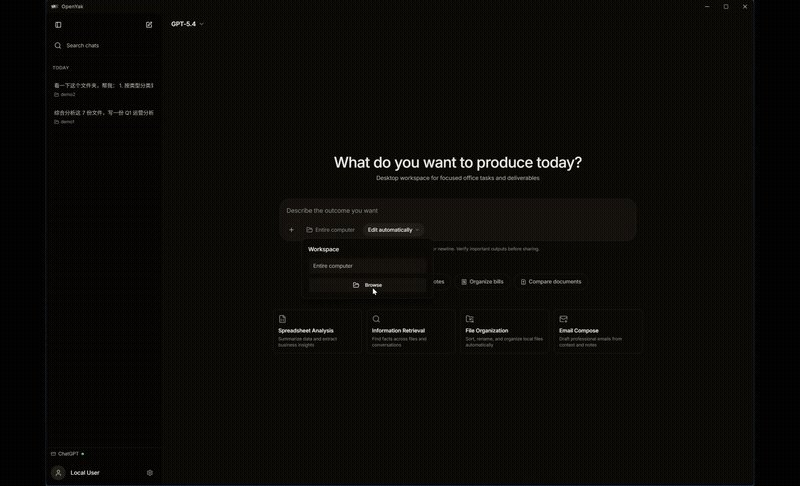
The AGPL-3.0 license ensures OpenYak remains open-source while the local-first architecture means conversations and data remain private. There's no cloud storage, no telemetry, and no third-party data processing - just your AI assistant running on your hardware.
For professionals and teams concerned about data privacy but still wanting powerful AI assistance, OpenYak represents a compelling alternative to cloud-dependent solutions. The combination of comprehensive features, model flexibility, and privacy guarantees makes it worth considering for anyone looking to harness AI without sacrificing control over their data.
Comments
Please log in or register to join the discussion