New research reveals that proper language analyzer selection in Azure AI Search can improve keyword search quality by up to 120%, with significant differences between Lucene and Microsoft analyzers depending on content type and language.
Optimizing Search Quality: Language Analyzer Selection in Azure AI Search
Language analyzers in Azure AI Search play a critical role in determining search quality, yet many organizations overlook their importance. Recent comprehensive research from Microsoft reveals that selecting the right language analyzer can improve search relevance by up to 120%, with an average improvement of 15% over using no analyzer at all.
What Changed: The Impact of Language Analyzers
Language analyzers transform raw text into searchable terms by applying language-specific rules for word segmentation, lemmatization, and compound decomposition. Without a proper analyzer, Azure AI Search defaults to basic tokenization that splits text on whitespace and punctuation, with no linguistic understanding.
The research team compared three analyzer options across 20+ languages and three diverse datasets:
- None (default): Basic whitespace/punctuation splitting
- Lucene: Open-source analyzers with stemming and stopword removal
- Microsoft: Proprietary NLP technology with lemmatization, word decompounding, and entity recognition
The findings are clear: using any language analyzer significantly outperforms the default approach. In all 31 language-dataset combinations tested, the standard tokenizer never won. The average improvement in NDCG@10 (Normalized Discounted Cumulative Gain at rank 10) was substantial:
| Strategy | Avg NDCG@10 vs None |
|---|---|
| Microsoft | +15.4% |
| Lucene | +13.4% |
| None | baseline |
Morphologically complex languages showed the most dramatic improvements:
- Finnish: +119.6%
- Korean: +113.9%
- Polish: +71.3%
Even English saw meaningful gains, with +5.9% improvement on clean content and +14.1% on enterprise support content.
Provider Comparison: Lucene vs Microsoft Analyzers
Azure AI Search offers two primary language analyzer options, each with distinct characteristics:
Lucene Analyzers
- Strengths: Faster processing, rule-based stemming effective for clean text
- Coverage: ~35 languages
- Best for: Clean, well-formatted content where broader matching improves recall
- Processing approach: Reduces words to short stems using algorithms like Porter and Snowball
Microsoft Analyzers
- Strengths: Advanced NLP capabilities, preserves original terms while adding normalized variants
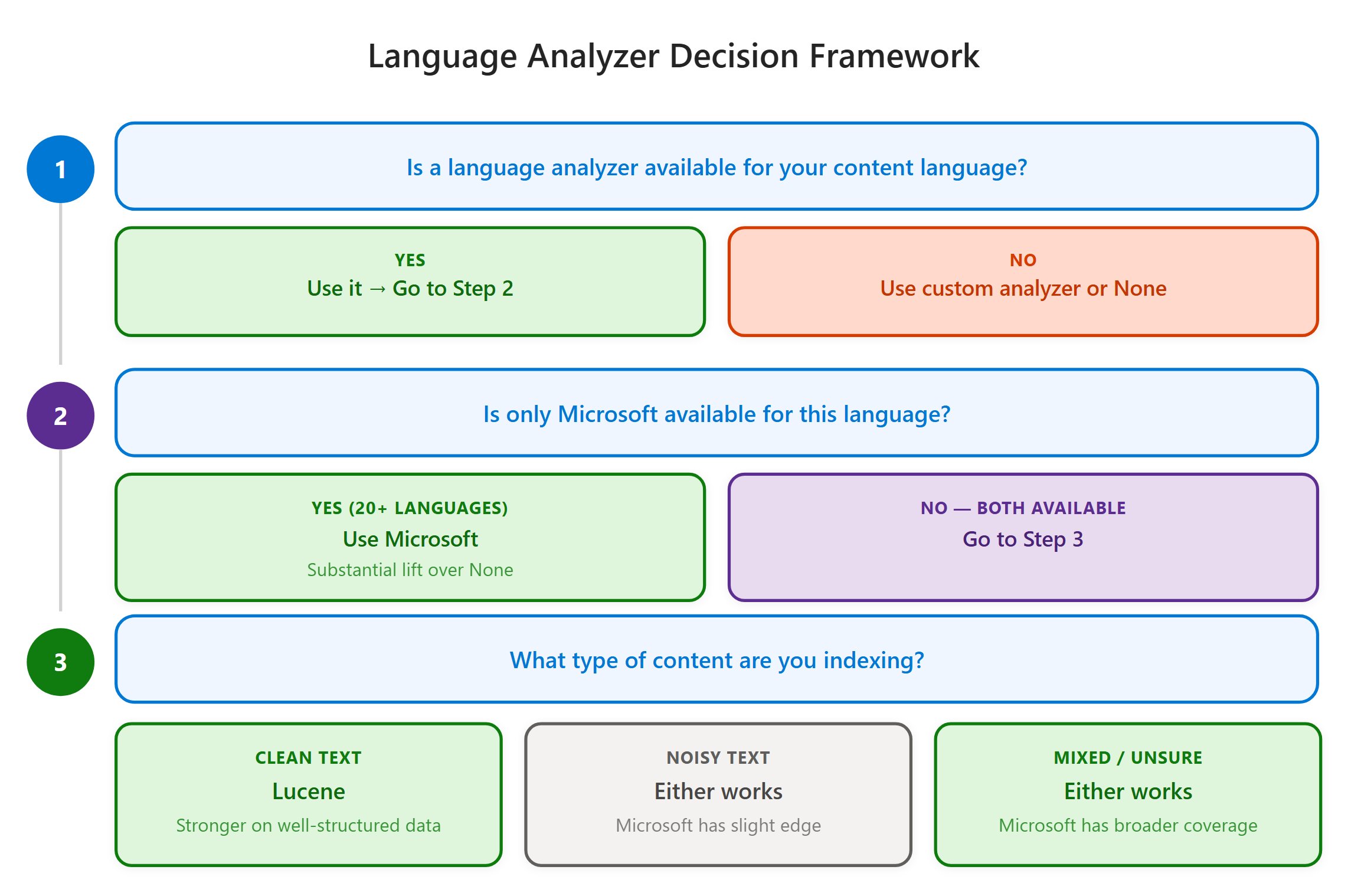
- Coverage: 50+ languages, including 20+ languages not supported by Lucene
- Best for: Noisy, user-generated content where precision matters
- Processing approach: Preserves original terms and adds normalized variants, handles proper nouns and compound words
The research revealed that content type significantly impacts which analyzer performs better:
| Content Type | Lucene Avg. NDCG | Microsoft Avg. NDCG | Preferred Analyzer |
|---|---|---|---|
| Clean, multilingual documents | 0.6845 | 0.6359 | Lucene (+7.6%) |
| Noisy, support tickets | 0.2406 | 0.2705 | Microsoft (+12.4%) |
Language-Specific Recommendations
For certain languages, the data consistently favored one analyzer:
| Language | Recommended | Average NDCG Margin |
|---|---|---|
| German (de) | Lucene | +0.042 |
| Spanish (es) | Lucene | +0.040 |
| Chinese (zh) | Microsoft | +0.010 |
For other languages, the optimal choice depends on your content characteristics. The Azure AI Search Analyze API allows you to test how different analyzers process your specific text.
Business Impact: Practical Recommendations
The research has several important implications for organizations implementing search solutions on Azure AI Search:
Always use a language analyzer. The improvement from using any analyzer versus none is substantial and consistent across all languages tested.
Choose analyzers based on content type:
- For clean, curated content (academic papers, documentation): Lucene generally performs better
- For noisy, user-generated content (support tickets, forums): Microsoft analyzers typically outperform
Implement per-field analyzers for multilingual indexes. Each language field should use its own analyzer for optimal results.
Consider language coverage requirements. If you need support for languages like Croatian, Hebrew, Hindi, or Vietnamese, Microsoft analyzers are the only option.
No performance concerns. The research confirmed no latency penalty for using either analyzer during search operations.
Customer behavior analysis revealed that only 27.8% of Azure AI Search indexes currently use any language analyzer, indicating significant opportunity for improvement. Among those who do use analyzers, Microsoft is favored (64.8% share), which aligns with the study's finding that Microsoft analyzers capture 96.7% of optimal NDCG@10 across all tested combinations.
Implementation Considerations
When implementing language analyzers in Azure AI Search:
Test with your specific data. While the research provides general guidelines, your particular content may respond differently to various analyzers.
Consider hybrid approaches. For indexes with mixed content types, you can configure different analyzers for different fields.
Monitor search quality metrics. Implement A/B testing to measure the impact of analyzer selection on your specific search experience.
Stay updated on language support. Microsoft continues to expand language coverage for its analyzers, so periodically review the supported languages list.
The research demonstrates that language analyzer selection is a critical factor in search quality that deserves careful consideration during implementation. By aligning analyzer choice with content characteristics and language requirements, organizations can significantly improve search relevance and user experience.
Comments
Please log in or register to join the discussion