A Rust-based terminal TUI client that transforms how developers interact with Postgres by enabling direct editing of database records through familiar text editors, complete with TOML-based data manipulation and comprehensive CRUD operations.
When I first conceived the idea a couple years ago, it seemed almost too simple: write in markdown, save in database. The vision was clear - use your favorite text editor to create content, then have that content parsed and stored in a database to gain all the benefits of structured data storage. This was how I wanted to interact with databases, particularly for blog posts and similar content where the writing experience matters as much as the data structure.
That initial spark has evolved, though not dramatically. The format shifted from markdown to TOML, though the principle remains identical - you could use markdown, HTML, plaintext, or virtually any format within the TOML structure. In fact, that's exactly how I'm composing this very piece. The core idea persists: make database interaction feel as natural as writing in a text editor.
The journey from concept to reality has been substantial. What emerged is pgtui, a Postgres TUI client written in Rust that transforms how developers interact with their databases through a terminal-based interface. Since its initial 0.1 release in April 2025 - which was essentially a placeholder - the project has matured significantly with numerous features added and countless bugs resolved.
One of the most challenging aspects was solving the bidirectional conversion between TOML and Postgres types. This proved to be a complex problem space where sqlx became an indispensable dependency, handling much of the heavy lifting for type conversions and database interactions. The toml crate provided robust parsing capabilities, while ratatui formed the foundation for the terminal user interface, enabling the rich, interactive experience that defines pgtui.
Core Features and Capabilities
The client offers a comprehensive set of features designed to make database interaction intuitive and efficient:
Database Navigation: Browse all non-system relations within a connected database, with sorting and filtering capabilities to quickly locate specific tables or views. This provides immediate visibility into your database structure without leaving the terminal.
Schema Inspection: View detailed relation definitions and descriptions. Interestingly, this particular feature still relies on psql for retrieving schema information, though I'm actively working to eliminate that dependency in future releases. The goal is to make pgtui completely self-contained.
Data Browsing: Navigate paginated table data with support for sorting by any column. This makes it easy to explore large datasets without overwhelming the terminal interface.
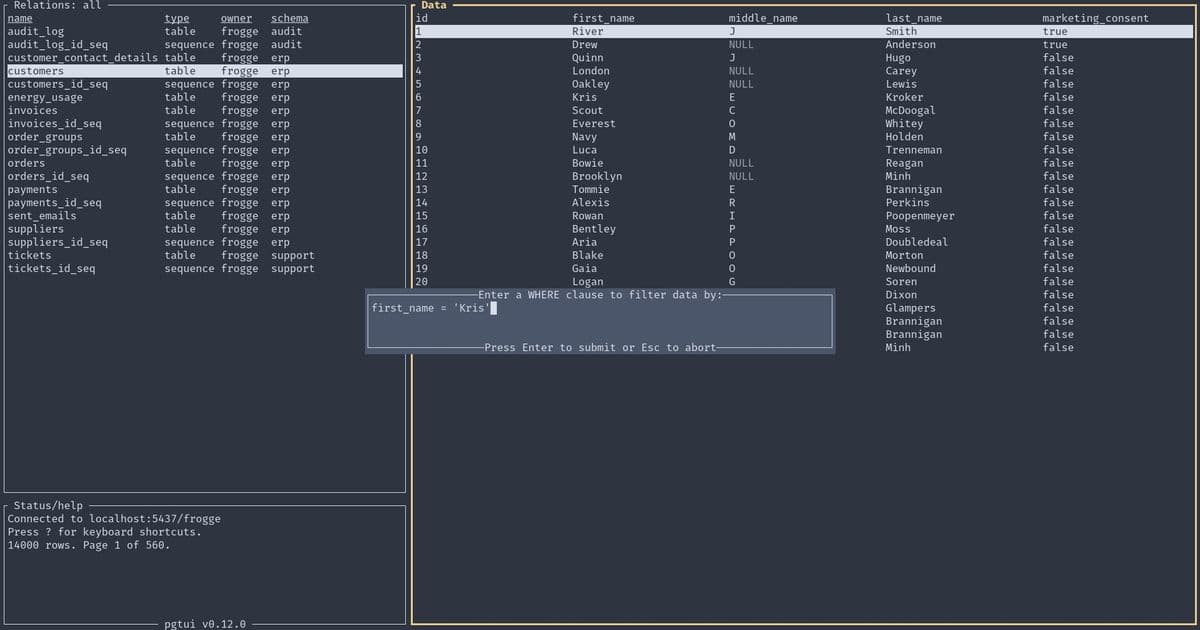
Advanced Filtering: Write SQL WHERE clauses to filter displayed data, providing powerful query capabilities directly within the TUI. This feature, demonstrated in the accompanying screenshot, shows how users can construct complex filters to isolate specific records.
Record Creation: Insert new records into tables using your preferred terminal editor. This is where pgtui truly shines - you're editing database records in exactly the same environment you'd use for any other text-based work.
Record Editing: Modify existing records with the safety net of being able to abandon changes midway through the editing process. This edit-in-place approach, shown in another screenshot, maintains the familiar text editor workflow while manipulating database content.
View-Only Mode: Open records in read-only mode when you need to reference data without the risk of accidental modifications.
Record Deletion: Remove records with built-in confirmation requirements, adding a safety layer to prevent accidental data loss.
Multi-Column Primary Key Support: Handle complex table structures with composite primary keys, ensuring pgtui works with a wide variety of database schemas.
Connection Management: Store database connection configurations in a file and switch between them seamlessly within the client, making it practical to work with multiple databases or environments.
Interactive Help: Display all available controls and commands, reducing the learning curve and making the tool accessible to users of varying experience levels.
The Development Journey
The evolution from that initial concept to the current 0.10.0 release represents countless hours of development focused on solving real-world database interaction problems. The decision to use Rust provided performance benefits and memory safety guarantees, while the choice of TOML as the intermediate format struck a balance between human readability and machine parsability.
What makes pgtui particularly compelling is how it bridges two worlds that typically remain separate - the creative, free-form environment of text editing and the structured, constraint-driven world of relational databases. By allowing users to manipulate database records through their preferred text editors, pgtui removes much of the friction that typically accompanies database operations.
Looking Forward
The current implementation, while feature-rich, continues to evolve. The immediate goal is eliminating the remaining psql dependency for schema inspection, which would make pgtui a truly standalone solution. Beyond that, the roadmap likely includes enhanced query capabilities, improved data visualization options, and potentially expanded support for other database systems.
For developers who spend significant time working with Postgres databases, particularly those who value the efficiency and familiarity of terminal-based tools, pgtui represents a thoughtful solution to a common workflow problem. It's not just another database client - it's an attempt to reimagine how we think about the boundary between content creation and data storage.
For those interested in trying pgtui, comprehensive usage and installation instructions are available in the project's README, along with demonstration materials showing the interface in action. The project embodies a philosophy that good tools should adapt to how people naturally work, rather than forcing users to adapt to the tool's limitations.
Comments
Please log in or register to join the discussion