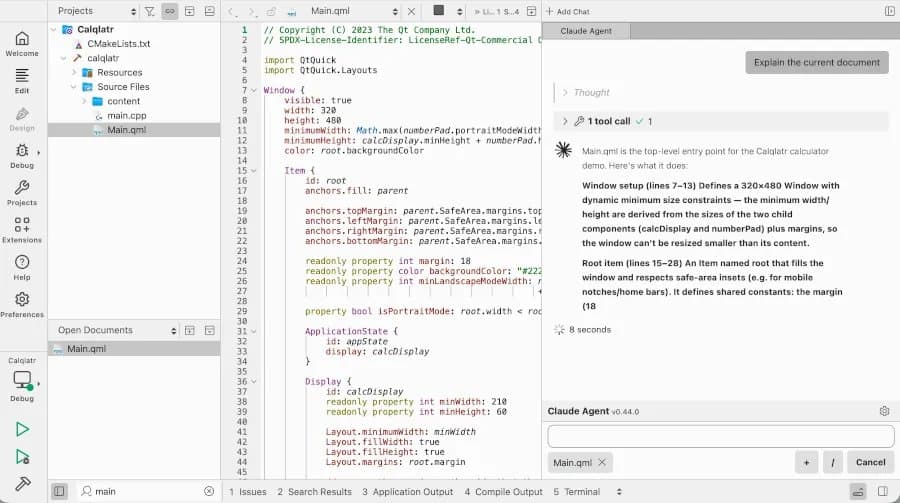
Qt Creator 20 brings ACP-based agent chat, Zen Mode, LLVM 22.1.2 Clangd, and GN project support to the Qt IDE.
The Qt Project released Qt Creator 20 June 17 with an Agent Client Protocol extension that adds AI agent chat inside the C++ and Qt IDE.
{{IMAGE:2}}
The new ACP client gives Qt Creator a chat panel for agent tools such as Claude Code, Codex, GitHub Copilot, and other providers that speak the protocol. Qt Creator 19 added Model Context Protocol support, and Qt Creator 20 extends that work from context sharing into agent control.
For Qt and C++ teams, the useful part sits in workflow fit. You can keep project files, editor state, build errors, and code review context in one IDE while an agent helps write patches or explain failures. That matters more for large Qt trees than for small demos because CMake files, kit settings, generated code, and platform targets can confuse a generic chat window.
The release also adds Zen Mode, an extension that puts the editor at the center of the interface. Developers who spend long sessions in Qt Widgets, QML, or C++ headers get a lower-clutter view without leaving the IDE.
Performance and tooling
Qt Creator 20 updates its Clangd C++ code model to LLVM 22.1.2. That change affects code completion, diagnostics, symbol lookup, refactoring, and header analysis. Qt did not publish compile-time or indexing benchmark figures with the release notes, so teams should measure the update against their own projects before they move a full shop.
A useful test matrix for a C++ workstation or build VM:
| Test | Measure | Reason |
|---|---|---|
| First project index | Time to usable completion | Shows Clangd startup cost |
| Reopen project | Time to diagnostics | Shows cache behavior |
| Full debug build | Wall time and CPU package power | Shows build impact outside the editor |
| QML edit cycle | Time from save to preview or run | Shows UI iteration cost |
| Agent task | Tokens, latency, patch size | Shows ACP provider cost and code churn |
Power consumption still depends on your local build setup. A 16-core desktop CPU can burn 150 watts or more during parallel C++ builds, while a laptop may throttle after several minutes. Qt Creator itself will not dominate system power under compile load; Clangd indexing, compiler jobs, linkers, emulators, and browser-based documentation views will. If you run agents that call local tools, include those subprocesses in your measurement.
Compatibility
The release keeps Qt Creator in its usual role as a cross-platform IDE for Qt and C++ development. The new GN project support gives developers another route into trees that use Generate Ninja files, which helps with Chromium-adjacent workflows and other codebases that rely on GN plus Ninja.
Developers who use CMake, Qt kits, and embedded targets should test project load, kit selection, debugger startup, and deployment scripts before rolling Qt Creator 20 across a team. ACP support also adds a security review item: agent providers can read code context that you expose through the IDE, and some agents can propose or run commands depending on configuration.
Build recommendations
Use Qt Creator 20 now if you want agent chat inside the IDE, GN project opening, or the newer Clangd model. The upgrade makes the most sense for developers who maintain large Qt/C++ projects and want AI help without moving work into a separate editor.
Hold a staged rollout for regulated codebases, embedded products, and teams with custom kits. Start with one representative workstation, one laptop, and one CI-like build VM. Measure indexing time, memory use, build time, and agent behavior on a real branch.
For homelab builders, pair Qt Creator 20 with a fast NVMe drive, 32 GB of RAM for mid-size Qt projects, and 64 GB or more for large C++ trees with several build directories. More CPU cores help during builds, but editor smoothness depends on single-core speed, storage latency, and enough RAM to keep Clangd caches out of swap.
Downloads and release details are available from Qt.io. The Qt Creator manual remains the best reference for kits, code model settings, debugging, and project setup.
Comments
Please log in or register to join the discussion