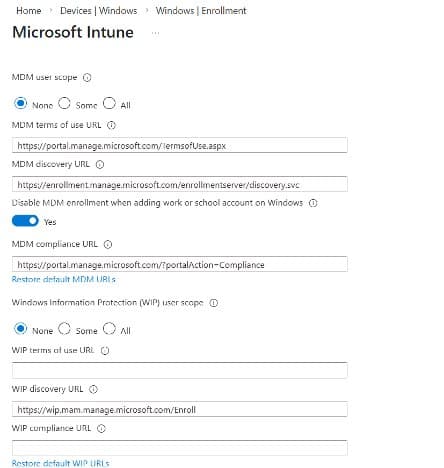
Microsoft Intune introduces a new toggle to block automatic MDM enrollment during Windows app sign-in, addressing BYOD and mixed ownership challenges.
Microsoft Intune has introduced a public preview feature that fundamentally changes how organizations approach device management on Windows. The new toggle, "Disable MDM enrollment when adding a work or school account on Windows," allows administrators to block automatic mobile device management (MDM) enrollment during the modern app sign-in flow, addressing a long-standing pain point for IT teams and end users alike.
The Problem with Automatic Enrollment
For years, Windows users signing into work or school applications have encountered the prompt "Allow my organization to manage my device." In most environments, this option was selected by default or clicked through without full understanding. That single action could result in Microsoft Entra device registration, automatic Intune MDM enrollment, and immediate policy application to the device.
For IT teams, this often led to unintended device enrollments, personal or BYOD devices becoming fully managed, and difficult unenrollment and recovery experiences. The disconnect between user intent (simply signing into an app) and the resulting device management state created unnecessary friction and support burden.
How the New Toggle Changes the Game
The new setting "Disable MDM enrollment when adding a work or school account on Windows" fundamentally alters the enrollment flow:
- Allows account registration without triggering device management
- Stops the flow before MDM enrollment occurs
- Removes the "Allow my organization to manage my device" screen from the app sign-in flow
- Preserves intentional enrollment paths through Windows settings or other deliberate methods
Important: This setting applies specifically to modern app sign-in flows, not Windows settings-based enrollment. Organizations can still use traditional enrollment methods when needed.
Recommended Best Practice
The optimal configuration recommended by Microsoft is to keep "MDM user scope" set to All (so enrollment remains available when needed) while enabling the new toggle to prevent automatic selection during app sign-in. This ensures devices are enrolled into Intune only through intentional enrollment flows, reducing accidental enrollments, support burden, and difficult recovery scenarios.
Impact Across Common Scenarios
BYOD/Personal Devices: High risk of accidental enrollment is eliminated. Users can access work applications without device takeover.
Microsoft Office/Teams Sign-In: May initiate MDM enrollment by default, but now requires explicit user choice for device management.
Microsoft Entra Hybrid Join (Corporate): Microsoft Entra joined devices remain joined; Windows settings enrollment continues as before.
Windows Autopilot/Provisioning: MDM enrollment continues as designed for corporate provisioning scenarios.
Security and Governance Benefits
Opt-in enrollment supports several key security and governance principles:
- Least Surprise: Users understand what they're agreeing to
- Explicit Consent: Device management requires deliberate action
- Cleaner BYOD Posture: Personal devices remain personal unless explicitly managed
- Safer Break Glass Scenarios: Emergency access without unintended enrollment
- Reduced Support Escalations: Fewer accidental enrollment issues
The approach also aligns well with Conditional Access and app-level protection strategies, allowing organizations to maintain security without over-managing devices.
When to Use Default Behavior
Default automatic enrollment may still be appropriate for:
- Fully corporate-owned device fleets
- Locked-down environments with strict compliance requirements
- Dedicated provisioning scenarios using Windows Autopilot
The key is that it should be a conscious decision, not an accidental one resulting from simply signing into an application.
The Bottom Line
For most organizations, especially those supporting BYOD, mixed ownership, or multi-tenant access scenarios, the modern best practice is clear: allow enrollment everywhere, but require intent. Using the new Intune toggle to make enrollment opt-in during app sign-in reduces risk, improves user trust, and simplifies the device lifecycle without sacrificing Intune's management capabilities.
This change represents a significant shift in how organizations think about device management, moving from an automatic, implicit model to one based on explicit user choice and intentional enrollment. As workforces become increasingly diverse and device ownership models more complex, this opt-in approach provides the flexibility and control that modern IT environments demand.
For a concrete example of the end-user experience with this model, see Step 6: Understand Microsoft Edge for Business End User Experience for Windows, which walks through how opt-in enrollment and app-level management are presented to users in Microsoft Edge for Business.
Comments
Please log in or register to join the discussion