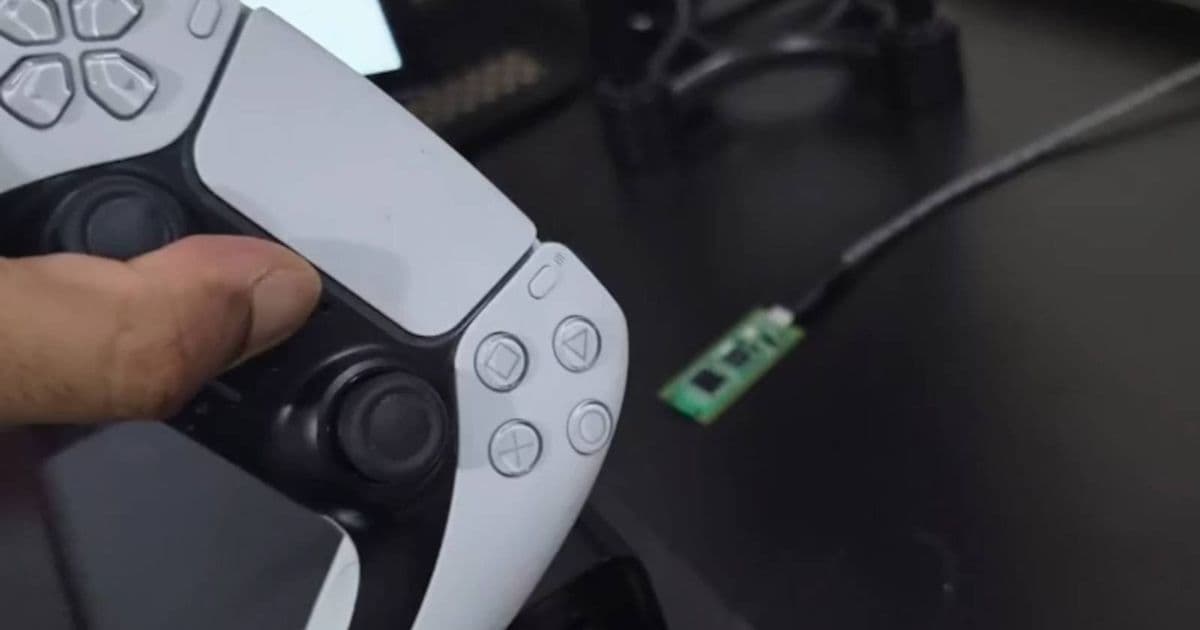
A Raspberry Pi Pico 2W project restores full DualSense controller functionality on PC by creating a hardware bridge that Windows Bluetooth cannot provide.
The PlayStation 5's DualSense controller represents a significant leap in game controller technology with its haptic feedback and adaptive triggers. However, PC gamers have faced a frustrating limitation: Windows Bluetooth connections strip away these advanced features, reducing the DualSense to a standard gamepad. This technological gap has now been bridged by an enterprising developer who created a PC dongle using a Raspberry Pi Pico 2W, effectively solving a problem Sony has left unaddressed.
The DualSense Dilemma on PC
When connecting a DualSense controller to a Windows PC via Bluetooth, users immediately notice the absence of haptic feedback and adaptive trigger functionality. This isn't due to a limitation in the controller itself but rather a bandwidth constraint in Windows' Bluetooth stack. The DualSense requires 4-channel audio bandwidth to transmit its advanced features, a capability that Windows Bluetooth simply doesn't support.
"Windows Bluetooth strips away the haptic feedback and adaptive triggers because it doesn't support the 4 channel audio bandwidth the DualSense requires," explained the creator of this solution on the Raspberry Pi subreddit. This limitation forces PC gamers to choose between wired connections that maintain full functionality or wireless connections that sacrifice the very features that make the DualSense special.
The Pico 2W Solution
The solution comes in the form of a Raspberry Pi Pico 2W microcontroller running specialized firmware called DS5Dongle. This tiny device acts as a hardware bridge between the DualSense controller and the PC, translating the controller's signals in a way that preserves all advanced features while maintaining a wireless connection.
The Raspberry Pi Pico 2W is particularly well-suited for this task due to its:
- ARM Cortex-M0+ processor
- USB 1.1 support
- Low power consumption
- Affordability (around $4-5)
- Small form factor
When overclocked to 133MHz, the Pico 2W has sufficient processing power to handle the DS5Dongle firmware efficiently. This combination of hardware and firmware creates a cost-effective solution that Sony has inexplicably failed to provide to the PC gaming community.
Technical Implementation
The DS5Dongle firmware essentially creates a virtual USB connection between the DualSense controller and the PC. While Windows Bluetooth can't handle the 4-channel audio required by the DualSense, it can communicate with the Pico 2W, which in turn communicates with the controller using the full protocol.
The process involves:
- The DualSense controller connects to the Pico 2W via Bluetooth
- The Pico 2W translates the signals to USB protocol
- The Pico 2W connects to the PC via USB (or optionally via Bluetooth for a completely wireless setup)
- The PC recognizes the controller as a USB device, supporting all advanced features
This approach bypasses Windows' Bluetooth limitations entirely by treating the controller as a USB device rather than a Bluetooth peripheral.
Setup and Configuration
Setting up the DS5Dongle is remarkably straightforward:
Hardware Requirements:
- Raspberry Pi Pico 2W
- Micro-USB cable
- DualSense controller
- Windows PC
Software Requirements:
- Thonny IDE (for programming the Pico)
- DS5Dongle firmware
- Latest DualSense controller drivers
Installation Steps:
- Flash the DS5Dongle firmware to the Pico 2W using Thonny
- Overclock the Pico to 133MHz for optimal performance
- Connect the Pico to your PC via USB
- Pair the DualSense controller with the Pico
- Configure the controller settings in Windows
The entire process takes less than 30 minutes and costs under $10 in components, making it an accessible solution for most PC gamers.
Cross-Platform Considerations
For mobile developers maintaining applications on both iOS and Android, this project highlights an important consideration: platform-specific limitations often require creative solutions. Just as Windows lacks proper Bluetooth support for the DualSense, mobile platforms may have their own unique constraints.
Cross-platform developers should note:
- iOS has strict Bluetooth accessory protocols
- Android offers more flexibility but still requires proper implementation
- Platform-specific testing is essential for controller support
- Hardware solutions like this Pico-based dongle may be necessary for full feature parity
This approach of using intermediary hardware to bridge platform-specific limitations could inspire solutions for other cross-platform challenges developers face.
Comparison with Existing Solutions
Before the Pico 2W solution, PC gamers had limited options for maintaining DualSense functionality:
Wired Connection: The simplest solution but eliminates the wireless convenience that many gamers desire.
Third-Party Bluetooth Adapters: Some specialized adapters claim to support full DualSense features, but they're often expensive ($30-50) and may not work reliably.
PS Remote Play: While functional, this requires an active PlayStation 5 and introduces additional latency.
The Pico 2W solution stands out for its affordability, reliability, and the fact that it maintains true wireless connectivity while preserving all controller features.
Future Implications
This DIY solution demonstrates how open-source hardware and software can fill gaps left by major manufacturers. For mobile developers, this highlights the importance of community-driven innovation in addressing platform limitations.
The success of the DS5Dongle project may inspire:
- Official hardware solutions from Sony
- Similar projects for other platform-specific controller limitations
- Integration of such solutions into mainstream gaming peripherals
- Enhanced cross-platform controller support in future operating systems
As mobile gaming continues to evolve, solutions that bridge platform-specific gaps will become increasingly valuable for developers aiming to provide consistent experiences across devices.
Conclusion
The Raspberry Pi Pico 2W DS5Dongle project represents a remarkable example of community innovation solving a real-world problem. By creating a hardware bridge that Sony has failed to provide, this DIY solution restores the full functionality of the DualSense controller on PC without compromising wireless convenience.
For mobile developers maintaining cross-platform applications, this project serves as a reminder that platform limitations often require creative solutions. The approach of using intermediary hardware to bridge communication gaps could inspire similar innovations in other areas of cross-platform development.
As gaming continues to blur the lines between platforms, solutions like the DS5Dongle will play an increasingly important role in ensuring that users can enjoy the full capabilities of their peripherals regardless of the device they're using. For more information on this project, you can visit the Raspberry Pi subreddit discussion or explore the DS5Dongle GitHub repository for detailed implementation details.
Comments
Please log in or register to join the discussion