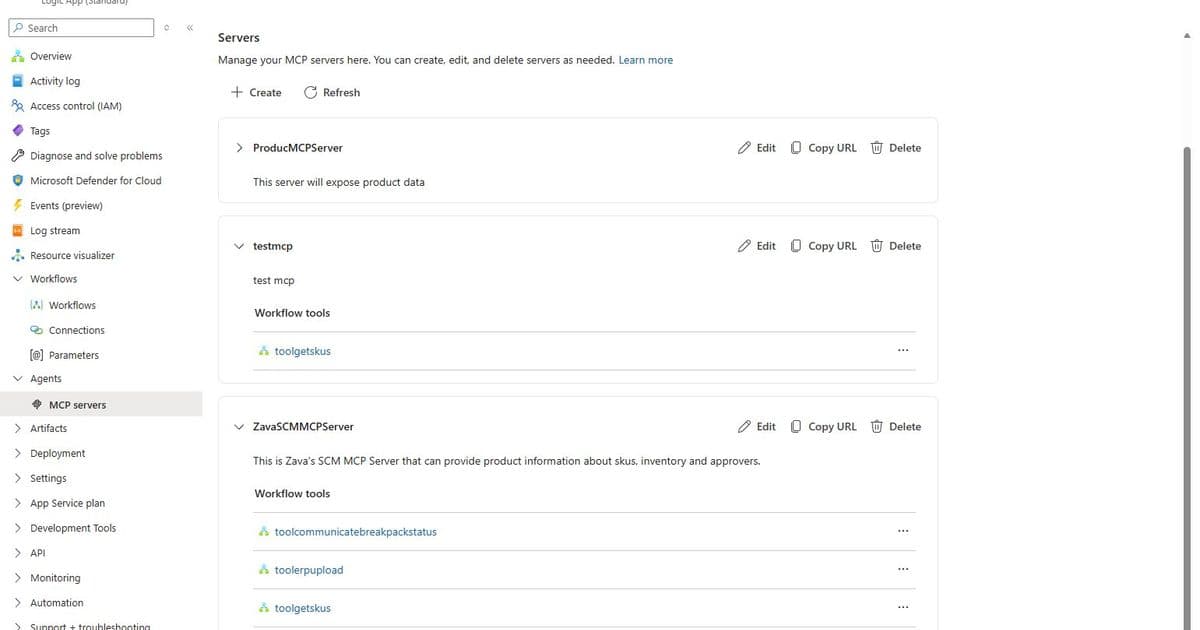
Microsoft introduces a guided wizard for building MCP servers in Azure Logic Apps Standard, eliminating protocol plumbing so developers can focus on agentic capabilities.
Microsoft has launched a new Logic Apps MCP Server Wizard that transforms how developers build agent connectivity. Instead of wrestling with protocol plumbing, you can now turn any existing Logic Apps Standard instance into a fully functional MCP server with just a few clicks.
What Changed
The new experience consolidates setup, tooling, and management into one intuitive surface. Developers can now create MCP servers using either existing workflows or by building new ones dynamically through a guided in-portal workflow.
Core capabilities include:
- Configure authentication (API key or OAuth)
- Generate API keys automatically
- Create or manage MCP servers
- Convert workflows into discoverable MCP tools
- Secure and test connections from agent platforms
Provider Comparison
Unlike traditional MCP server implementations that require manual protocol setup, Logic Apps Standard now offers:
API Center and Microsoft Foundry - Previously required separate publishing wizard experiences with Azure Logic Apps connectors
Logic Apps MCP Server Wizard - Unified experience that works with any existing Standard instance, supporting both managed connectors and custom workflows
Key advantage: The wizard automatically generates Request trigger schemas and wires up inputs, eliminating the manual plumbing work that typically consumes 60-70% of development time.
Business Impact
For organizations building AI agent capabilities, this means:
- Faster time-to-market: Convert existing workflows to MCP tools in minutes instead of days
- Reduced maintenance: Shared authentication schemes across all MCP servers in a Logic App
- Greater flexibility: Mix and match managed connectors, custom code, and built-in connectors
- Improved reliability: Consistent naming conventions and descriptions help models call tools more accurately
How It Works
Creating new workflows: Select connectors like Salesforce, choose specific actions (Create record, Update record, Get Opportunity records), configure object types for consistency, and let the wizard generate the underlying workflows automatically.
Using existing workflows: Select workflows with HTTP Trigger and HTTP Response Action, then include them in your MCP server. The wizard preserves your naming conventions while adding the necessary MCP protocol support.
Authentication options: Choose between API key-based authentication (with key generation and expiration management) or OAuth using EasyAuth for Azure Logic Apps.
Once configured, you can test your MCP server from VS Code, Copilot Studio, Microsoft Foundry, or Azure Logic Apps. The system even handles edge cases like Salesforce connector configuration to prevent unpredictable model behavior.
This investment builds on Microsoft's previous work with API Center and Foundry, but takes it further by enabling any existing Logic Apps Standard instance to become an MCP server. The result is a platform where developers can focus on building meaningful agentic capabilities instead of wiring up protocol plumbing.
For developers tired of writing the same authentication and protocol code repeatedly, this wizard represents a significant step toward making agent development as straightforward as building any other cloud workflow.
Comments
Please log in or register to join the discussion