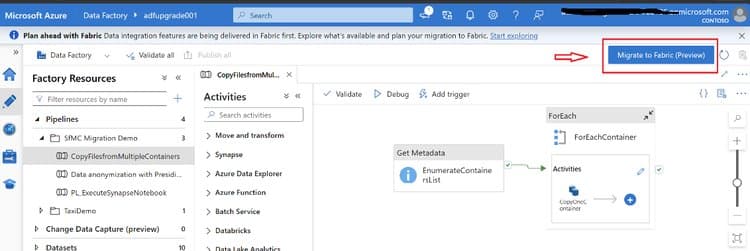
This article examines the strategic considerations for migrating from Azure Data Factory and Synapse Pipelines to Microsoft Fabric Data Factory, analyzing architectural differences, migration approaches, and business implications for organizations modernizing their data integration workflows.
Strategic Migration from Azure Data Factory to Fabric Data Factory: A Comparative Analysis
Microsoft's Fabric Data Factory represents a significant evolution in cloud data integration, promising unified data estate management and enhanced AI capabilities. For organizations operating Azure Data Factory (ADF) and Synapse Pipelines, understanding the migration path to Fabric Data Factory requires careful consideration of architectural differences, feature parity, and operational impacts.
Architectural Evolution: What Changed
Fabric Data Factory introduces fundamental architectural shifts from its predecessors, moving beyond simple feature additions to a reimagined approach to data integration.
Core Infrastructure Transformation
The most significant change is the complete transition to a fully managed SaaS model. Unlike ADF's hybrid approach requiring infrastructure management, Fabric Data Factory eliminates Azure Integration Runtimes entirely. Compute becomes automatically managed within Fabric capacity, simplifying operations but introducing new capacity planning considerations.
For organizations with on-premises data sources, the On-Premises Data Gateway (OPDG) replaces ADF's Self-Hosted Integration Runtime, maintaining connectivity while aligning with the new SaaS paradigm.
Development Experience Redesign
The development workflow undergoes substantial simplification with the elimination of the separate publish step required in ADF. In Fabric Data Factory, pipelines are authored directly in the Fabric portal and can be saved or executed immediately, reducing friction in the development lifecycle.
Data connection management sees similar streamlining, with traditional Linked Services and Datasets replaced by Connections and inline data properties within activities. This configuration reduction decreases complexity while potentially limiting some advanced connection management capabilities available in ADF.
New Capabilities and Native Activities
Fabric Data Factory introduces several new capabilities not available in ADF or Synapse pipelines:
- Office 365 Outlook email and Teams messaging activities
- Semantic model refresh capabilities
- Fabric notebook integration
- Invoke SSIS (preview functionality)
- Lakehouse maintenance operations (preview)
These additions extend the platform's integration capabilities, particularly for Microsoft ecosystem tools and analytics scenarios.
Enhanced CI/CD and AI Integration
The platform introduces built-in deployment pipelines supporting cherry-picking, individual item promotion, Git integration, and SaaS-native CI/CD approaches that go beyond ADF's ARM template-based methodology. Most notably, Fabric Data Factory includes Copilot assistance for pipeline creation and management—a capability absent in ADF or Synapse pipelines.
Comparative Analysis: Fabric Data Factory vs. ADF/Synapse
Understanding the functional differences between these platforms is critical for planning migration strategies and managing expectations.
Feature Parity and Gaps
While Fabric Data Factory maintains core data integration capabilities, several ADF features require attention during migration:
- SSIS Integration Runtime functionality is limited, with Invoke SSIS available only in preview
- Managed Virtual Networks are not supported
- Certain trigger types lack direct equivalents
- Dynamic linked service properties work differently
These gaps necessitate either redesign using Fabric-native alternatives or temporary retention of affected pipelines in ADF.
Data Flow Transformation
ADF's Mapping Data Flows don't directly translate to Fabric equivalents. Organizations must rebuild these using Dataflow Gen2, Fabric Warehouse SQL, or Spark notebooks, with particular attention to transformation logic and data type validation post-migration.
Trigger and Parameter Management
Fabric Data Factory lacks centralized trigger management, requiring scheduling definitions at the pipeline level. Similarly, ADF Global Parameters must be converted to Fabric Variable Libraries, with attention to data type differences and runtime usage patterns.
Compute Model Differences
The most significant operational difference lies in the compute model. Fabric Data Factory uses a fixed-capacity model instead of ADF's elastic pay-as-you-go runtime. This shift requires careful capacity planning based on peak load testing and continuous monitoring using tools like the Fabric Capacity Estimator.
Migration Strategies and Tooling
Organations can choose from multiple migration approaches depending on business priorities, existing integration patterns, and desired pace of transformation.
Migration Approaches
Three primary migration strategies emerge:
Lift-and-Shift: Accelerates transition timelines with minimal pipeline refactoring, suitable for time-sensitive migrations or low-complexity workloads.
Modernization: Re-architects orchestration logic to fully leverage Fabric-native analytics and AI capabilities, delivering long-term benefits in maintainability and performance.
Hybrid: Balances migration velocity with targeted modernization of high-value or low-parity workloads, offering a pragmatic middle path for most organizations.
Microsoft-Supported Migration Tools
Microsoft provides several tools to facilitate migration:
Built-in Fabric UI Assistant: Enables pipeline readiness assessment across ADF and Synapse environments, mounting existing ADF pipelines into Fabric workspaces, and side-by-side validation.
PowerShell Upgrade Tool: The Microsoft.FabricPipelineUpgrade module allows bulk ADF migration at scale, repeatable upgrades, and CI/CD-driven pipeline conversion with a supported path.
Migration Assessment: Before migration, organizations should use the built-in assessment to classify pipelines as Ready, Needs Review, Coming Soon, or Unsupported, providing early visibility into potential migration risks.
Open-Source Alternatives
The Fabric Toolbox offers open-source tools for migration planning and execution:
Fabric Data Factory Migration Assistant PowerShell: A browser-based SPA supporting migration from both Azure Data Factory and Synapse ARM templates.
Fabric Assessment Tool: A command-line utility that scans workspaces to extract inventory data and assess migration scope by creating structured asset exports.
Business Impact and Considerations
The migration to Fabric Data Factory extends beyond technical implementation, affecting operational models, cost structures, and analytical capabilities.
Operational Implications
The shift to a fully managed SaaS model reduces infrastructure management overhead but requires new operational approaches. Organizations must adapt to:
- Simplified deployment processes without separate publish steps
- Pipeline-level rather than centralized trigger management
- Connection-based inline configuration replacing traditional datasets
Cost and Performance Considerations
The fixed-capacity model changes cost optimization strategies. While potentially more predictable than ADF's pay-as-you-go model, it requires careful capacity planning to avoid over-provisioning. Organizations should validate migrated pipelines under production-like workloads to confirm performance and reliability before cutover.
Enhanced Analytical Capabilities
Fabric Data Factory's integration with the broader Fabric ecosystem enables:
- Unified access to data across Lakehouse, Data Warehouse, and Real-Time Analytics workloads
- Simplified governance through OneLake shortcuts
- AI-assisted pipeline development and management
These capabilities position organizations to more effectively leverage real-time analytics, generative AI, and machine learning at scale.
Implementation Roadmap
A successful migration requires careful planning and execution:
Assessment Phase: Use Microsoft's migration assessment tools to classify pipelines by readiness and identify dependencies.
Prioritization: Focus initially on low-risk, high-parity pipelines that can be migrated with minimal redesign.
Pilot Migration: Begin with a representative subset of pipelines to validate migration tools and processes.
Side-by-Side Validation: Mount existing ADF pipelines into Fabric to enable gradual migration and parallel testing.
Phased Rollout: Migrate pipelines in logical groups, validating each before proceeding.
Optimization: Leverage Fabric-native capabilities such as Copilot, deployment pipelines, and OneLake shortcuts.
For complex or large-scale enterprise migrations, engaging Microsoft partners can help accelerate modernization efforts while minimizing operational risk.
Conclusion
Migrating from Azure Data Factory or Synapse Pipelines to Microsoft Fabric Data Factory represents a strategic step toward building a unified, AI-ready analytics platform. The transition requires understanding fundamental architectural shifts, particularly the move from ADF's PaaS model to Fabric's SaaS-managed approach.
By leveraging the comprehensive tooling ecosystem and adopting appropriate migration strategies, organizations can modernize their data integration infrastructure while positioning themselves to more effectively leverage advanced analytics and AI capabilities. The key to success lies in careful planning, thorough validation, and strategic alignment with business objectives.
For organizations beginning this journey, Microsoft provides extensive documentation and migration guidance through resources like the official migration documentation and the Fabric migration roadmap.
Comments
Please log in or register to join the discussion