An examination of how consistent design patterns from the desktop era have been lost in modern web applications, and why homogeneous interfaces matter for user experience.
The Decline of Design Idioms in Modern Software
John Loeber's article "Bring Back Idiomatic Design" makes a compelling case for what we've lost in the transition from desktop to web software: consistent, predictable interfaces that users could rely upon without constant cognitive overhead.
What Are Design Idioms?
At its core, the article defines design idioms as standard design patterns that require no explanation for users. The checkbox for "stay logged in" is a perfect example - it's so universally recognized that both users and developers implement it without question. These patterns create a shared language between software and its users, reducing friction and cognitive load.
The author argues that homogeneous interfaces - those with consistent interactions across applications - were a hallmark of the desktop software era. When Command+C meant copy everywhere, and File menus contained Save in the same location across applications, users could enter a state of flow rather than constantly hunting for functionality.
The Desktop vs. Browser Software Eras
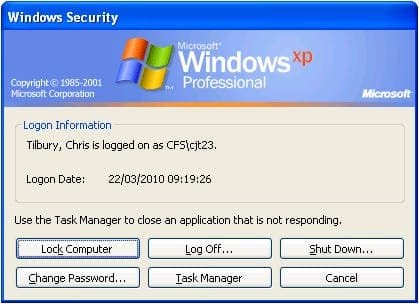
The article contrasts the Windows 2000 and XP interfaces, which despite their dated appearance, got several things right:
- Standardized menu structures (File, Edit, View)
- Keyboard shortcuts clearly indicated with underlined letters
- Descriptive labels rather than cryptic icons
- Status bars providing clear information about current state
These interfaces worked because they followed established idioms that Microsoft had codified through extensive design guidelines. The operating system and its GUI libraries enforced consistency, creating a predictable ecosystem.
In contrast, modern web applications like Figma and Linear, despite being excellent products, share no design idioms. They have different icons, keyboard shortcuts, and interaction patterns. Even within the same company's ecosystem, Gmail, Google Docs, and Google Workspace offer inconsistent experiences.
Why We Lost Design Consistency
The author identifies two primary reasons for this decline:
1. The Mobile Transition
The advent of touchscreens required reinventing established mouse-and-keyboard patterns. Most web applications now try to accommodate both mobile and desktop experiences, resulting in awkward compromises like hamburger menus on desktop interfaces. This "middle ground" approach has introduced numerous poor design patterns that have been perpetuated through frontend development practices.
2. Beyond HTML
Modern web development has moved far beyond simple HTML/CSS. With frameworks like React, TypeScript, and WebAssembly, applications like Figma can now implement desktop-style functionality directly in the browser. This breaks the traditional webpage-as-document model, causing browser fundamentals like the back button and standard keyboard shortcuts to lose their meaning.
The rapid evolution of frontend development has prioritized what's possible over what's polished. Multi-user collaboration and real-time features have taken precedence over power-user keyboard shortcuts and consistent interfaces.
Successful Idiomatic Design Today
Despite this trend, some organizations still prioritize design consistency. Apple's ecosystem demonstrates the power of strong, opinionated design systems that create homogeneous experiences across all applications and devices. This "it-just-works" effect builds user trust and reduces the need for customization.
The author notes that these successful designs eventually become idioms through two mechanisms: convergence (as designers recognize effective patterns) and frequency (as more implementations create community standards).
Practical Recommendations for Developers
For those building products today, the author suggests these guidelines:
- Follow HTML/CSS idioms when possible - Links should be underlined, colorful, and use proper semantic HTML tags
- Avoid reimplementing browser basics - Use native elements rather than JavaScript recreations
- Respect browser conventions - Ensure the back button works as expected, URLs are shareable
- Maintain internal consistency - If deviating from general idioms, establish clear patterns within your own application
- Prefer words to icons - Use only universally understood icons
- Prioritize clarity over aesthetics - Make visual elements obvious rather than merely beautiful
The article concludes with an aspirational vision for a future where common interactions like date pickers and credit card forms have converged on optimal designs, and basic keyboard shortcuts work consistently across all web applications.
This analysis of design patterns serves as a valuable reminder that as technology advances, we shouldn't abandon the hard-won lessons of usability and consistency that made earlier software generations so effective.
Comments
Please log in or register to join the discussion