
A new visualization tool reveals surprising patterns in expert activation across different prompts, showing that 25% of experts remain dormant for any given input while the specific dormant experts vary dramatically.
I've been curious for a while about what's actually happening inside Mixture of Experts models when they generate tokens. Nearly every frontier model these days (Qwen 3.5, DeepSeek, Kimi, and almost certainly Opus and GPT-5.x) is a MoE - but it's hard to get an intuition for what "expert routing" actually looks like in practice.
So I built a small tool to visualise it: moe-viz.martinalderson.com
You can pick between a few different prompts, watch the generation animate out, and see exactly which experts fire at each layer for each token. The top panel shows routing as the token is generated, the bottom panel builds up a cumulative heatmap across the whole generation.
I built this by modifying the llama.cpp codebase to output more profiling data, with Claude Code's help. So it may have serious mistakes, but it was a really fun weekend project.
The thing that really surprised me: for any given (albeit short) prompt, ~25% of experts never activate at all. But it's always a different 25% - run a different prompt and a different set of experts goes dormant. That's a much more interesting result than I expected.
This finding has interesting implications for how we think about MoE architectures. The fact that different prompts activate completely different subsets of experts suggests that the routing mechanism is doing sophisticated work in matching input patterns to the most relevant specialized knowledge. It also raises questions about whether having 25% of experts dormant for any given task represents optimal resource utilization, or if there's room for improvement in how routing decisions are made.
Interestingly Gemma 26BA4 runs really well with the "CPU MoE" feature - 4b params is not a lot to run on a fairly fast CPU and having KV cache on GPU really helps. I think there's a lot of performance improvements that could be done with MoE inference locally as well - eg caching certain experts on GPU vs CPU.
If you're interested in learning more about LLM inference internals I'd certainly recommend pointing your favourite coding agent at the llama.cpp codebase and getting it to explain the various parts - it really helped me learn a lot.
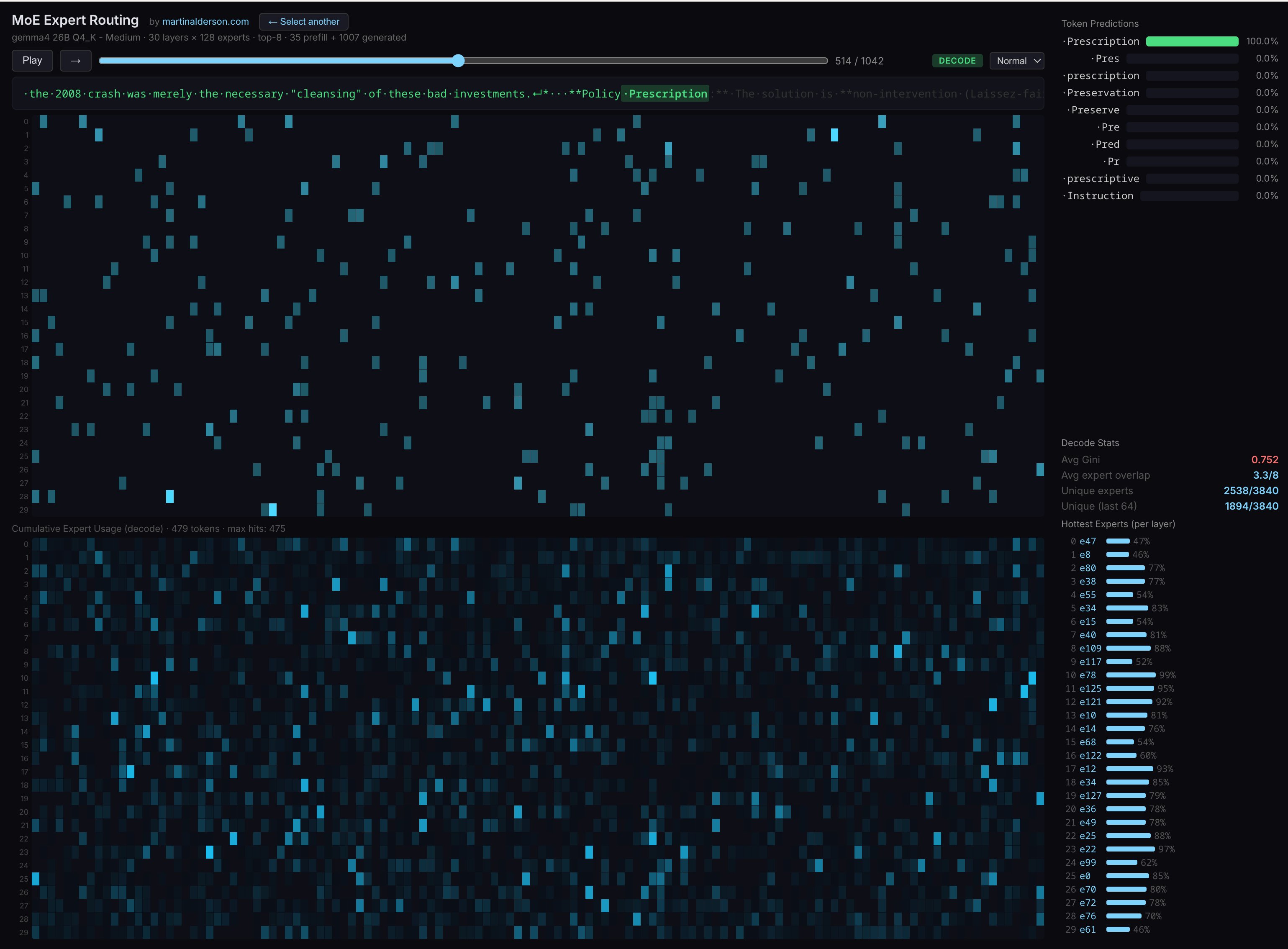
The visualization tool itself provides several interesting insights beyond just the 25% dormancy rate. By watching the animation of expert activation in real-time, you can see how different types of prompts trigger different routing patterns. For instance, technical prompts might consistently activate certain experts across multiple runs, while creative writing prompts might engage a completely different set. The cumulative heatmap at the bottom gives a bird's-eye view of which experts are most frequently used across the entire generation, revealing patterns that aren't obvious from just looking at individual tokens.
This kind of visualization is particularly valuable because MoE models are becoming increasingly common in production systems, yet their internal decision-making remains largely opaque. Understanding which experts get activated for which types of content could help developers optimize their prompts, debug model behavior, or even inform future architectural decisions about how many experts to include and how to structure their specialization.
For developers working with MoE models, this tool offers a practical way to develop intuition about how these systems work under the hood. Rather than treating MoE as a black box, you can actually see the routing decisions being made token by token, layer by layer. This kind of visibility is crucial for anyone trying to push the boundaries of what these models can do or optimize their performance for specific use cases.
If you found this useful, I send a newsletter every month with all my posts. No spam and no ads. Subscribe
Comments
Please log in or register to join the discussion