
Apple and Google have turned push notifications into a curated, AI‑driven experience. The article traces the evolution from simple delivery services to on‑device summarisation, ranking and rewriting, compares the push pipeline to email’s earlier transformation, and offers practical advice for marketers facing opaque platform edits.
The hidden editor behind every push
When a developer sends a notification, the payload first travels through a cloud service owned by the device maker – APNs for iOS or FCM for Android. From the start those services could throttle or drop messages, but for most of the last decade they acted as a transparent pipe. Over the past five years the pipe has been refitted with on‑device language models that rewrite, group and sometimes suppress the very text the sender crafted.
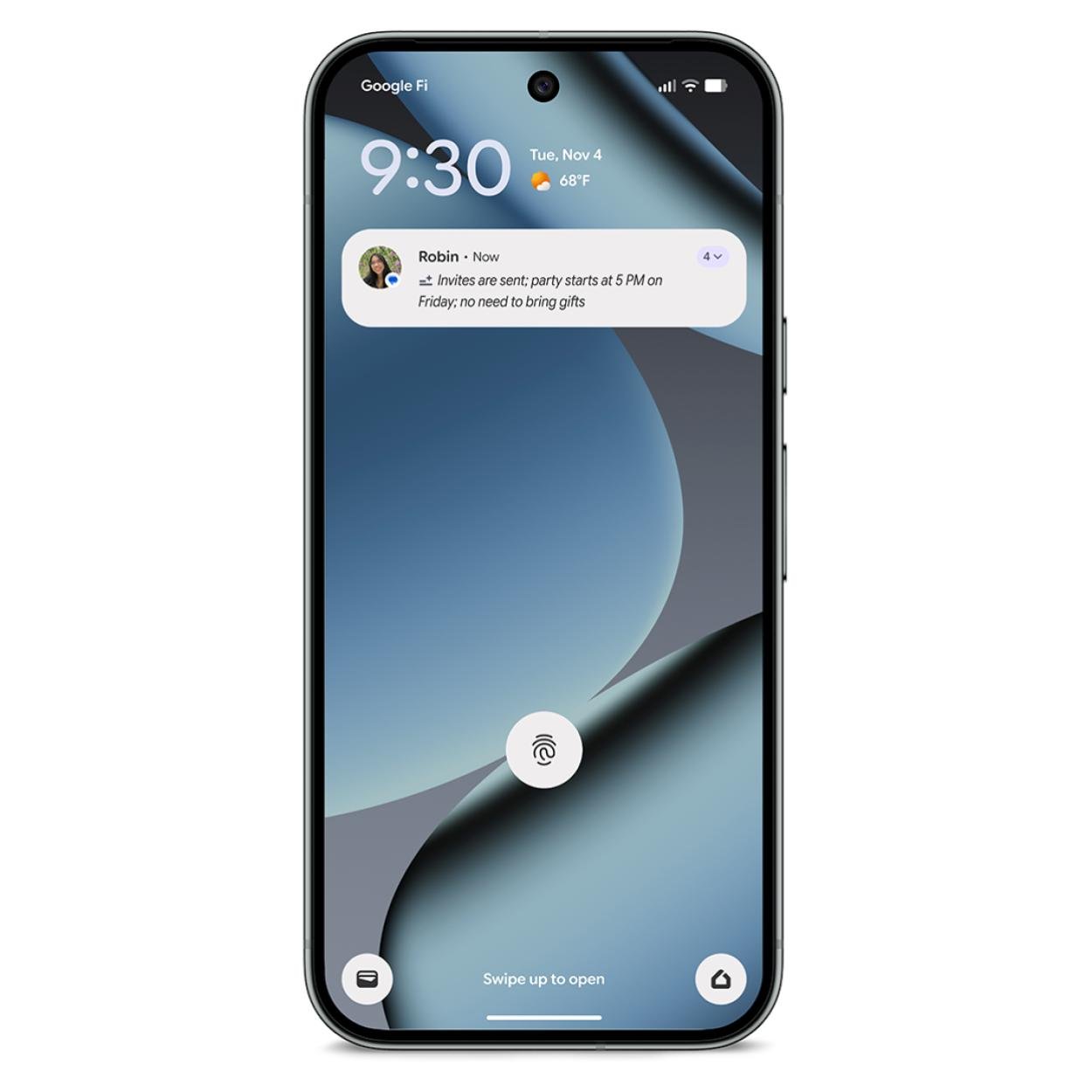 Notification summaries on Android
Why the pipe exists: battery and attention
In 2009 Scott Forstall warned that a phone could not keep a separate network poll open for every app. The answer was a single TLS channel to Apple’s servers, later mirrored by Google’s Cloud‑to‑Device Messaging, Google Cloud Messaging and finally Firebase Cloud Messaging in 2016. The design saved battery, but it also gave the platform a choke point where it could decide what the user actually sees.
Fifteen years of incremental control
| Year | Platform | Key control mechanism |
|---|---|---|
| 2017 | Android 8 (Oreo) | Notification channels – developer‑declared importance levels that users can mute per channel |
| 2021 | iOS 15 | Focus, Scheduled Summary, four‑level interruption taxonomy (passive, active, time‑sensitive, critical) |
| 2022 | Android 13 | Runtime permission POST_NOTIFICATIONS – explicit user grant required |
| 2024‑25 | iOS 18 / Android 14 | On‑device summarisation and ranking powered by Apple Intelligence and Gemini Nano |
Each step shifted a slice of control from the sender to the user, and another slice to the platform’s opaque model. The platform’s motivation is not purely user‑centric; a tidy notification surface improves retention, reduces uninstalls and showcases the OS‑level AI.
Push follows the email playbook, but with fewer lights
Email providers have long run classifiers that decide whether a message lands in Primary, Promotions or Spam. When Apple introduced Mail Privacy Protection in iOS 15, the open‑pixel metric vanished, forcing marketers to rely on clicks and conversions. Push is now at a similar stage: the on‑device model decides whether a notification is shown, summarised, or hidden, and developers receive almost no telemetry about those decisions.
Key differences:
- No universal receipt – APNs and FCM confirm only that they accepted the payload; they do not tell you if the device displayed it.
- No persistent inbox – a notification disappears from the tray once dismissed, leaving no searchable archive.
- Limited payload – only a few fields (title, body, image) are available for the model to work with.
How the on‑device models work
Apple’s on‑device foundation model (≈3 billion parameters) runs a summarisation adapter that receives the combined text of groupable notifications and emits a single line marked with a sparkle icon. The adapter is a small LoRA‑style module that can be swapped without retraining the base model. When the BBC complained about fabricated headlines, Apple disabled the feature for News apps, added italics to AI‑generated text and gave users a per‑app toggle.
Google’s counterpart, Gemini Nano, lives inside the AICore service introduced in Android 14. It shares weights across authorised apps, runs on the device’s NPU/GPU/CPU and uses Low‑Rank Adaptation to specialise for tasks such as notification organising and smart reply.
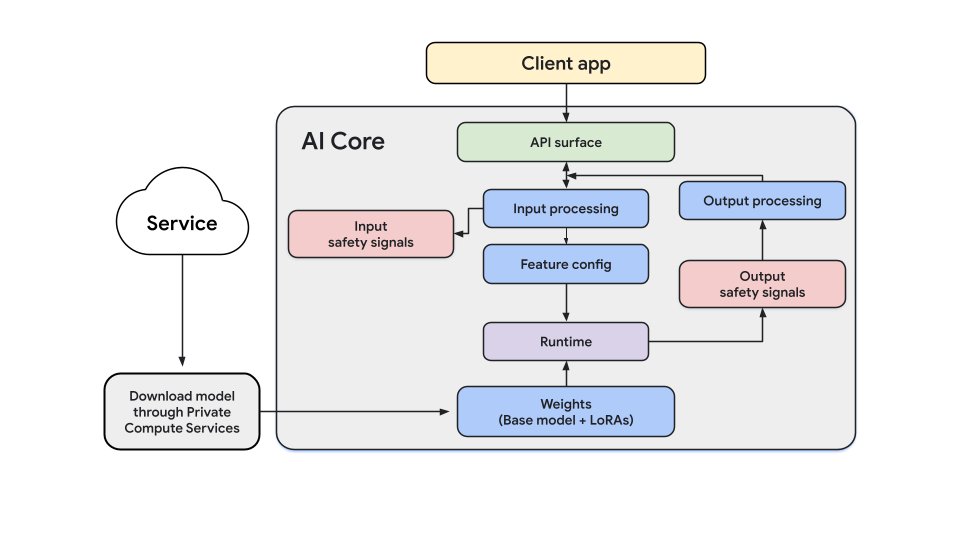 Gemini Nano architecture
Both stacks expose a hierarchy of decisions:
- User‑controlled filters – Focus mode, Do‑Not‑Disturb, channel muting.
- Platform ranking – learned per‑app scores that can promote or demote a notification.
- Summarisation – if the notification is groupable, the model rewrites the title/body.
- Delivery – the final payload reaches the lock screen or is dropped silently.
What users actually do with notifications
Empirical work from the CHI and UbiComp communities shows a consistent pattern: most notifications are ignored, a minority trigger immediate action, and the perceived value depends heavily on the source. Messaging alerts rank highest, promotional alerts rank lowest. A 2025 study of 800 billion pushes across 10 000 apps reported an average opt‑in rate of 61 %, down from 85 % a year earlier, after Android 13 made the permission explicit.
When users disable a channel or a summary, the underlying text reappears unchanged – the model only intervenes when the default settings are active. Because most people never tweak those defaults, the summariser’s output becomes the de‑facto view of the notification.
The marketer’s blind spot
| Metric | What you actually know |
|---|---|
| Accepted by platform | APNs/FCM response code – payload reached the cloud service |
| Delivered to device | Occasionally reported by FCM callbacks; not reliable |
| Shown on screen | Only observable via SDK hooks (e.g., UNNotificationServiceExtension on iOS) |
| Open / tap | SDK‑recorded tap events – but these are a biased subset, filtered by the platform’s relevance model |
No API tells you whether a notification was bundled into a summary, placed in Android’s Promotions section, or silently dropped because the device’s storage limit was hit. The only reliable “middle‑of‑funnel” signal on Android is the delete‑intent that fires when a user swipes a visible notification away – a narrow win that still leaves most edits invisible.
Writing for a model you can’t see
Because the summariser keeps factual nuggets and discards brand‑voice flourishes, a practical rule of thumb is:
- Lead with the fact – “Your order ships tomorrow at 10 am” survives; “Great news! 🎉 Your order is on its way!” often does not.
- Keep titles concise – the first few words are what the model extracts for the summary line.
- Use structured data – where possible, expose key fields (price, ETA, count) so the model can surface them directly.
- Avoid time‑sensitive level for marketing – iOS will prompt the user to disable it if taps are low, and the toggle is per‑app, not per‑campaign.
Shifting weight to owned surfaces
Push should be reserved for two scenarios that the platform cannot replace:
- Re‑engagement of dormant users – only push reaches a device that hasn’t opened the app in weeks.
- Transactional or time‑critical alerts – live activities, delivery updates, security codes.
All other communication (cross‑sell, education, onboarding) can be moved to in‑app inboxes, persistent message centres, or contextual UI elements that the developer fully controls and measures.
The future: notifications that act for you
Both Apple and Google are exposing their on‑device models to third‑party apps (Apple’s Foundation Models framework, Google’s ML Kit GenAI). The next logical step is for the model to act on a notification: dismiss it, open the app, or even draft a reply. Patents from Microsoft and Google already describe such “digital assistant” behavior, and early experiments in Siri and Gemini show prototypes of auto‑completion for common actions.
If agents can complete the user’s intent without a tap, the classic click‑through metric will lose relevance. Marketers will need to expose the underlying action (via App Intents on iOS or App Actions on Android) so the model can invoke it directly.
Practical checklist for 2026
- Reserve push for essential, user‑initiated triggers – price‑drop alerts, back‑in‑stock notices, status updates.
- Ask permission in‑context – after the user experiences value, not on first launch.
- Segment aggressively – send only to users who have demonstrated interest; generic blasts are now filtered out by the platform’s relevance model.
- Write fact‑first titles – test by truncating the title to 4‑5 words; if the meaning remains, the model will likely keep it.
- Instrument every in‑app surface – capture render, dismiss and interaction events; treat push as the gateway, not the destination.
- Monitor SDK‑level delivery – use
UNNotificationServiceExtensionor Android’sNotificationListenerServiceto confirm that a payload reached the OS. - Pool campaign data – because individual push metrics are noisy, aggregate over weeks and look for trends in downstream conversion rather than raw open rates.
- Prepare for agent‑driven actions – expose key flows as App Intents/App Actions so future AI assistants can complete them.
- Stay aware of platform changes – Apple may toggle summarisation per‑app; Android OEMs may ship custom summarisation stacks (e.g., Samsung One UI 8.5). Subscribe to the developer blogs of both ecosystems.
- Accept the new reality – the channel is no longer a pure broadcast medium; it is a curated, AI‑mediated surface. Success will belong to those who align their messaging with the platform’s relevance criteria rather than trying to outrun it.
References (selected):
- Apple Developer docs on APNs registration: https://developer.apple.com/documentation/usernotifications/registering-your-app-with-apns
- Firebase Cloud Messaging guide: https://firebase.google.com/docs/cloud-messaging
- Android notification channels: https://developer.android.com/develop/ui/views/notifications/channels
- Batch guide to iOS time‑sensitive level: https://help.batch.com/en/articles/5543431-understanding-and-managing-ios-15-time-sensitive-interruption-level
- Pushwoosh study on Android 13 opt‑in impact: https://www.pushwoosh.com/blog/android-13-opt-in-rates-research/
- Batch 2025 push benchmark: https://batch.com/ressources/etudes/benchmark-notifications-push-crm-mobile
- Apple Intelligence technical report (July 2025): https://arxiv.org/abs/2507.13575
- Gemini Nano documentation: https://developer.android.com/ai/gemini-nano
- Microsoft patent on notification augmentation: https://patents.google.com/patent/US11340963B2/en
- Google patent on notification prioritisation: https://patents.google.com/patent/US8707201
- CHI 2014 large‑scale mobile notification study: https://weberdo.com/publications/2014-Large-Scale-Assessment-of-Mobile-Notifications.pdf
- UbiComp 2016 PrefMiner paper: https://pure-oai.bham.ac.uk/ws/files/29201286/PrefMiner_Mining_User_s_Preferences_for_Intelligent_Mobile_Notification_Managemen.pdf
Comments
Please log in or register to join the discussion