
Microsoft's June 2026 extended security update for Windows 10 patches 200 vulnerabilities, including three publicly disclosed zero-days, while quietly laying groundwork for the Secure Boot certificate swap that has admins watching for BitLocker recovery surprises.

Microsoft has shipped KB5094127, the June 2026 extended security update for Windows 10, and while the headline is the usual Patch Tuesday cleanup, the more interesting story sits underneath: this build is part of how Microsoft is managing the expiring Secure Boot certificates that affect nearly every Windows device in production right now.
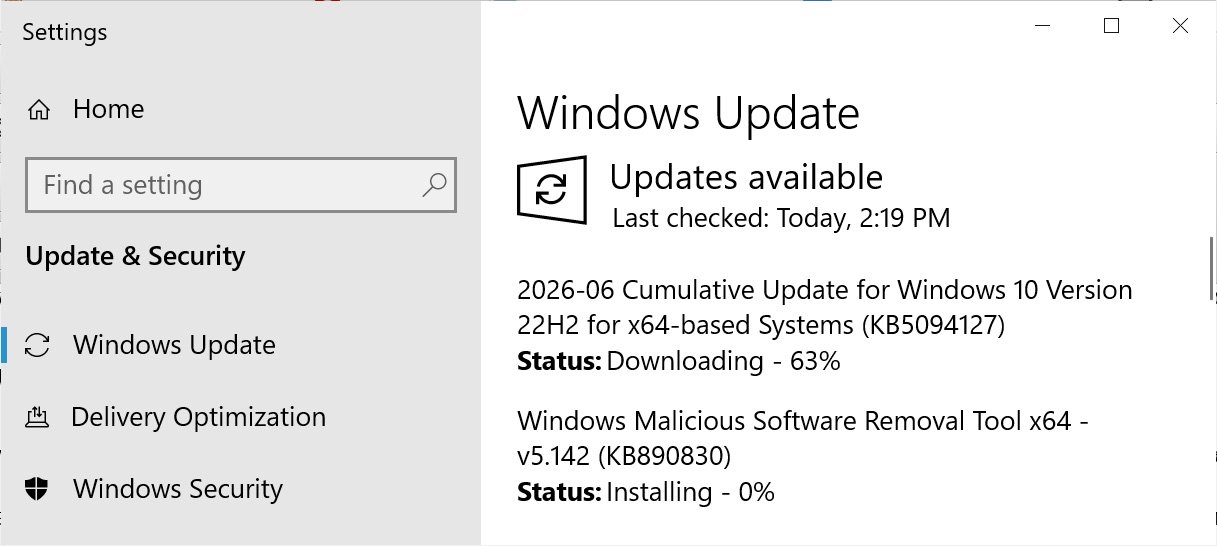
If you are running Windows 10 Enterprise LTSC or you are enrolled in the Extended Security Updates (ESU) program, the install path is unchanged. Open Settings, go to Windows Update, and run a manual Check for Updates. After it applies, mainstream Windows 10 moves to build 19045.7417, and Enterprise LTSC 2021 lands on 19044.7417.
What the update actually changes
Windows 10 is no longer getting new features, so KB5094127 is mostly security fixes and bug repairs. The notable functional change is in File Explorer search, which now handles Chinese text and UTF-8 encoded files that lack a byte order mark (BOM). Text renders more consistently across search results, Content view, and tooltips. Minor, but a real fix for anyone working in mixed-encoding environments.
The security payload is the heavier part. KB5094127 rolls in the June 2026 Patch Tuesday fixes, which addressed 200 vulnerabilities across the Microsoft ecosystem, three of them publicly disclosed zero-days. That is a large month by any measure, and the public disclosure of three flaws before patch availability means proof-of-concept details were already circulating. For ESU customers specifically, this is the kind of update where waiting out a deployment window carries real exposure.
The Secure Boot certificate transition is the real subplot
The part of this release worth understanding in depth is the Secure Boot work. Secure Boot relies on cryptographic certificates baked into UEFI firmware to verify that boot components are trusted before they run. Some of those certificates, including the long-serving 2011-era keys, are reaching expiration this month. Microsoft has been distributing replacements, including the Windows UEFI CA 2023 certificate, to keep Secure Boot functional once the old keys lapse.
KB5094127 adds machinery to manage that rollout carefully rather than pushing certificates to every device at once. The update enables dynamic status reporting for Secure Boot states inside the Windows Security app, so the certificate state of a device becomes visible rather than opaque. It also introduces a new Group Policy setting, LimitSecureBootRequiredServiceData, found under Computer Configuration > Administrative Templates > Windows Components > Secure Boot. When enabled, Windows suppresses the telemetry event it would normally send to Microsoft about Secure Boot service data. That same policy ships in the Windows Restricted Traffic Limited Functionality Baseline, which is the package locked-down and air-gapped environments use to minimize outbound connections.
The rollout itself is deliberately gated. Microsoft says quality updates now include higher-confidence device targeting data, and devices only receive the new certificates after they demonstrate enough successful update signals. In practice, a machine has to prove it can take updates cleanly before Microsoft trusts it with a firmware-adjacent certificate change. That phased approach exists for a good reason: a botched Secure Boot certificate update can leave a device unable to boot, and recovering an unbootable fleet at scale is exactly the disaster nobody wants to manage.
The BitLocker recovery warning admins should read first
Alongside the update, Microsoft is flagging a known issue that can trigger BitLocker recovery prompts after recent updates install. This is the kind of thing that turns a routine patch night into a help desk flood, so it deserves attention before you deploy broadly.
The problem hits devices configured with a specific BitLocker Group Policy that explicitly includes PCR7 in the TPM validation profile, combined with certain Secure Boot and Windows Boot Manager configurations tied to the newer Windows UEFI CA 2023 certificate. PCR7 is the Platform Configuration Register that BitLocker can bind to for Secure Boot state. When the underlying Secure Boot certificate changes, the measured value in PCR7 changes too, and BitLocker interprets that as a sign the boot environment was tampered with. The result is a recovery key prompt at startup.
Microsoft's temporary workaround is to remove the Group Policy setting that forces PCR7 into the validation profile, then suspend and resume BitLocker so it regenerates its default PCR bindings. Suspending and resuming is what reseals the encryption keys against the current platform state, clearing the mismatch. A permanent fix is in progress. The practical takeaway for administrators: confirm your BitLocker Group Policy configuration and make sure recovery keys are accessible in Azure AD or Active Directory before this update reaches devices that match the affected profile. Pilot it on a representative group first rather than trusting that your TPM profiles are clean.

This release sits in a longer chain of Windows 10 ESU updates, following KB5087544 and KB5082200 from prior months. The pattern is consistent: Windows 10 is in maintenance mode, but the Secure Boot certificate expiration is forcing real, firmware-touching changes through what would otherwise be quiet security rollups. For teams still running Windows 10 under ESU, the right move is to treat the Secure Boot and BitLocker interactions as the priority during testing, not the security fixes you already know you need. Patch the vulnerabilities, but validate that your encrypted machines still boot without prompting users for a 48-digit recovery key on Monday morning.
Comments
Please log in or register to join the discussion