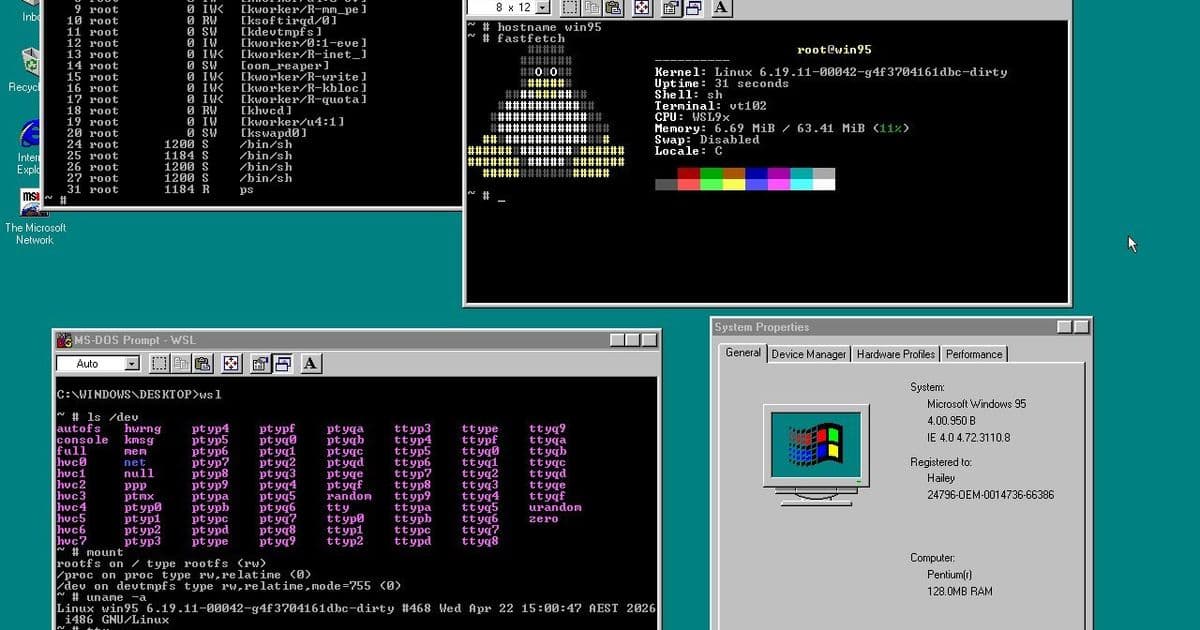
An unofficial tool called WSL9x enables running Linux applications on Windows 95, bridging three decades of computing technology by combining a modern Linux kernel with classic Windows 9x architecture.
Microsoft introduced the Windows Subsystem for Linux (WSL) with Windows 10, initially providing command-line Linux utilities before expanding to support graphical applications. However, WSL remains limited to modern Windows versions, leaving retro computing enthusiasts seeking alternatives for older systems. Enter the Windows 9x Subsystem for Linux (WSL9x), an innovative unofficial project that brings Linux applications to Windows 95—an operating system that predates many current developers.
Technical Architecture
At its core, WSL9x represents an impressive technical feat by shoehorning a modern Linux kernel inside the Windows 9x kernel environment. According to the project documentation, Windows boots first, but once Linux initializes, both kernels operate side-by-side. This dual-kernel approach enables compatibility between 30-year-old Windows software and contemporary Linux applications.
The system includes a wsl.com client application—a small 16-bit DOS program that transforms the MS-DOS prompt window into a command-line interface for interacting with the Linux subsystem. This design choice maintains compatibility with the legacy Windows 95 environment while providing access to Linux functionality.
Hardware and Software Requirements
One of the most remarkable aspects of WSL9x is its minimal hardware requirements. The project can operate on vintage hardware with Intel 486 processors, making it accessible to retro computing enthusiasts. However, as Linux development progresses, compatibility with older hardware becomes increasingly challenging. The current implementation uses Linux 6.19, but developers plan to drop support for 486 hardware with the upcoming Linux 7.1 kernel.
This compatibility with legacy hardware positions WSL9x as a valuable tool for:
- Retro computing enthusiasts
- Software preservation projects
- Legacy system testing
- Educational environments using older equipment
Comparison with Microsoft's WSL
While sharing a similar name, WSL9x differs significantly from Microsoft's official Windows Subsystem for Linux. Key distinctions include:
Platform Support: Microsoft's WSL requires Windows 10 or 11, while WSL9x targets Windows 95 and related 9x versions.
Architecture: Microsoft's WSL utilizes hardware-accelerated virtualization, whereas WSL9x operates without virtualization, enabling it to run on systems that lack modern CPU features.
Development Status: WSL is a Microsoft-supported product with regular updates, while WSL9x is an independent project with community-driven development.
Application Support: Microsoft's WSL offers broader Linux application compatibility, while WSL9x has more limited support due to the older Linux kernel version and architectural constraints.
Use Cases and Applications
WSL9x opens several interesting possibilities for developers and retro computing enthusiasts:
Software Preservation: Running modern Linux applications on vintage hardware helps preserve software that might otherwise become inaccessible.
Development Environments: Creating lightweight development setups on older hardware for educational purposes or specific legacy projects.
Compatibility Testing: Testing how modern Linux applications behave in constrained environments.
Niche Applications: Running specialized Linux tools that might be useful in retro computing contexts, such as emulators or development utilities.
Limitations and Considerations
Despite its innovative approach, WSL9x comes with several limitations:
Performance: Running without hardware virtualization results in significant performance overhead compared to modern solutions.
Application Compatibility: Not all Linux applications will function correctly due to kernel version constraints and architectural differences.
Security: Combining kernels from different eras introduces potential security considerations that wouldn't exist in more modern, homogeneous environments.
Maintenance: As Linux kernel development progresses, maintaining compatibility with older hardware will become increasingly challenging.
Future Prospects
The WSL9x project demonstrates the enduring creativity within the retro computing community. While primarily a niche interest today, projects like this highlight how developers continue to find innovative solutions to bridge technological generations.
For those interested in exploring WSL9x, the project's documentation and source code provide detailed setup instructions and configuration options. As with any retro computing project, compatibility may vary, and users should approach expectations with the understanding that this represents experimental rather than production-ready software.
The Windows 9x Subsystem for Linux stands as a testament to the ingenuity of developers who refuse to let technology become obsolete, creating bridges between computing eras and ensuring that even the most vintage systems can remain relevant in today's software landscape.
Comments
Please log in or register to join the discussion