A new guide from Microsoft's cloud architecture team reframes Azure Databricks capacity failures as a regional VM supply issue, not a platform defect. The strategic takeaway for teams running large Spark workloads: diversify your VM families, plan quota early, and treat serverless as the durable exit from SKU scarcity.
Microsoft's cloud architecture team has published a detailed operational guide addressing one of the more frustrating realities of running analytics at scale on Azure: clusters that refuse to start, autoscaling that stalls, and jobs that intermittently fail to launch. The message to cloud and data teams is direct. These are not Azure Databricks product failures. They are infrastructure-level capacity constraints originating in the Azure VM supply pool, and solving them requires a different playbook than filing a product support ticket and waiting.
For teams evaluating where to run memory-heavy Spark pipelines, or weighing a migration from AWS into Azure, the guidance reshapes how you should think about compute reliability across providers. The constraint is not unique to Databricks. It reflects a broader truth about every hyperscaler: compute is a shared, finite, dynamically allocated resource, and your architecture either accounts for that or it doesn't.
What Changed in How Microsoft Frames the Problem
The key reframing is structural. Azure Databricks does not own or reserve compute. When a cluster is created or scaled, Databricks requests virtual machines from Azure on demand. That means the failure surface lives in Azure's regional VM inventory, not in the Databricks control plane. When a specific SKU family is constrained in a region, cluster creation, autoscaling, and job execution all stall, and they do so with confusingly inconsistent symptoms.
Microsoft's architects break the problem into three layers, which is the most useful part of the guidance for anyone trying to diagnose a stuck workload.
Layer 1, Azure infrastructure. This is the layer most teams underestimate. Capacity here is governed by VM SKU availability in a given region, regional supply that is dynamic and shared across all Azure tenants, and per-subscription vCPU quotas. The distinction between quota and capacity matters: quota is your subscription's deployment limit, like a credit card limit, while regional capacity is the actual underlying hardware available. Both must be sufficient at the same time. The two most common Databricks worker families, D-series (general purpose) and E-series (memory optimized), are also the most heavily requested, which makes them the most frequently constrained.
Layer 2, the Databricks platform. The control plane carries its own published ceilings that architecture must respect proactively. Workspaces cap at 10,000 jobs created per hour, 2,000 simultaneously running tasks, 1,000 SQL warehouses, and 25,000 virtual machines per subscription per region. Several of these are non-fixed and can be raised through your Databricks account team. The full set lives in the Azure Databricks resource limits documentation.
Layer 3, Spark execution. Even when both lower layers cooperate, Spark's execution model can produce capacity-like symptoms: data skew, excessive shuffle, inefficient partitioning, and UDF overuse. Shuffle operations in real workloads can grow far larger than the input data, creating memory and compute pressure that no amount of additional nodes will relieve.
This layered model explains the single most confusing behavior teams report: why retries sometimes work. Capacity is shared and fluctuates throughout the day. As other tenants' workloads complete, nodes are released back to Azure and briefly become available. A retry succeeds when it lands in one of those windows.
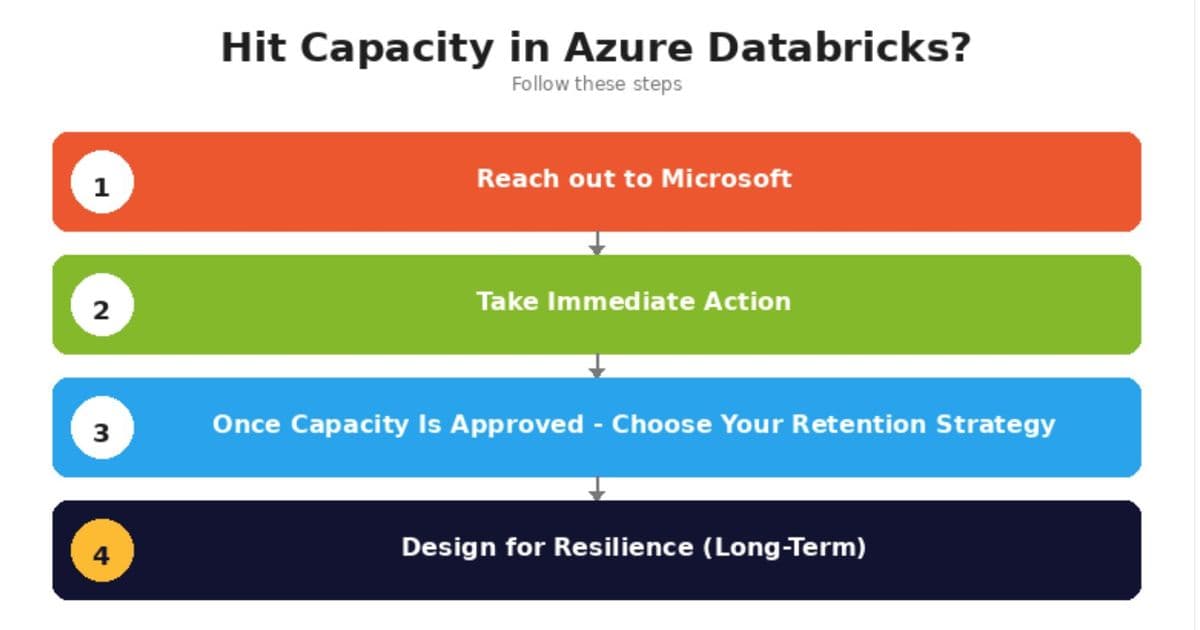
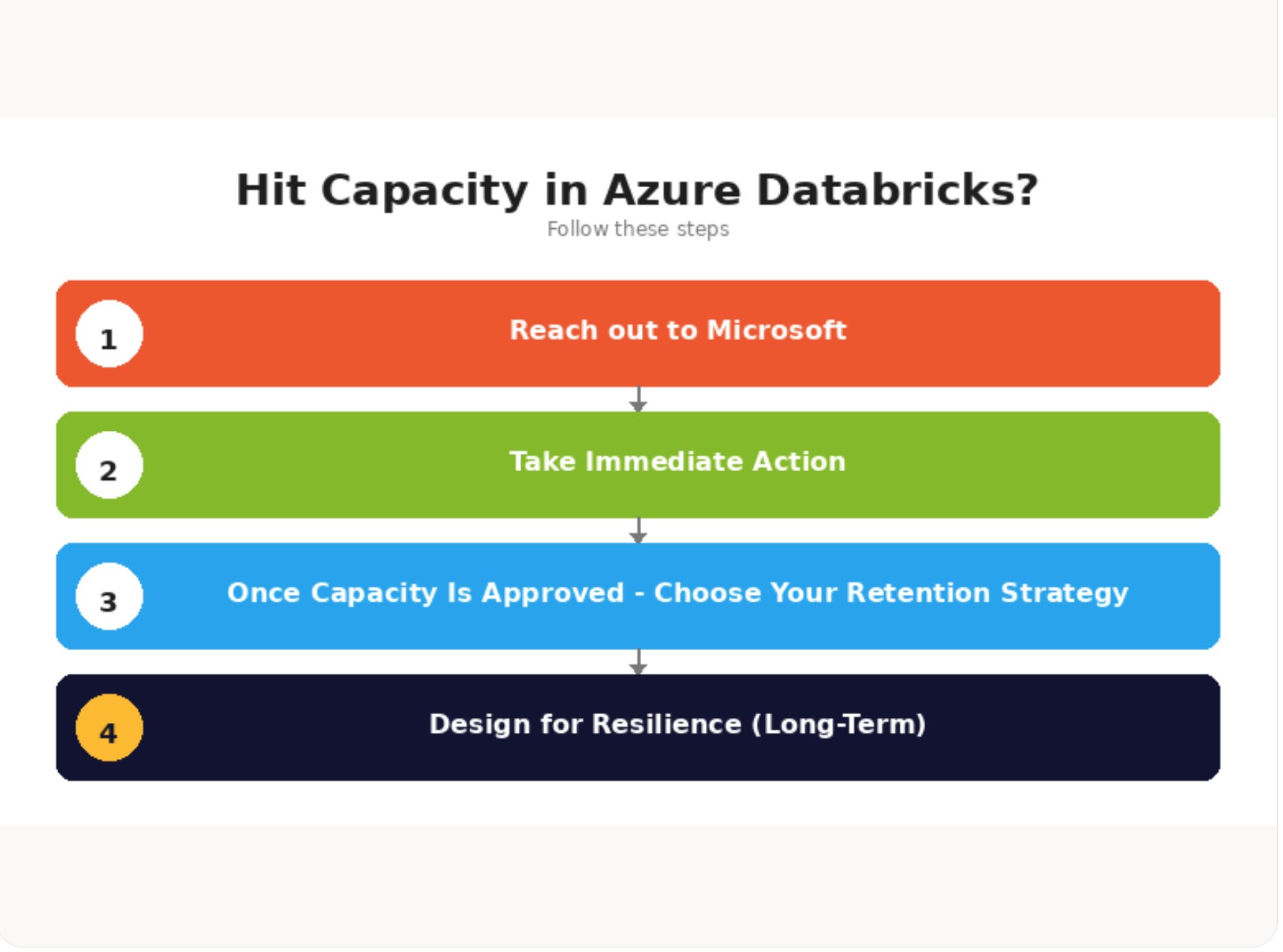
The Immediate Mitigations, Ordered by Effort
The guide sequences fixes from quickest to most involved, which is the right way to think about an active incident.
The fastest lever is scheduling. Capacity availability changes throughout the day, so running outside peak business hours in the impacted region's time zone significantly improves success rates. It costs nothing to implement and it is the most underused tactic.
The second lever is SKU substitution, and this is where the strategic depth shows. Most environments default to D-series and E-series precisely because they are the obvious choices, which is also why they are the most contended. Microsoft's decision framework pushes teams toward less crowded families:
- Memory-bound workloads (large joins, heavy shuffles): move from E-series to L-series. Similar memory per core, plus large local NVMe that accelerates Delta caching.
- CPU-bound workloads (parsing, transformations): move from D-series to F-series. Higher CPU performance at lower cost, with the trade-off of less memory per core.
- IO-heavy or cache-sensitive workloads: L-series reduces shuffle pressure and improves throughput.
The architectural warning underneath this is blunt. Designing for a single VM family is one of the biggest production risks in Azure Databricks. Build cluster configurations so you can switch families without re-engineering jobs.
The third lever is regional diversity. Because constraints are region- and SKU-specific, deploying workspaces across multiple regions reduces dependency on any single region's supply. This is not automatic. It requires separate workspaces and deliberate replication of data and configuration, which is why it sits later in the sequence.
Engaging Microsoft: The Capacity Intake Process
The correct escalation path is not a generic support ticket. It runs through your Microsoft account team, who can route the request into the Azure capacity intake process. The guide is specific about what to bring, because missing fields slow everything down. Capacity intake teams want exact subscription IDs, primary and alternate regions, the specific VM series and version, total core count requested, the workload characteristic (CPU-bound versus memory or shuffle-heavy versus IO-heavy, batch versus streaming versus SQL), the scale and ramp profile, and the business context. A line like "need by month-end, ramp from 2,000 to 9,650 cores over Q3, migration off AWS" is exactly the shape of request that moves quickly.
Microsoft also recommends opening an Azure Support ticket and sharing the ticket number with your Customer Success Account Manager, because the capacity planning teams track requests against support tickets.
Holding Onto Capacity Once It's Approved
Approval is not permanent. Because Azure capacity is shared and dynamic, approved capacity is retained only while compute stays actively deployed. The recommended mechanism for workloads not yet on serverless is an Azure Databricks Instance Pool, which pre-allocates warm idle VMs so clusters draw from ready nodes instead of re-requesting from the regional pool between runs. No DBU charges apply to idle pool nodes, though the underlying Azure VM costs do.
The honest caveat: pools hold nodes on a best-effort basis. Periodic platform events can recycle pool nodes, briefly dropping the pool below its configured minimum while Azure re-acquires replacements. Pools improve availability and startup latency. They are not a hard reservation. For genuinely guaranteed capacity, the guide points to Azure On-Demand Capacity Reservations, which are distinct from both instance pools (best-effort) and Reserved Instances (a billing discount with no capacity guarantee). That three-way distinction is worth internalizing, because teams routinely assume Reserved Instances guarantee availability. They do not.
The Long-Term Position: Serverless as the Exit
The durable recommendation is to move eligible workloads to serverless compute. Serverless abstracts VM SKU and regional capacity management away from the customer entirely, with scaling handled by the platform. For Databricks Jobs, SQL Warehouses, and Delta Live Tables, serverless removes SKU dependency completely. The trade-off is loss of fine-grained control over individual VMs, which also means SKU-swap and pool-based mitigations no longer apply. Customer-side levers shrink to retry and off-peak scheduling, but in exchange you get the simplest and most available option when the workload supports it.
Business Impact for Cloud Strategy
For anyone owning cloud strategy, the practical reading is about resilience and provider risk. Capacity scarcity in popular SKU families is a structural cost of running on shared infrastructure, and it applies in spirit to every hyperscaler. The teams that avoid recurring fire drills are the ones that plan quota before they need it, standardize compute through Databricks Cluster Policies that steer creation toward approved and available families, optimize Spark workloads so they consume fewer scarce cores in the first place, and treat serverless as the default for eligible jobs.
Microsoft is candid that Azure continues to expand infrastructure but offers no guaranteed timelines for relief in constrained regions. That candor is the actual strategic input. If your continuity plan depends on a single region and a single VM family being available on demand, you do not have a continuity plan. Multi-SKU and multi-region awareness, paired with a clear escalation path through your account team, is the defensible architecture. The capacity will fluctuate regardless. What you control is whether your workloads are designed to flex around it.
Comments
Please log in or register to join the discussion