
Microsoft has opened public preview of Data Collection Rules for Azure resource platform logs, replacing per-resource diagnostic settings with a single declarative model that can govern thousands of resources at once. For teams drowning in configuration drift across hundreds of subscriptions, this changes the economics and the operating model of cloud observability.
Microsoft announced the public preview of Data Collection Rules (DCRs) for Azure resource platform logs on June 10, 2026, and the change targets one of the most quietly expensive problems in large Azure estates: collecting platform telemetry consistently when you have thousands of resources to manage. If your organization has ever tried to keep diagnostic settings uniform across dozens of subscriptions, this preview addresses the exact pain you have felt.

What Changed
Until now, collecting platform logs from an Azure resource meant configuring a diagnostic setting on that resource. One resource, one setting. That works fine for a handful of services. It falls apart at enterprise scale.
Consider the scenario Microsoft uses to frame the announcement: a platform team responsible for more than 8,000 resources spread across 14 subscriptions. Every new resource needs a diagnostic setting that has to be configured consistently, audited continuously, monitored for drift, and re-enabled whenever someone changes or disables it. Multiply that across multiple engineering teams, dozens of regions, and recurring compliance audits, and a centralized observability strategy quietly degrades into fragmented, resource-by-resource toil.
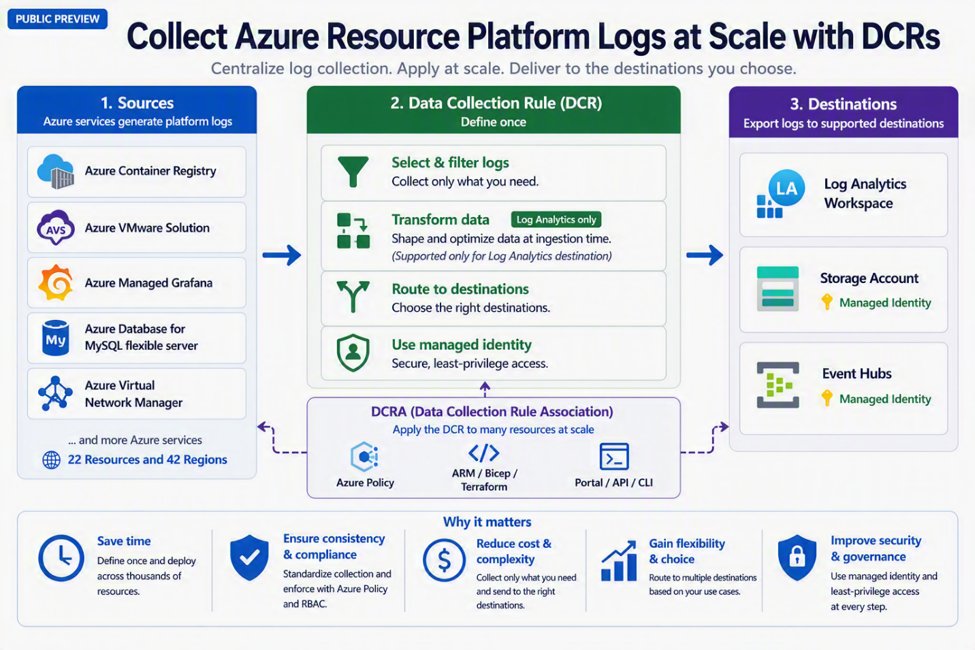
DCRs flip the model. Instead of touching each resource, you author one Data Collection Rule that defines which log categories you want and where they should go, then associate that rule with thousands of resources through a Data Collection Rule Association (DCRA). The rule becomes the unit of management, not the individual resource. You can read the platform log collection documentation and the broader DCR overview on Microsoft Learn for the underlying concepts.
DCRs are not new to Azure Monitor. They already standardize data collection for agents, metrics, and various PaaS data sources. Extending them to platform logs brings resource telemetry under the same declarative umbrella, which is the strategic point: one collection model instead of several disconnected ones.
Diagnostic Settings vs. DCRs: A Practical Comparison
The value here is easiest to understand by comparing the two approaches across the dimensions that actually matter to a platform team.
Configuration. Diagnostic settings require you to configure each resource individually, which produces inconsistent coverage and drift that often goes unnoticed until an audit finds it. A DCR is defined once and associated with many resources, so standards stay consistent by design.
Cost. This is the difference most finance-conscious teams will notice first. Diagnostic settings give you no way to filter or shape log data before it is ingested. You pay to ingest everything, then filter later if at all. DCRs support filtering and transformation at ingestion time when the destination is Log Analytics, so noise gets dropped before it lands in your workspace and before it shows up on your bill. During the preview, transformations are supported only for the Log Analytics destination, which is a constraint worth planning around.
Security. Diagnostic settings lacked a consistent managed-identity-first pattern across destinations, which left gaps in security and audit posture. DCRs use managed identity, either system-assigned or user-assigned, with least-privilege RBAC for Storage and Event Hubs destinations. No shared keys.
Operations. Onboarding with diagnostic settings is slow, manual, and hard to audit or roll back. DCRs onboard through ARM, Bicep, Terraform, or Azure Policy, so your telemetry configuration lives in version control alongside the rest of your infrastructure as code.
Governance. Diagnostic settings produced fragmented workflows with different patterns for different telemetry types. DCRs offer one declarative model with auditable associations that align with the rollout mechanisms you already use.
What You Can Do During Preview
The preview unlocks several concrete patterns for platform teams.
You can define a single DCR for the log categories you care about and apply it across thousands of resources, eliminating per-resource configuration entirely. You can cut ingestion costs by filtering noise before it reaches Log Analytics, so only the signal you need gets billed. You can wire new workloads into observability automatically by attaching a DCR through Azure Policy, meaning a freshly created subscription inherits your collection standards without anyone manually touching diagnostic settings or worrying about drift.
Routing stays flexible from the same management model. Analytics-grade logs can go to Log Analytics, archival data to Storage, real-time streams to Event Hubs, and ecosystem flows to Partner Solutions. The destination fits the scenario rather than forcing one pattern everywhere.
Business Impact and Migration Considerations
For organizations running large Azure footprints, the practical payoff is a shift from per-resource maintenance to platform-scale governance. The cost angle deserves attention during planning. Ingestion-time filtering can meaningfully reduce Log Analytics spend, but only for the Log Analytics destination in this preview. If a significant share of your telemetry routes to Storage or Event Hubs, the cost benefit is narrower for now, and you should model that before assuming savings.
Migration is not an overnight switch. Diagnostic settings remain the established per-resource model, and the DCR coverage for platform logs is still expanding. Microsoft's near-term roadmap includes more supported resource types, additional destinations including more Partner Solutions in the Marketplace, broader transformation support beyond Log Analytics, and deeper integration with built-in policy definitions and reference templates. A pragmatic approach is to pilot DCRs on a subscription or resource group where the supported resource types already cover your needs, validate the cost and coverage behavior, and standardize your Bicep or Terraform modules before rolling the pattern across the estate.
Teams already invested in Azure Policy for governance will find the fit natural, since enforcing a DCR through policy is the same muscle they use for tagging and compliance rules today. The version-controlled, identity-first design also reads well in security reviews, which matters for regulated workloads where shared keys and configuration drift are recurring audit findings.
The direction Microsoft is signaling is consolidation: one collection model for agents, metrics, and now platform logs, governed declaratively and rolled out through the same IaC pipelines you already run. For platform teams managing observability across hundreds or thousands of resources, that consolidation is the real story, more than any single feature in the preview. The reference material, including supported resource types and regions and the existing diagnostic settings documentation for context, is the right starting point for scoping a pilot.
Comments
Please log in or register to join the discussion