
Confluent's new fully managed V2 Kafka connector for Azure Cosmos DB is now generally available, and it's integrated directly into the Azure portal through Azure Native Confluent. This eliminates the operational friction of managing connectors across separate cloud consoles, offering a unified experience for building event-driven architectures that span Confluent Cloud and Azure's database services.
The operational overhead of managing data pipelines across multiple cloud providers has long been a friction point for engineering teams. Confluent's announcement of the general availability of its fully managed V2 Kafka connector for Azure Cosmos DB, now integrated directly into the Azure Native Confluent service, addresses this head-on. This move transforms a previously manual, multi-portal process into a single-pane-of-glass experience within the Azure portal, fundamentally changing how architects design and deploy real-time streaming applications that leverage both Confluent's Kafka ecosystem and Azure's scalable database.
What Changed: From Manual Integration to Native Azure Experience
The core shift is the direct provisioning and management of Confluent-managed Cosmos DB Kafka connectors from within the Azure portal. Previously, teams would need to navigate between the Confluent Cloud console and the Azure portal to set up the necessary infrastructure—creating environments, clusters, topics, and connectors in separate systems. This not only increased the time to deployment but also introduced configuration drift and complexity in monitoring and security management.
The new capability within Azure Native Confluent streamlines this entire workflow. Users can now:
- Navigate to their native Confluent resource in Azure.
- Create environments, Kafka clusters, and topics directly from the Azure interface.
- Provision either source or sink connectors for Azure Cosmos DB without leaving the Azure ecosystem.
- Manage authentication and access controls through Azure-native service accounts.
This is more than a convenience feature; it's a strategic alignment of two major cloud-native platforms. By embedding Confluent's data streaming capabilities into Azure's management plane, Microsoft and Confluent are reducing the cognitive load on DevOps teams and minimizing the surface area for human error during setup.
{{IMAGE:2}}
Provider Comparison: The V2 Connector vs. Its Predecessor
The new V2 connector isn't just a repackaged version of the old one. It represents a significant architectural upgrade with tangible benefits for production workloads. When comparing the V2 connector to the earlier V1 version, the improvements are clear across three key dimensions: throughput, security, and reliability.
Throughput and Performance: The V2 connector is built on a more modern, scalable architecture. It can handle higher volumes of data with lower latency, making it suitable for high-velocity event streams. This is critical for scenarios like real-time analytics on user activity logs stored in Cosmos DB or synchronizing microservice state across distributed systems. The V1 connector, while functional, could become a bottleneck under heavy load, requiring careful partitioning and tuning. The V2 connector's design leverages Confluent's latest runtime optimizations, allowing for more efficient parallel processing and data serialization.
Enhanced Security and Observability: Security is a primary concern in multi-cloud environments. The V2 connector integrates deeply with Confluent's service account model, enabling least-privilege access controls. Administrators can create dedicated service accounts with fine-grained permissions, ensuring that the connector only has access to the specific Kafka topics and Cosmos DB containers it needs. This aligns with the principle of zero-trust security and is a marked improvement over the more permissive API key-based authentication that was common in V1 setups. Furthermore, the V2 connector offers better built-in observability, with more detailed metrics and logs that can be streamed to Azure Monitor or Confluent's own monitoring tools, providing clearer insights into connector health and data flow.
Increased Reliability: For stateful connectors like those interfacing with a database, reliability is non-negotiable. The V2 connector introduces more robust error handling and retry mechanisms. It can better tolerate transient failures in either the Kafka cluster or the Cosmos DB instance, ensuring that data is not lost during outages. The V1 connector was more susceptible to data duplication or loss in failure scenarios, requiring custom logic for idempotency. The V2 connector's design incorporates idempotent writes and checkpointing more natively, reducing the burden on application developers.
Business Impact: Accelerating Event-Driven Architectures on Azure
For organizations invested in the Microsoft Azure ecosystem, this integration lowers the barrier to adopting event-driven patterns. Azure Cosmos DB is a popular choice for globally distributed, low-latency applications, and Apache Kafka is the de facto standard for building real-time data pipelines. Bringing them together seamlessly allows teams to:
- Build Real-Time Applications: Create applications that react instantly to changes in Cosmos DB, such as updating a user interface when a document changes or triggering a workflow based on a new record.
- Implement Change Data Capture (CDC): Use Cosmos DB as a source to stream every change (insert, update, delete) into Kafka topics. This data can then be consumed by multiple downstream systems—analytics platforms, search indexes, or other databases—without impacting the performance of the primary database.
- Synchronize Data Across Systems: Use Cosmos DB as a sink to persist event data from Kafka. This is ideal for maintaining a historical audit trail, feeding data into a data lake for batch processing, or populating a cache for fast lookups.
From a financial and operational perspective, the fully managed nature of the connector means teams no longer need to dedicate engineering resources to provisioning, scaling, and maintaining the connector infrastructure itself. This shifts the focus from infrastructure management to business logic and application development. The availability of a free $1000 credit for new sign-ups to Azure Native Confluent further incentivizes experimentation and proof-of-concept development.
Getting Started: A Step-by-Step Walkthrough
The process of creating a Confluent Cosmos DB (v2) Kafka Connector from the Azure portal is designed to be intuitive. Here’s a detailed breakdown of the steps:
- Navigate to the Native Confluent Resource: Start in the Azure portal and locate your Azure Native Confluent service instance.
- Access the Connectors Section: Within the resource, find the "Connectors" menu and select "Create new connector." This is also where you would create a new environment, cluster, or topic if you haven't already done so.
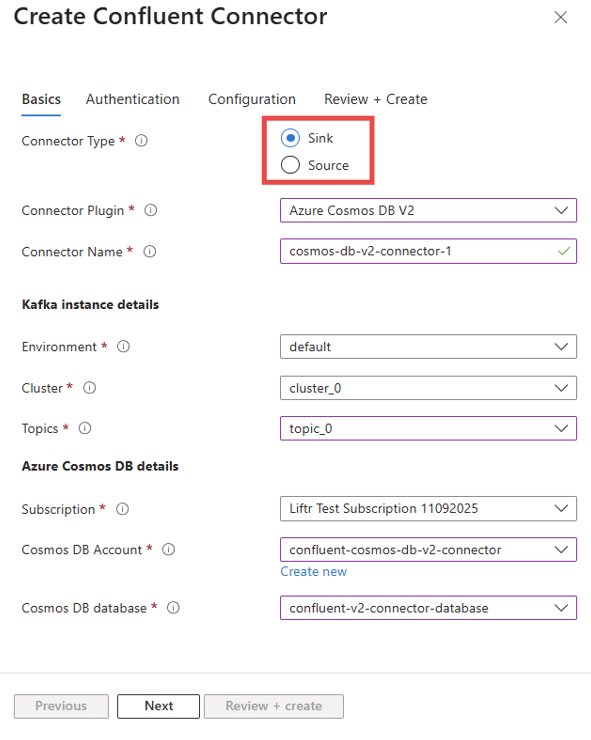
- Select Connector Type: You have two primary choices:
- Source Connector: This pulls data from Azure Cosmos DB containers and streams it into Kafka topics. Use this for CDC or feeding data from Cosmos DB to other services.
- Sink Connector: This consumes data from Kafka topics and writes it into Azure Cosmos DB containers. Use this to persist event streams or synchronize data into Cosmos DB.
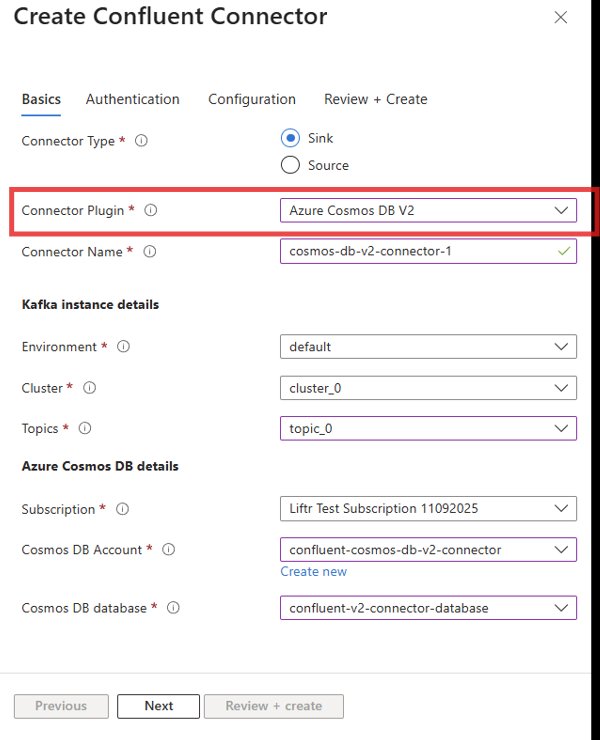
- Choose the Plugin: From the list of available connector plugins, select "Azure Cosmos DB V2". This ensures you are using the latest, most capable version.
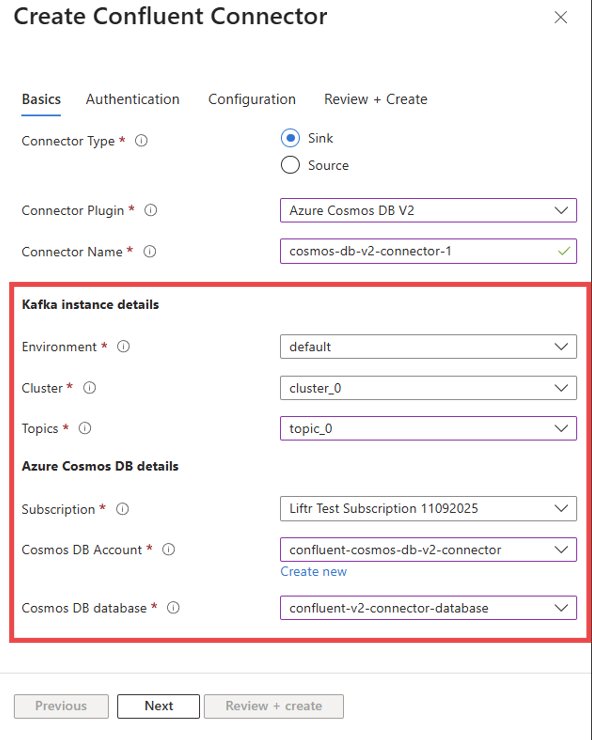
- Configure Basic Details: Provide a name for your connector. Then, select the Kafka topics you want to use for data in/out, and specify the target Azure Cosmos DB account and database.
- Set Up Authentication: This is a critical security step. The recommended approach is to use Service Account authentication. Provide a name for the service account; the system will automatically create this account in Confluent Cloud with the necessary permissions. For legacy compatibility, you can also opt for user-account authentication by provisioning an API key manually in Confluent Cloud, but the service account method is more secure and aligned with best practices.
- Define Connector Configuration: This is where you map Kafka topics to Cosmos DB containers. The format is straightforward:
topic1#container1,topic2#container2. This allows for flexible, multi-container data routing. - Review and Create: Carefully review the configuration summary to ensure all settings are correct. Once satisfied, click "Create." The connector will be provisioned, and you can monitor its real-time status directly from the Azure portal.
Strategic Implications for Multi-Cloud Data Strategies
This announcement is a clear signal of the deepening partnership between Microsoft and Confluent. For enterprises, it simplifies the architecture of hybrid and multi-cloud data systems. Instead of treating Confluent Cloud as a separate entity, it can now be managed as a native extension of the Azure platform. This reduces the operational complexity of managing data flows across boundaries.
For teams considering a migration from a self-managed Kafka cluster to Confluent Cloud, this integration provides a compelling reason to adopt the managed service. The ability to manage everything from a single Azure portal reduces the learning curve and operational overhead. It also ensures that security policies and monitoring are consistent across both the data streaming layer and the database layer.
The availability of this connector also strengthens the case for using Azure Cosmos DB as the operational data store for event-sourced architectures. With a reliable, high-performance, and secure bridge to Kafka, Cosmos DB becomes an even more powerful component in a real-time data stack.
Conclusion
The general availability of the Confluent Cosmos DB V2 connector, integrated directly into Azure Native Confluent, is a significant step forward for developers and architects building on Azure. It transforms a complex, multi-portal integration into a streamlined, secure, and manageable operation. By offering higher throughput, enhanced security, and greater reliability, the V2 connector provides a robust foundation for event-driven applications. This move not only accelerates development cycles but also aligns with the broader industry trend of simplifying multi-cloud operations through deep platform integrations.
Relevant Resources:
- Azure Native Confluent Service Documentation
- Confluent Cloud Azure Cosmos DB Connector Documentation
- Microsoft Announcement on Azure Native Confluent
Comments
Please log in or register to join the discussion