Docker Desktop gives containers host-style network access through vpnkit, layered DNS, proxy handling, and port forwarding across a Linux VM boundary.
Docker Desktop solves a hard development problem: Linux containers need a Linux kernel, but developers expect those containers to reach VPNs, proxies, host services, and localhost ports as if no VM sits between them.
David Scott’s Docker engineering post explains the system behind that experience. Docker Desktop runs Linux containers inside a helper Linux VM on macOS and Windows. That VM creates a network boundary. Corporate VPN clients, host proxy settings, DNS split-horizon rules, and localhost debugging tools all live on the host side.
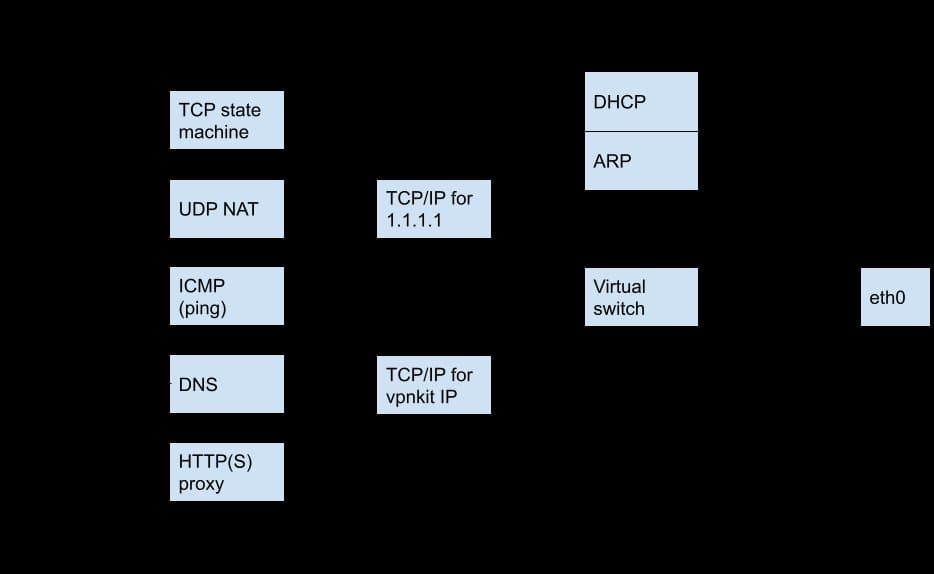
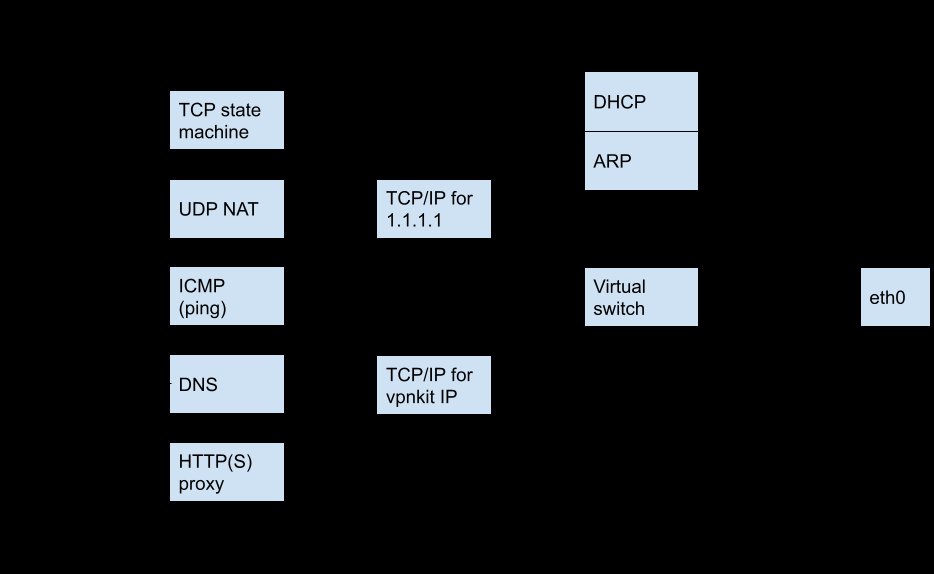
Docker solves the mismatch with a set of user-space components. The key piece, vpnkit, implements a TCP/IP stack in OCaml using libraries from the MirageOS project. Instead of asking the host to route VM-originated packets, Docker Desktop forwards traffic through vpnkit at user level. That choice helps containers reach resources behind VPNs that reject traffic from guest VMs.
A container that calls connect() sends traffic through the Linux VM. The VM sends Ethernet frames to the host over shared memory on macOS or hypervisor sockets on Windows. Vpnkit receives those frames, handles DHCP and ARP, and creates a virtual TCP/IP peer for each remote destination. When Linux sends a TCP SYN packet, vpnkit opens a host-side socket to the destination. If the host connection succeeds, vpnkit completes the handshake with Linux and proxies bytes between both sides.
That design matters because many companies configure VPN clients to forward traffic only from the host. Security teams use that rule to stop a laptop from routing outside traffic into a private network. A VM breaks the assumption because traffic appears to come from a guest. Vpnkit keeps the host in the path, so containers can pull from internal registries and call private services without asking developers to change VPN policy.
Docker Desktop also handles UDP and ICMP through the same user-space approach. Developers see normal container networking, while the host sees network activity that matches its own routes, proxy rules, and VPN state.
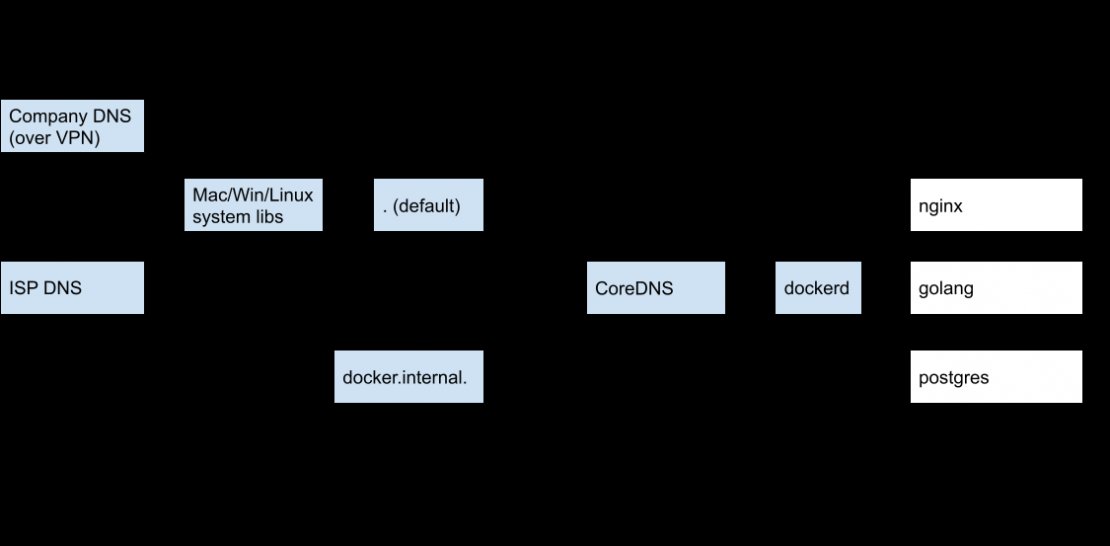
DNS adds a second layer. Docker Desktop runs more than one resolver because containers need more than one kind of name. Dockerd handles container-to-container names inside the same Docker network. A service named postgres can change IP addresses across runs, but another container can still connect to postgres by name.
Docker forwards other DNS lookups to CoreDNS. Docker Desktop treats docker.internal as a special domain. The name host.docker.internal resolves to a host address that containers can reach. That gives you a portable way to call a database, API, or tool that runs on the host while the rest of the stack runs in containers.
For public and corporate names, Docker Desktop uses host OS resolution paths. That choice preserves split DNS rules. A company domain can resolve through a VPN resolver, while docker.com can resolve through a public resolver. If your browser can resolve a name, Docker Desktop aims to make the same name work inside containers.
HTTP proxy support follows the same principle. Some companies require outbound traffic to pass through an HTTP proxy for logging or filtering. Docker Engine can read proxy settings from environment variables, but that approach forces a restart when the proxy changes. Docker Desktop avoids that interruption with an internal HTTP proxy inside vpnkit.
On macOS, Docker Desktop watches system proxy settings. When a developer changes Wi-Fi networks or joins a VPN, Docker Desktop updates the internal proxy target. Containers and builds continue through the new route without restarting Docker Engine.

Port forwarding solves the reverse path. Containers can reach the outside world, but developers also need browsers, debuggers, and test clients on the host to reach services inside containers. A command such as docker run -p 80:80 asks Docker to expose container port 80 on host port 80.
Docker Desktop handles that request through a Docker API proxy. The host writes to /var/run/docker.sock, but dockerd runs inside the helper Linux VM. Docker Desktop forwards API calls across a low-level transport rather than exposing dockerd over a plain TCP network path.
The API proxy also inspects port publishing requests. If another host process already uses the requested port, Docker Desktop can return a useful error. If the port remains free, com.docker.backend accepts host connections and forwards them into the VM through vpnkit-forwarder.
Privileged ports add a macOS-specific wrinkle. Unix systems used to require root for ports below 1024, including port 80. Docker Desktop does not run as root on the host, and docker run --privileged only grants root inside the VM. The hypervisor keeps that privilege away from the host.
Docker Desktop handles the narrow case with a small privileged helper launched by macOS. The helper binds privileged ports when macOS still requires root, such as requests for a specific IP address like 127.0.0.1:80:80. Modern macOS lets unprivileged users bind low ports on all interfaces, so Docker Desktop needs the helper less than older systems did.
The trade-off in Docker Desktop’s networking model centers on control. A native Linux host can rely on kernel routing, iptables, and direct interfaces. Docker Desktop cannot assume that path because macOS and Windows do not run Linux containers without a VM. Docker chooses user-space networking so it can match host behavior across VPNs, proxies, DNS rules, and port permissions.
That choice adds components. Developers depend on vpnkit, the API proxy, CoreDNS, proxy watchers, and port forwarders. Each piece can fail or misread host state. In return, Docker Desktop gives developers a portable network contract: containers can call the internet, private registries, peer containers, and host services with stable names and predictable ports.
The architecture also shows a broader pattern in developer tools. A tool that hides virtualization must recreate the host’s network intent, not the host’s packets. VPN policy, DNS policy, proxy policy, and localhost debugging all encode human choices. Docker Desktop reads those choices from the host and projects them into the Linux VM.
For teams, the lesson goes beyond Docker. Local development environments need to respect corporate networks without making each developer become a network engineer. Docker Desktop’s stack shows one path: keep security boundaries in place, translate host policy into the guest, and provide names such as host.docker.internal that match how developers think about their machines.
Comments
Please log in or register to join the discussion