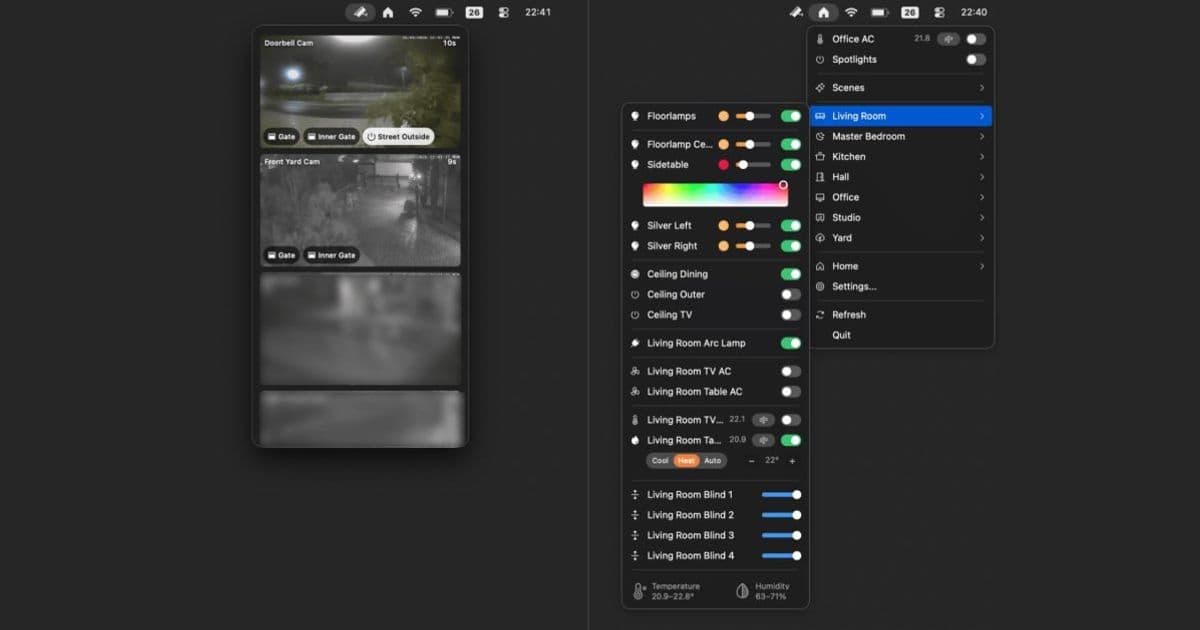
Itsyhome is a new indie app that brings smart home controls to your Mac's menu bar, supporting both HomeKit and Home Assistant ecosystems.
Managing your smart home devices from your Mac just got a lot easier with the release of Itsyhome, a new indie app that brings comprehensive smart home controls directly to your menu bar.
Cross-Platform Smart Home Control
Itsyhome stands out in the crowded smart home app market by offering support for both Apple's HomeKit ecosystem and Home Assistant. This dual-platform approach means you're not locked into Apple's ecosystem if you prefer Home Assistant or have a mixed setup.
For developers, this cross-platform compatibility is particularly noteworthy. The app demonstrates how third-party developers can create unified interfaces for different smart home protocols, potentially serving as a model for future cross-platform smart home applications.
Menu Bar Integration
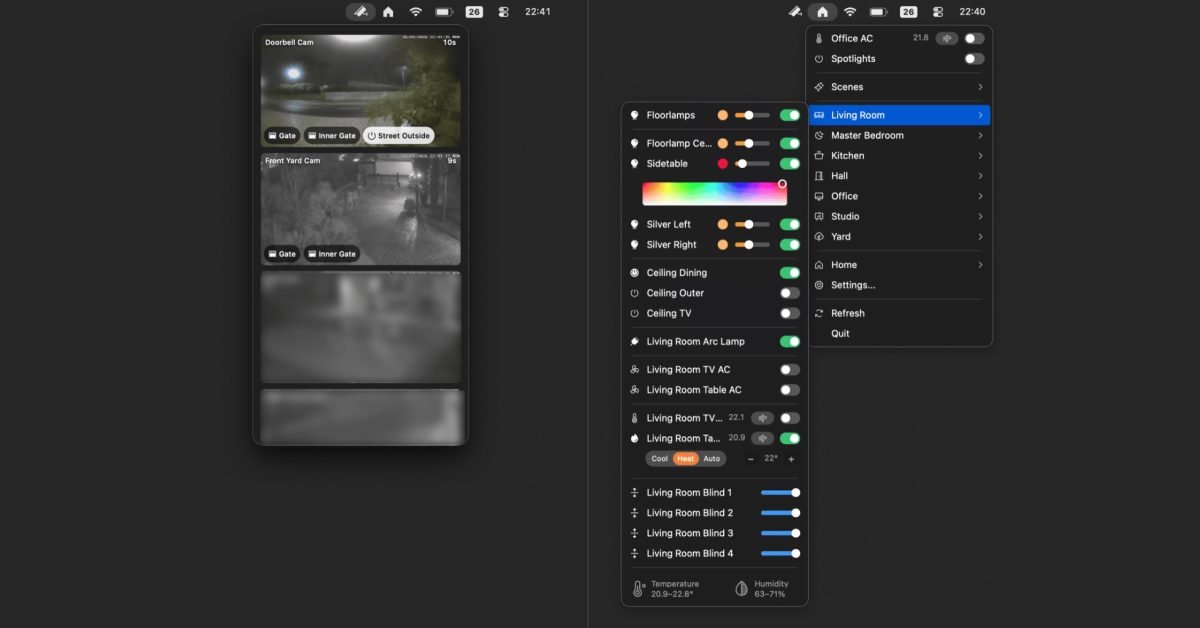
The app's primary interface lives in your Mac's menu bar, providing quick access to all your smart home devices without the need to switch to a dedicated application. This design choice aligns with macOS's emphasis on menu bar utilities and follows Apple's Human Interface Guidelines for creating efficient, accessible tools.
Device and Room Management
Itsyhome organizes your smart home devices by room, making it easy to find and control specific devices. The app includes several organizational features:
- Custom device groups: Create batch control groups for frequently used device combinations
- Pinned devices: Keep your most-used devices at the top of the menu for instant access
- Hide functionality: Remove devices you don't want quick access to
These features show thoughtful consideration of user workflow, allowing for personalized organization that can adapt to different usage patterns.
Advanced Integration Features
Beyond basic device control, Itsyhome includes several advanced features that enhance its utility:
- Keyboard shortcuts: Assign key combinations to toggle important devices quickly
- Stream Deck integration: Control your smart home directly from Elgato Stream Deck devices
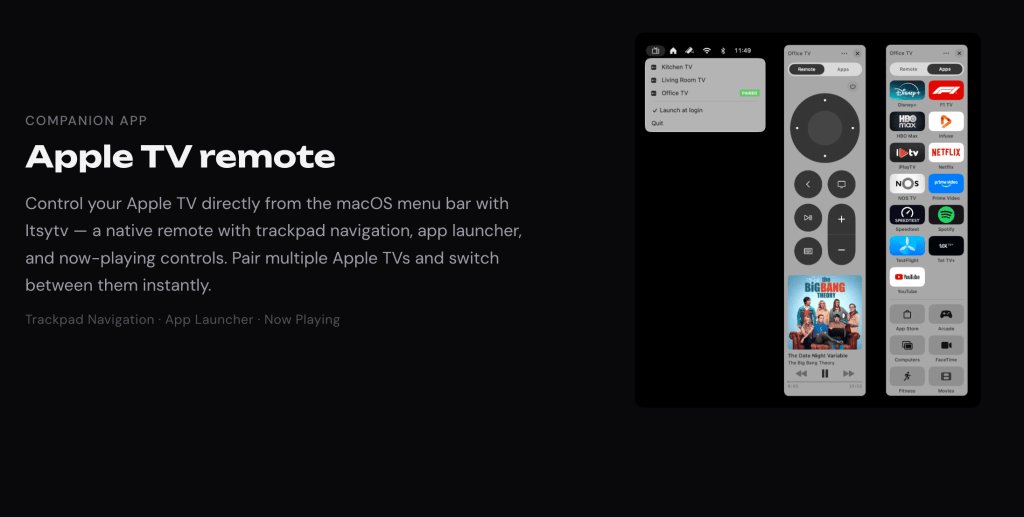
- Apple TV remote: A built-in remote control app with an integrated app launcher
The Apple TV remote functionality is particularly interesting, as it provides an alternative to Apple's official Remote app and physical remotes. The built-in app launcher eliminates the need to navigate through the Apple TV's home screen, potentially saving time for frequent users.
Pricing and Availability
Itsyhome is available for free on the Mac App Store for Macs running macOS 14.0 (Sonoma) and later. The free version provides core functionality, while a one-time $12.99 purchase unlocks premium features including:
- Camera access
- iCloud sync
- Webhook integration
This pricing model is developer-friendly, avoiding the subscription fatigue that many users experience with smart home applications.
Open Source Development
One of Itsyhome's most compelling aspects is its open-source nature. The source code is available on GitHub, allowing developers to:
- Examine the implementation details
- Contribute improvements or bug fixes
- Fork the project for custom modifications
- Learn from the codebase for their own smart home projects
This open approach aligns with the indie development community's values and provides transparency that many users appreciate in security-sensitive applications like smart home controllers.
Technical Requirements
The app requires macOS 14.0 or later, which means it takes advantage of newer macOS features and APIs. For developers, this requirement suggests the app likely uses modern Swift and SwiftUI frameworks, though the open-source nature allows for verification of the technical stack.
Developer Perspective
From a development standpoint, Itsyhome represents an interesting case study in creating cross-platform smart home interfaces. The app demonstrates how to abstract different smart home protocols behind a unified interface, a challenge that many developers face when building smart home applications.
The inclusion of Stream Deck integration and webhook support shows forward-thinking about extensibility, allowing the app to integrate with broader automation workflows beyond just direct device control.
Conclusion
Itsyhome fills a notable gap in the macOS smart home ecosystem by providing a dedicated, menu bar-based controller that works with multiple platforms. Its combination of thoughtful features, reasonable pricing, and open-source development makes it a compelling option for Mac users who want better smart home control without leaving their desktop environment.
For developers interested in smart home applications, Itsyhome's source code offers valuable insights into cross-platform integration and macOS-specific UI patterns. The app demonstrates that with careful design, it's possible to create a unified smart home interface that respects both user privacy and platform conventions.
Whether you're a HomeKit loyalist, a Home Assistant enthusiast, or somewhere in between, Itsyhome provides a streamlined way to control your smart home devices directly from your Mac's menu bar.
Comments
Please log in or register to join the discussion