
Microsoft Threat Intelligence uncovered a supply‑chain attack that uses dependency‑confusion npm packages to run an obfuscated post‑install stager, collect environment data, and prepare for future exploitation. The campaign spans three maintainer accounts, nine scoped packages, and a shared C2 infrastructure. Mitigations include locking dependencies, disabling lifecycle scripts, and blocking the attacker’s C2 domains.
What changed
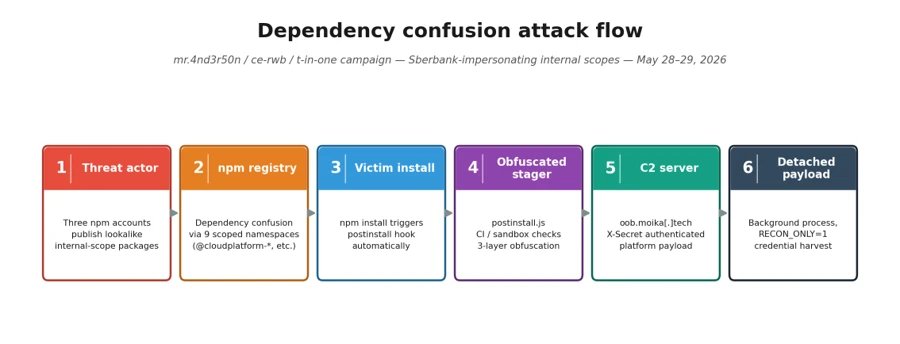
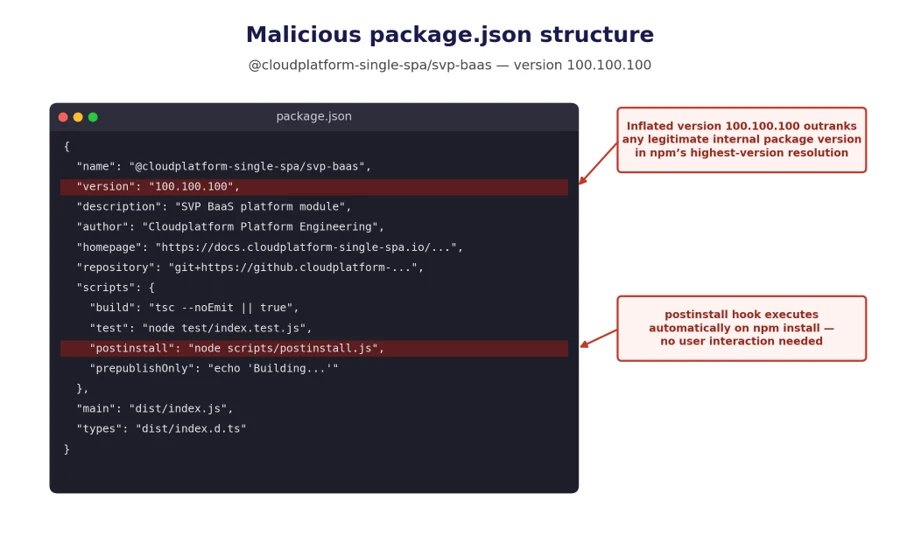
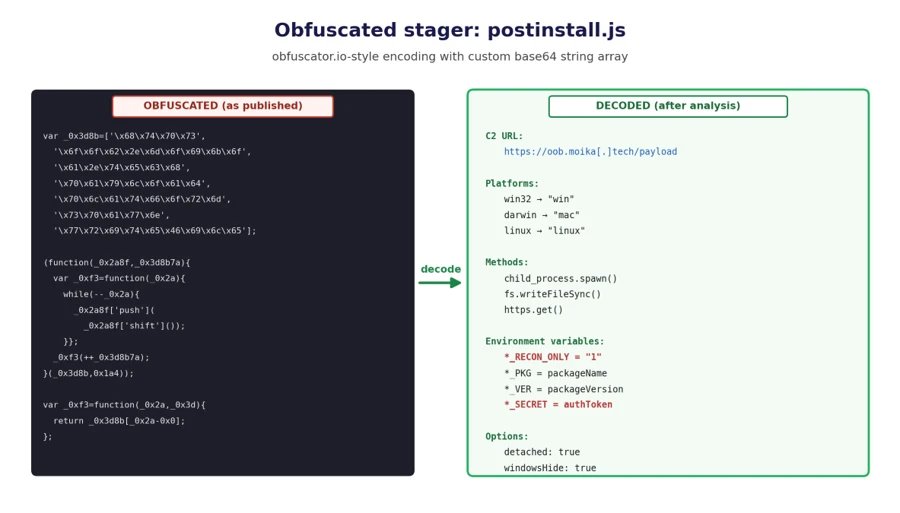
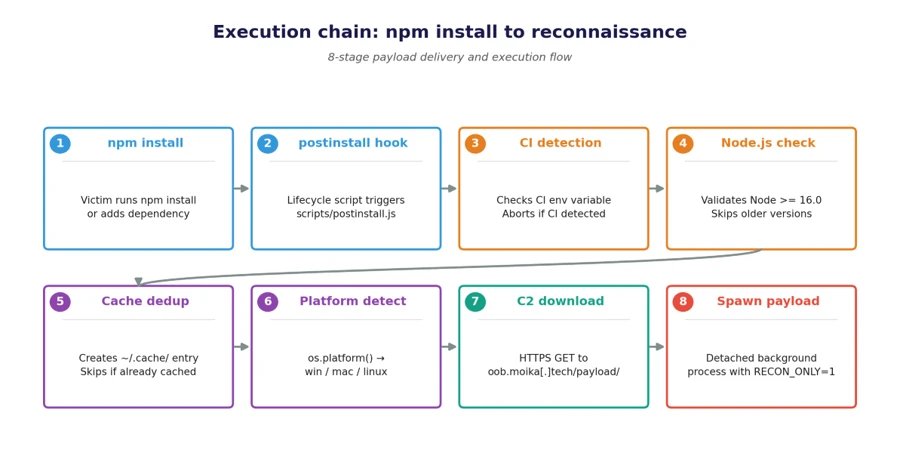
Microsoft Threat Intelligence detected a coordinated supply‑chain operation that leverages dependency‑confusion in the npm ecosystem. Between May 28‑29 2026, three attacker‑controlled maintainer accounts published malicious scoped packages that mimic internal corporate namespaces. Each package contains a heavily obfuscated postinstall script that runs automatically during npm install, contacts a common command‑and‑control (C2) server, and drops a reconnaissance‑only JavaScript payload. The payload silently harvests hostnames, environment variables, installed tools, and developer credentials, then reports them back to the attacker. A shared secret header (X‑Secret: l95HdDaz3kQx1Zsg3WxH6HvKANf51RY1) and identical C2 host confirm a single operator behind all three accounts.

Provider comparison
npm vs. private registries
| Aspect | Public npm registry | Private corporate registry |
|---|---|---|
| Namespace control | Open – anyone can register a scope that matches an internal name | Restricted – only authorized users can publish under the corporate scope |
| Package verification | Minimal – metadata is not signed, version numbers are not validated | Strong – can enforce signed packages, CI checks, and policy gates |
| Default script execution | npm install runs lifecycle scripts (preinstall, postinstall) by default |
Can be configured to disable scripts globally (npm config set ignore-scripts true) |
| Visibility of malicious activity | Attackers can hide behind legitimate‑looking package.json fields |
Auditors can enforce internal naming conventions and block external lookups |
| Pricing impact | Free, but organizations may incur indirect costs from compromised builds | May require paid hosting, but reduces risk and potential breach costs |
Pricing and migration considerations
- Public npm is free for publishing and consuming packages, which encourages rapid adoption but also lowers the barrier for malicious actors. Migrating to a private registry introduces subscription fees (e.g., Azure Artifacts, JFrog Artifactory) but provides access controls, signing, and quarantine features that directly mitigate dependency‑confusion attacks.
- Migration path – Export existing
package-lock.jsonfiles, rewrite scopes to point at the private registry in.npmrc, and enablenpm auditintegration to catch known vulnerable or suspicious packages before they enter the build pipeline. - Cost‑benefit – The expense of a private registry is often outweighed by the avoided incident response, credential rotation, and potential data loss from a supply‑chain breach like the one described here.
Business impact
Immediate risks
- Credential exposure – The reconnaissance payload enumerates environment variables, which frequently contain CI tokens, cloud API keys, and service‑account secrets. A single compromised developer workstation can reveal credentials for multiple downstream services.
- Build pipeline disruption – By detecting CI environments and aborting execution, the attacker avoids detection in monitored pipelines while still compromising developer machines that run
npm installlocally. - Reputation damage – Publicly visible malicious packages erode trust in the organization’s open‑source contributions and can trigger supply‑chain warnings from partners.
Long‑term considerations
- Two‑phase attack model – The current campaign runs in reconnaissance‑only mode (
*_RECON_ONLY=1). The attacker can later flip the flag on the C2 server to trigger full exploitation, such as credential theft or backdoor deployment, on previously profiled targets. - Regulatory exposure – If the harvested data includes personal identifiers or protected health information, breach notification obligations under GDPR, CCPA, or sector‑specific regulations may apply.
- Operational overhead – Remediation requires rotating all secrets, scanning codebases for the dropped stager files (
._<scope>_init.js), and updating CI/CD configurations to block script execution, which can divert engineering resources for weeks.
Mitigation and protection guidance
- Inventory affected scopes – Search your dependency trees for any of the nine targeted scopes (
@cloudplatform-single-spa,@wb-track,@data‑science,@ce‑rwb,@payments‑widget,@travel‑autotests,@t‑in‑one,@capibar.chat,@sber‑ecom‑core). Pin known‑good versions and block automatic upgrades. - Disable lifecycle scripts – Enforce
npm config set ignore‑scripts trueglobally or add"ignoreScripts": trueto yournpmrc. This stops the maliciouspostinstallfrom executing. - Scope‑lock registries – Configure
.npmrcso that the nine scopes resolve exclusively to your private registry, e.g.,@cloudplatform-single-spa:registry=https://registry.mycorp.io. This prevents fallback to the public npm registry. - Network controls – Block outbound traffic to
oob.moika.techand the lure domains (npm.t‑in‑one.io,docs.t‑in‑one.io,jira.t‑in‑one.io) at the firewall/DNS level. - Credential rotation – Assume any environment variable captured by the payload may be compromised. Rotate all npm access tokens, CI secrets, cloud keys, and service‑account passwords.
- Detect script abuse – Deploy Microsoft Defender for Endpoint or equivalent EDR to flag
nodeprocesses that spawn detached child processes with--unref. The built‑in detectionTrojan:JS/ObfusNpmJs.SAalready catches the obfuscated stager. - Audit caches and temp files – Look for files matching
._*_init.jsin~/.cache/andos.tmpdir(). Delete any suspicious artifacts and monitor for re‑creation. - Advanced hunting queries – Use the sample Kusto queries provided in the original report to hunt for:
- npm lifecycle script execution involving the affected scopes
- outbound connections to the C2 host with the hard‑coded
X‑Secretheader - dropped payload files in temporary directories
How Microsoft Defender helps
- Antivirus – Quarantines the dropped stager as soon as it is written to disk, preventing the second‑stage download.
- Endpoint detection – Flags suspicious Node.js child‑process creation and unusual network connections from
npmornodebinaries. - XDR integration – Correlates endpoint alerts with identity and cloud‑app signals, giving a unified view of the compromise across developer machines and CI runners.
- Security Copilot – Provides AI‑assisted investigation templates to summarize affected hosts, enumerate harvested secrets, and generate remediation playbooks.
References
- npm maintainer profiles: mr.4nd3r50n, ce‑rwb, t‑in‑one
- Microsoft Defender Threat Analytics report: https://security.microsoft.com/threatanalytics3
- Official npm documentation on lifecycle scripts: https://docs.npmjs.com/cli/v10/using-npm/scripts
Comments
Please log in or register to join the discussion