Windows Server Insiders can now install and boot directly from ReFS-formatted volumes, bringing enterprise-grade resilience, massive scalability, and performance optimizations to the OS boot volume for the first time.
Microsoft has announced that Resilient File System (ReFS) boot support is now available for Windows Server Insiders in Insider Preview builds, marking a significant milestone in enterprise storage technology. For the first time, administrators can install and boot Windows Server directly on an ReFS-formatted boot volume through the standard setup interface.
Why ReFS Boot Matters
Modern enterprise workloads demand more from the boot volume than what NTFS can provide. ReFS was designed from the ground up to protect data integrity at scale, and by enabling it for the OS boot volume, Microsoft ensures that even the most critical system data benefits from advanced resilience, future-proof scalability, and improved performance.
The move to ReFS boot means a more robust server right from startup, offering several key benefits:
Resilient OS disk: ReFS improves boot-volume reliability by detecting corruption early and handling many file-system issues online without requiring chkdsk. Its integrity-first, copy-on-write design reduces the risk of crash-induced corruption, helping keep systems running smoothly.
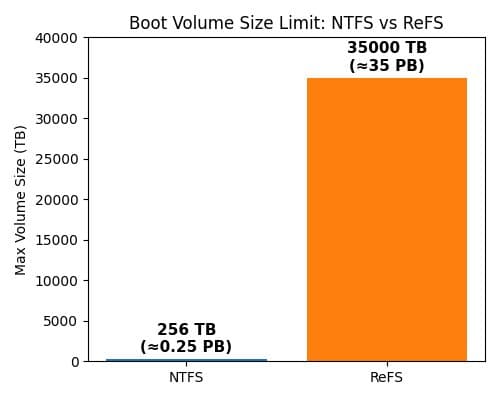
Massive scalability: ReFS supports volumes up to 35 petabytes (35,000 TB) — vastly beyond NTFS's typical limit of 256 TB. This means your boot volume can grow with future hardware, eliminating capacity ceilings that could otherwise constrain enterprise deployments.
Performance optimizations: ReFS uses block cloning and sparse provisioning to accelerate I/O-heavy scenarios. This enables dramatically faster creation or expansion of large fixed-size VHD(X) files and speeds up large file copy operations by copying data via metadata references rather than full data movement.
Technical Comparison: ReFS vs NTFS Boot Volumes
The advantages of ReFS boot become clear when comparing it directly with traditional NTFS boot volumes:
| Feature | ReFS Boot Volume | NTFS Boot Volume |
|---|---|---|
| Metadata checksums | ✅ Yes | ❌ No |
| Integrity streams (optional) | ✅ Yes | ❌ No |
| Proactive error detection (scrubber) | ✅ Yes | ❌ No |
| Online integrity (no chkdsk) | ✅ Yes | ❌ No |
| Fixed-size VHD creation | Seconds | Minutes |
| Large file copy operations | Milliseconds-seconds (independent of file size) | Seconds-minutes (linear with file size) |
| Sparse provisioning | ✅ Yes | ❌ No |
Getting Started with ReFS Boot
Ready to try it out? Here's how to get started with ReFS boot on Windows Server Insider Preview:
Update to the latest Insider build: Ensure you're running the most recent Windows Server vNext Insider Preview. Builds from 2/11/26 or later (minimum build number 29531.1000.260206-1841) include ReFS boot in setup. Join Windows Server Insiders if you haven't already.
Choose ReFS during setup: When installing Windows Server, format the system (C:) partition as ReFS in the installation UI. Note that ReFS boot requires UEFI firmware and does not support legacy BIOS boot, so it's not supported on Generation 1 VMs.
Complete installation & verify: Finish the Windows Server installation as usual. Once it boots, confirm that your C: drive is using ReFS by running
fsutil fsinfo volumeInfo C:or checking the drive properties.
Enterprise Impact and Future Outlook
The introduction of ReFS boot represents a significant step forward for enterprise Windows Server deployments. By bringing enterprise-grade storage features to the boot volume, Microsoft is addressing the growing demands of modern data centers where reliability, scalability, and performance are critical from the moment a server powers on.
For organizations running large-scale virtualization environments, database servers, or storage-intensive applications, the ability to boot from ReFS could reduce downtime, simplify storage management, and improve overall system reliability. The massive scalability also future-proofs deployments as storage technologies continue to evolve.
As with any Insider Preview feature, organizations should thoroughly test ReFS boot in their environments before considering production deployment. The Windows Server team encourages Insiders to try ReFS boot and share feedback through the Windows Server Insiders Forum.
The move to ReFS boot is part of Microsoft's broader strategy to modernize Windows Server storage capabilities, and it's likely that future Windows Server releases will build upon this foundation to deliver even more advanced storage features for enterprise customers.
Comments
Please log in or register to join the discussion