
Microsoft is rolling out a standardized preview experience for Word, Excel, and PowerPoint files in Teams across platforms, promising faster load times and fewer preview failures.
For years, Microsoft Teams users have struggled with inconsistent and often frustrating file preview functionality. The ability to quickly glance at a document before downloading or opening it has been plagued by performance issues, reliability problems, and inconsistent behavior across different file types and platforms. Now, Microsoft is addressing this long-standing annoyance with a standardized preview system that promises significant improvements in both speed and reliability.
The Problem with Current Previews
The current file preview system in Microsoft Teams has been a source of frustration for many users. When attempting to preview Word documents, Excel spreadsheets, or PowerPoint presentations, users frequently encounter:
- Slow loading times, especially for larger files
- Inconsistent rendering across different platforms
- Preview failures that force users to download files unnecessarily
- Different preview behaviors for the same file type across devices
These issues not only disrupt workflow but also contribute to decreased productivity as users waste time waiting for previews to load or are forced to download files unnecessarily to view their contents.
Introducing the Standardized Preview Experience
In a recent announcement on the Microsoft 365 Message Center, Microsoft detailed plans for a unified preview experience for its core Office file types within Teams. The new system aims to create a consistent, performant preview experience across desktop and mobile platforms.
"We're introducing a standardized preview experience for Word, Excel, and PowerPoint files in Microsoft Teams across desktop and mobile platforms," Microsoft stated in their announcement. "This update improves performance, reliability, and consistency when previewing files, resulting in faster load times and fewer preview failures."
Technical Improvements Behind the Scenes
While Microsoft hasn't provided extensive technical details about the underlying changes, the move to a standardized preview system likely involves several key technical improvements:
Unified Rendering Engine: Instead of using different preview methods for different file types, Microsoft appears to be implementing a single, optimized rendering engine that can handle all Office file types consistently.
Optimized File Processing: The new system likely processes files more efficiently, potentially by extracting only the necessary content for preview rather than rendering the entire document.
Improved Caching Mechanisms: Better caching strategies could reduce load times for frequently accessed files by storing preview data locally.
Enhanced Error Handling: The standardized approach likely includes more robust error handling to gracefully manage files that can't be properly previewed rather than simply failing.
Platform Availability and Limitations
One notable aspect of this update is the staged rollout across platforms. Microsoft has specified different availability for each Office application:
- PowerPoint and Excel: Supported on both iOS and Android platforms
- Word: Currently available on iOS only, with other platforms likely to follow
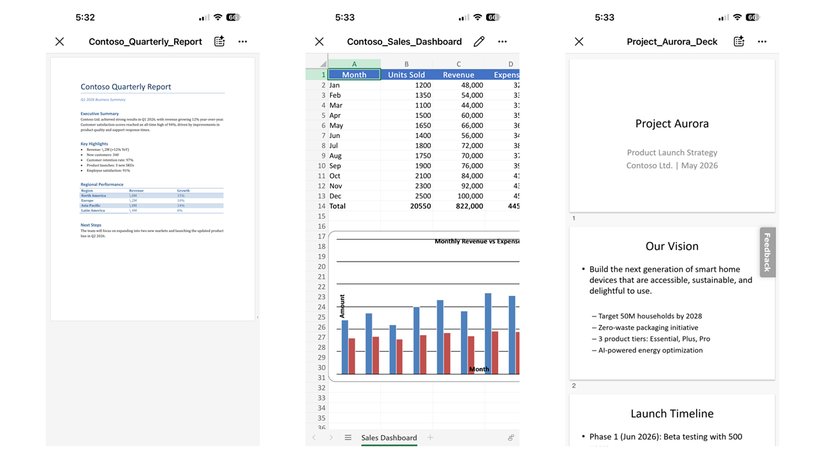
This staggered rollout suggests that Microsoft is prioritizing mobile platforms first, possibly due to the unique challenges of file preview on smaller screens or because mobile usage patterns show higher demand for this functionality. The iOS-first approach for Word previews might indicate that iOS implementation was completed first or that Microsoft is testing the waters with a single platform before expanding.
Automatic Rollout with No Admin Action Required
One of the most user-friendly aspects of this update is that it requires no manual intervention from users or IT administrators. The standardized preview experience will roll out automatically through Teams' regular update channels.
Microsoft has indicated that the update should reach all supported devices by late June 2026. This automatic deployment means that organizations won't need to worry about configuring group policies or managing deployment schedules, simplifying what could otherwise be a complex IT update process.
Why This Matters for Users
The improved preview functionality addresses several pain points that have plagued Teams users:
Increased Productivity: Faster preview times mean users can quickly determine if a file contains the information they need without downloading it, saving valuable time.
Better Mobile Experience: For users who frequently access Teams on mobile devices, the improved previews will make it easier to work with documents while on the go.
Reduced Bandwidth Usage: By enabling users to preview files without downloading them, the update could reduce data consumption, particularly beneficial for users with limited mobile data plans.
Consistent Experience: The standardized approach means users will encounter the same preview behavior regardless of which device they're using or which Office application they're previewing.
Ecosystem Considerations
This update fits into Microsoft's broader strategy of improving its productivity ecosystem. By enhancing the file preview experience in Teams, Microsoft is making its collaboration tool more effective when used alongside its Office applications.
The platform-specific limitations also reveal something about Microsoft's priorities in the mobile space. The decision to prioritize iOS for Word previews suggests that Apple's platform may represent a key user demographic for Microsoft's productivity tools, or that iOS implementation presented fewer technical challenges.
Looking Ahead
While the initial rollout focuses on Word, Excel, and PowerPoint, it's reasonable to expect that Microsoft will eventually extend this standardized preview experience to other file types supported in Teams, including PDFs, text files, and potentially third-party document formats.
The late June 2026 rollout timeline means that most users should have access to the improved previews within the next few months. As with many Microsoft updates, the rollout will likely be gradual, with some users receiving the update before others.
Conclusion
Microsoft's move to a standardized preview experience in Teams addresses one of the most persistent annoyances in the collaboration platform. By promising faster load times, improved reliability, and consistent behavior across platforms, this update should significantly enhance the user experience when working with Office documents within Teams.
While the platform-specific limitations mean not all users will immediately benefit from all improvements, the automatic rollout and focus on core Office applications suggest Microsoft is taking a pragmatic approach to solving this long-standing problem. For Teams users who have grown accustomed to frustrating preview experiences, this update can't come soon enough.
Comments
Please log in or register to join the discussion