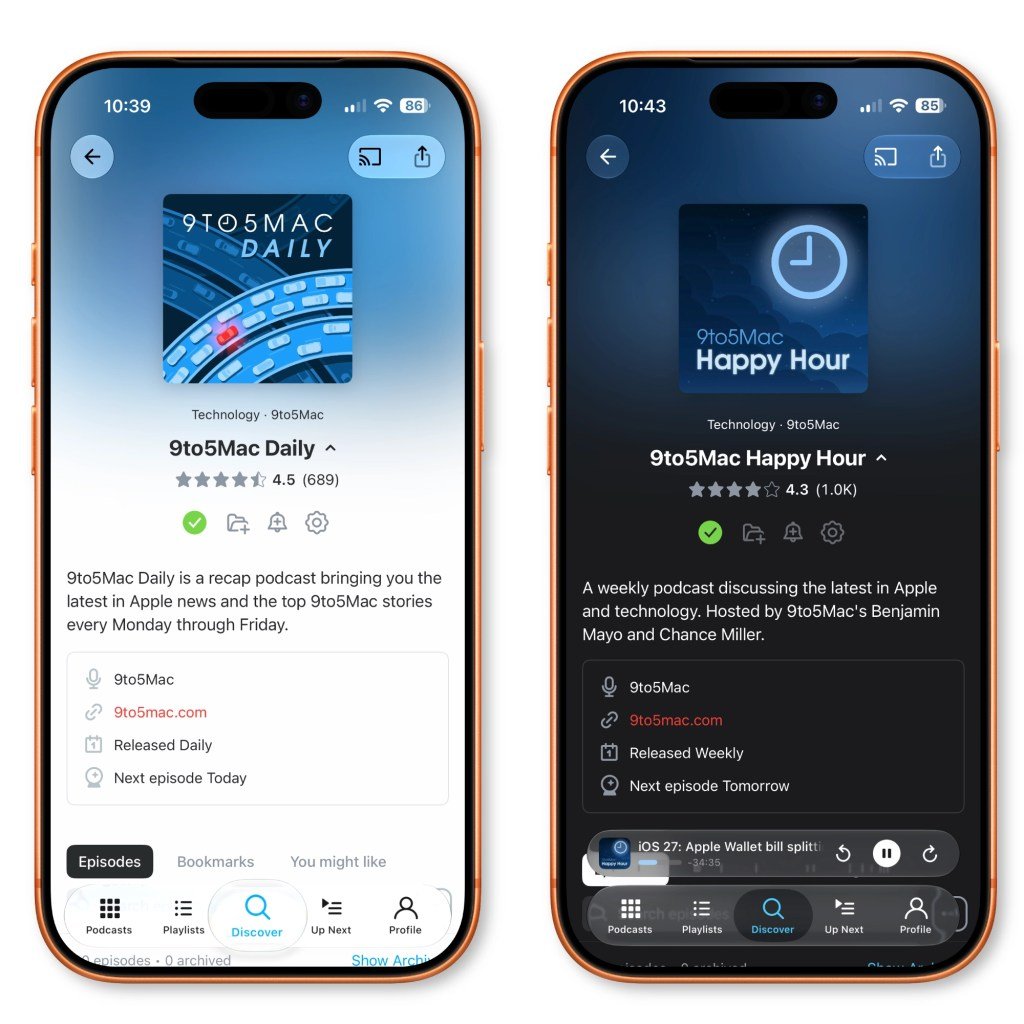
Pocket Casts 8.13 brings Apple's Liquid Glass design language to iOS, joining a wave of apps adapting to the translucent, depth-driven interface introduced in iOS 26 and refined in iOS 27. Beyond the visual refresh, the update ships a batch of practical UI improvements worth studying for anyone maintaining a media app across platforms.
Pocket Casts shipped version 8.13 for iOS this week, and the headline is a full adoption of Apple's Liquid Glass design language. For users, the app now looks, in the company's words, "lighter, glassier, and a little more magical." For developers maintaining apps on both iOS and Android, the more interesting story is what adopting Liquid Glass actually requires, and how a mature app like Pocket Casts handles a platform design shift without breaking its cross-platform feature parity.
The platform update: Liquid Glass across iOS 26 and 27
Liquid Glass arrived with iOS 26 last summer and got meaningful refinements in iOS 27, which Apple released this week. The system emphasizes translucent surfaces, layered depth, dynamic lighting, and motion that responds to content underneath. Controls float over blurred backgrounds, navigation bars pick up the color of what scrolls beneath them, and the overall effect leans on the GPU to keep those translucency and blur passes smooth.
This is not a wallpaper-level change. Liquid Glass touches the system materials your app inherits through UIKit and SwiftUI. If you build navigation with standard UINavigationBar and UITabBar components, or use SwiftUI's NavigationStack and TabView, much of the new look comes through automatically once you compile against the iOS 26 or 27 SDK. The catch is the parts that don't come for free: custom views, hand drawn backgrounds, and any place where an app previously faked a blur or hardcoded a background color now needs review so it doesn't clash with the translucent system chrome.
Developer impact: where the work actually lands
Pocket Casts is a useful case study because it is feature dense. A podcast player has full-screen now-playing views, mini players, widgets, context menus, and multi-select editing modes, each of which interacts with system materials differently.
Look at the specific changes in 8.13 and you can see the design migration threaded through them. Chapter art now appears in the mini player, podcast pages gained context menus, and Up Next episode titles can expand to two lines. These read like feature additions, but several are the kind of layout adjustments that surface when you move to a translucent design. When navigation bars and tab bars become see-through, content density and truncation rules change, because text that used to sit against a solid bar now sits against moving content behind glass. Allowing two-line titles and surfacing chapter art are the sort of fixes you make when the new materials expose cramped spacing.
The multi-select mode now hides the tab bar to free up space, which is a direct accommodation to Liquid Glass. A translucent tab bar costs screen real estate and visual clarity during a focused editing task, so hiding it entirely is cleaner than fighting the material. Widgets can now tint podcast artwork as well, aligning the widget surface with the system's tinted, layered look.
The smaller fixes tell the rest of the migration story. Improved player dismissal gestures, better scrolling behavior, a corrected "Show Archived" toggle during search, and fewer artwork placeholder flashes in the full player are exactly the regressions that appear when you adopt a new design system. Placeholder flashes in particular are a GPU and timing problem: when artwork loads asynchronously behind a translucent surface, any gap shows through the glass more obviously than it would behind an opaque panel, so loading states that were invisible before suddenly need polish.
Migration: how to approach Liquid Glass in your own app
If you maintain an iOS app and have not yet moved to Liquid Glass, the practical path looks like this. Build against the latest SDK and audit every screen against the new system materials before assuming the defaults are fine. Pay closest attention to custom backgrounds, any manual blur effects you can now delete in favor of system materials, and text legibility over translucent bars. Test loading and placeholder states carefully, since translucency makes timing gaps more visible. Re-check gesture-driven dismissals, because the interactive transitions are part of how Liquid Glass communicates depth, and a janky dismissal undercuts the whole effect.
For teams shipping on both iOS and Android, the trade-off is familiar. Android's Material design follows its own trajectory, and you cannot share these surface treatments across platforms the way you share business logic. The realistic approach is to keep your data layer, networking, and playback engine platform-neutral while treating the presentation layer as platform-specific, then adopt each OS's current design language on its own schedule rather than forcing a shared look that fits neither. Pocket Casts has long maintained native apps on both platforms, and shipping a Liquid Glass refresh on iOS without waiting for an Android equivalent reflects that division.
Pocket Casts 8.13 is available now in the App Store, and the project's source is published on GitHub for developers who want to see how the team structured the update.
Comments
Please log in or register to join the discussion