Replit has launched Design Mode, a revolutionary tool that leverages the new Gemini 3 model to transform ideas into fully-designed websites and prototypes in under two minutes, dramatically accelerating the web development workflow.
Replit Unveils Design Mode: AI-Powered Web Creation in Minutes with Gemini 3
In a move that promises to bridge the gap between ideation and implementation, Replit today announced the launch of Design Mode, a groundbreaking feature that leverages the power of Google's new Gemini 3 model to enable users to create beautiful, interactive websites and prototypes in under two minutes.
Addressing the Gap Between Ideas and Implementation
For years, Replit has established itself as a premier platform for developers to build full-stack applications directly in the browser. However, the company recognized a persistent challenge voiced by many users: the need for rapid visual design capabilities without the traditional development overhead.
"Many people told us the same thing: 'I just want to make something that looks good, fast,'" explained the Replit team in their announcement. While Replit offered powerful development tools, it wasn't always optimized for quick visual design or rapid iteration—a gap that Design Mode now aims to fill.
Gemini 3: The Engine Behind the Design Revolution
At the heart of Design Mode lies Google's newly released Gemini 3 model, a significant advancement in AI capabilities that goes beyond code generation to understand visual design principles.
Unlike earlier AI models that primarily focused on functional code, Gemini 3 demonstrates a sophisticated understanding of layout, color theory, typography, and visual hierarchy. This enables it to generate not just functional websites, but aesthetically pleasing designs that would typically require a skilled designer's input.
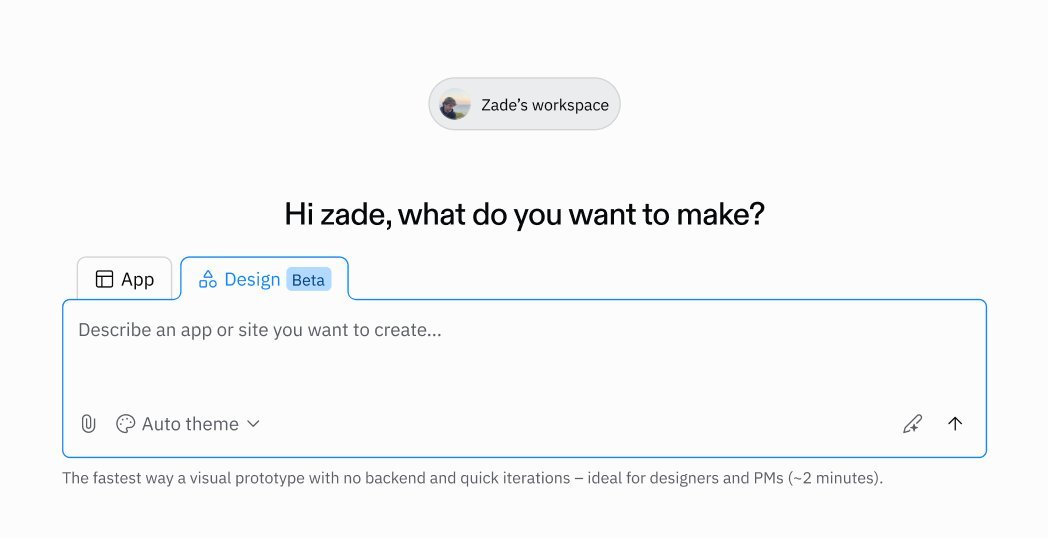
"When you select Design Mode on the home page and ask the Agent to create a website or prototype, Agent instantly generates a polished, interactive design—ready to share or deploy," the Replit team highlighted. "Gemini 3 doesn't just generate code; it understands what looks good."
Two Primary Use Cases for Design Mode
Replit has identified two primary scenarios where Design Mode excels:
1. Visual Design & Rapid Prototyping
Design Mode positions itself as a compelling alternative to existing design tools like Magic Patterns or Claude Artifacts. Key capabilities include:
- Creating interactive, high-quality mockups in minutes rather than hours or days
- Eliminating the manual handoff process between design and engineering teams
- Enabling instant sharing of clickable prototypes for stakeholder feedback
This capability significantly accelerates the ideation phase, allowing teams to quickly validate concepts before committing extensive resources to development.
2. Simple, Beautiful Websites
Beyond prototyping, Design Mode enables users to create fully deployable static websites at remarkable speed—reportedly up to 5X faster than traditional methods. Whether it's a landing page, personal portfolio, or business website, users can now produce professional-looking sites without the steep learning curve associated with platforms like Wix or Squarespace.
From Design to Full Application: A Seamless Transition
A particularly innovative aspect of Design Mode is its ability to bridge the gap between design and development. Initially, designs are front-end only, allowing users to focus purely on the visual aspects. When functional requirements like user authentication, checkout processes, or forms are needed, Replit's Agent creates visual representations of these features to maintain design fidelity.
The transition to a full application is remarkably simple: users can click "Convert to App," and Replit transforms their design into a complete application where backend logic, databases, and other functionality can be added—all within the same workspace.
Implications for the Development Workflow
The introduction of Design Mode represents a significant evolution in how web development workflows might be structured in the AI era. By removing the friction between idea and first draft, the tool enables:
- Rapid iteration on visual elements without dependency on engineering resources
- Visual testing of concepts before committing to backend development
- A streamlined path from initial concept to deployable product
This approach could fundamentally change how startups and development teams approach product development, potentially reducing the time from concept to market significantly.
Industry Context and Competitive Landscape
Replit's entry into the AI-powered design space places it in direct competition with a growing number of tools that leverage generative AI for web creation. However, what sets Design Mode apart is its tight integration with a full-stack development environment, allowing for a seamless transition from design to implementation.
This move reflects a broader trend in the tech industry where AI is being used to democratize complex technical processes, making sophisticated web development accessible to a wider audience while still providing powerful tools for professional developers.
The Future of AI-Assisted Development
As AI models continue to advance, we're likely to see more tools that blur the lines between design and development. Design Mode's approach—using AI not just for code generation but for understanding and implementing design principles—may represent an important step toward more intuitive, human-centered development tools.
For developers and designers alike, the emergence of such tools raises interesting questions about the future of their roles. Rather than replacing human creativity, these technologies may serve as powerful collaborators, handling routine aspects of the design and development process while allowing human creators to focus on higher-level problem-solving and innovation.
Getting Started with Design Mode
Replit has made Design Mode immediately available to users. Those interested in exploring the new feature can visit replit.com and start creating their own designs today. The promise is simple yet powerful: your ideas have never looked this good, this fast.
As the boundaries between design, prototyping, and development continue to blur, tools like Design Mode may well become essential components of the modern developer's toolkit, accelerating innovation and making sophisticated web creation accessible to all.
Comments
Please log in or register to join the discussion