Waze is adding traffic light icons slowly, and that matters because navigation UI is as much about trusted context as it is about routing speed.
Platform update
Waze appears to be rolling out traffic light icons to more users, after a limited test surfaced earlier and after years of requests from drivers who switch between Waze, Google Maps, Apple Maps, and built-in car navigation. The feature is simple on the surface: small traffic light markers appear on the map at some intersections. In practice, it is a meaningful map-data and rendering change because it gives drivers another fixed road cue before a turn, lane change, or complex junction.
The rollout is not universal yet. User reports indicate that some people have seen the icons for weeks, some saw them briefly during testing, and others still do not see them at all. That fits how Waze usually ships map-facing features. The app can update client code through the App Store and Google Play, but the availability of a map layer can still be controlled by region, account cohort, server-side flags, and the quality of local map data.
The current iOS listing shows Waze version 5.19.95.0 and requires iOS 16.0 or later, with iPadOS 16.0 or later for iPad. On Android, the Play Store listing was updated May 24, 2026 and continues to position Waze as a live traffic and navigation app with Android Auto support. Waze also remains available through Apple CarPlay and Android Auto, which matters because many drivers only interact with Waze on the dashboard, not on the phone screen.
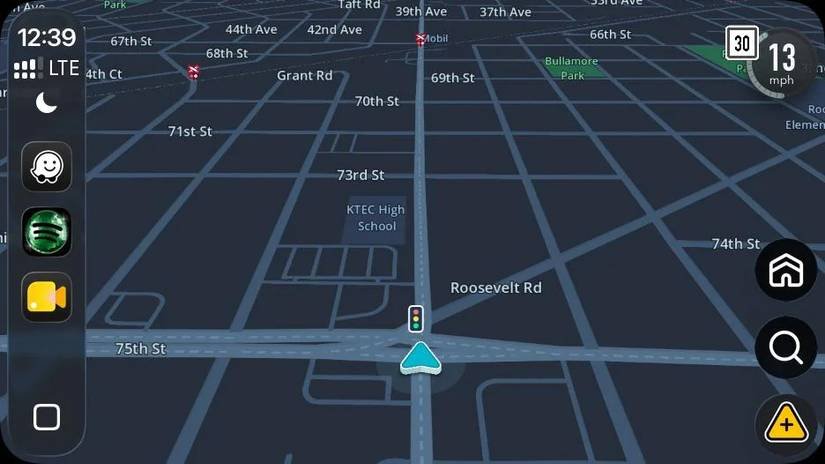
Traffic lights are not the same kind of object as a crash report or a police alert. A crash report is temporary, user-submitted, and expected to expire. A traffic light is infrastructure. It belongs in the base map or in a trusted road-attribute layer, and it needs to stay accurate across map edits, intersection redesigns, construction changes, and regional road rules. That is why this feature can look slow even if the icon itself is tiny.
Waze says in its help documentation that its navigation depends on drivers using the app, user reports, real-time information, and an active data connection. That model is excellent for hazards, closures, speed changes, and congestion. It is trickier for static infrastructure because users can report many live incidents in the app, but there is no standard public reporting flow specifically for adding a missing traffic light. The likely path is a mix of internal map data, editor workflows, validation, and selective rollout.
For drivers, the practical result is uneven availability. You might see lights in one city and not another. You might see them at larger intersections but not smaller neighborhood crossings. They might appear on the phone UI before they appear consistently in CarPlay or Android Auto, or the reverse could happen depending on how Waze gates the layer. Until Waze publishes a formal launch note, the safest assumption is that this is a staged feature, not a completed global release.
Developer impact
For mobile developers, this update is a useful reminder that navigation apps are not just route calculators. They are real-time clients for a large, changing geospatial dataset. The UI has to merge static map features, dynamic reports, routing instructions, sensor location, speed, heading, voice guidance, and vehicle-display constraints without overloading the driver.
A traffic light icon sounds like a map annotation. On iOS and Android, though, annotation density is one of the hardest parts of a navigation UI. If the app shows every signal, stop sign, camera, hazard, lane cue, speed indicator, place label, road shield, and upcoming maneuver at once, the map becomes harder to read. If it hides too much, users lose the local context that helps them trust the route. Waze has an extra constraint because its identity is built around community reports. Its map already has more live objects than a traditional turn-by-turn app.
The cross-platform work is also more complicated than drawing the same icon twice. On iPhone and Android phones, Waze controls the full app surface. In CarPlay and Android Auto, the interaction model is stricter. Apple’s CarPlay framework supports navigation apps, route guidance, instrument cluster information, and templates designed for low-distraction use. Google’s Android for Cars App Library uses templates and category rules for car experiences, including navigation apps, with driver-distraction requirements built into the platform model.
That means a traffic light layer has to be evaluated differently on each surface. A phone screen can tolerate smaller icons, pinch gestures, and denser map inspection while parked. A dashboard screen may be wider, lower resolution, farther from the driver, and controlled by touch, a rotary knob, or steering-wheel controls. A marker that is readable on a Pixel or iPhone may be too small on an older car head unit. A cluster or heads-up display, where supported, needs even more restraint.
There is no sign that this rollout changes the public Waze integration SDK story. Waze still offers partner programs such as its Transport SDK for ride-hailing, delivery, parking, and related transportation workflows, plus Waze Deep Links for launching navigation from another app or website. Those tools help apps hand off destinations and receive certain navigation-adjacent benefits, but they do not expose a general map-feature API that would let third-party developers query whether a traffic light exists at a coordinate.
That distinction matters for cross-platform apps that wrap navigation. If you maintain a fleet app, delivery app, dispatch tool, or field-service app, you should not assume Waze traffic light data is available outside Waze. A user may benefit from the icon while navigating in Waze, but your own app still needs its own map provider, road metadata source, or routing engine if traffic-signal awareness affects your workflow. For example, estimating stop frequency, modeling delivery arrival variance, or scoring route complexity cannot depend on a visual-only feature inside another app.
For app teams using React Native, Flutter, Kotlin Multiplatform, or shared C++ map engines, this is the familiar split between shared domain logic and platform-native presentation. The route model might be cross-platform, but the rendering rules should not be treated as identical. iOS has different background location expectations, CarPlay entitlement requirements, and App Store review concerns. Android has Android Auto, Android Automotive OS, foreground service behavior, Play policy rules, and a larger range of screen densities and vehicle integrations. A feature like traffic lights pushes teams to separate map data ingestion from display policy.
The update also exposes a product trade-off. Waze users tend to value speed, live rerouting, and community alerts. Google Maps and Apple Maps have spent years adding richer road context, lane cues, traffic signals, and place data. By adding traffic light icons, Waze is closing one of the everyday gaps without turning into a general-purpose map app. The risk is clutter. The value is confidence, especially near multi-lane urban intersections where the next instruction is easier to understand when the driver can match it to a visible signal.
Migration
For users, there is not much to migrate yet. Update Waze from the official download page, then check the normal mobile app before assuming the feature is missing from your account. If you rely on CarPlay or Android Auto, also test on the in-car display because a dashboard build can expose small differences in spacing, zoom, and marker visibility. Do not expect every intersection to be marked immediately.
For mobile teams, the migration path is more about assumptions than code. Treat this as a server-side map-layer rollout unless Waze publishes a required client version. On iOS, document that the current App Store build requires iOS 16.0 or later. On Android, validate on the current Play Store build and on the Android Auto setups your customers actually use. For QA, include at least one dense urban route, one suburban arterial route, and one route with several complex intersections. The failure mode is not just whether the icon appears. It is whether the icon appears at the right zoom level, avoids covering maneuver text, and does not compete with hazards or lane guidance.
If your app launches Waze through deep links, no immediate URL change is required. Keep using the supported Waze deep link format for destination handoff, and do not add logic that assumes the traffic light layer exists. A reasonable test matrix is simple: iOS app to Waze, Android app to Waze, browser to Waze, CarPlay after phone handoff, and Android Auto after phone handoff. The feature should be treated as part of Waze’s own navigation context, not as a contract exposed to your app.
If your product has its own map, this is a good moment to review how you model road furniture and driver cues. Traffic lights are high-value because they are easy for drivers to verify in the physical world. They can also improve instruction phrasing. There is a difference between telling a driver to turn in 300 feet and telling them to turn at the second light. The first is precise in GPS terms. The second is often easier for humans, especially in cities where GPS drift, tall buildings, and closely spaced streets can make distance-only instructions feel late.
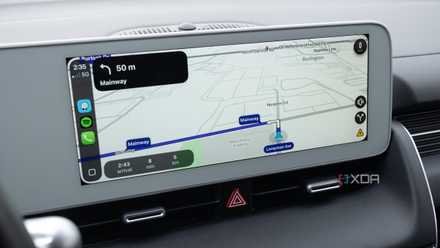
The broader lesson for cross-platform navigation work is that feature parity is not only a checklist. A map layer can exist on iOS, Android, CarPlay, and Android Auto, while still behaving differently because each surface has its own safety rules, screen geometry, input model, and release path. Waze adding traffic light icons is a small visible change backed by a much larger operational problem: collecting trustworthy road data, deciding when to show it, and shipping it carefully enough that drivers gain context without losing focus.
For now, the best migration advice is conservative. Keep Waze updated, test across both mobile platforms, avoid promising availability by region, and watch for an official Waze announcement or help-center update. The feature looks like it is arriving, but for developers and power users, the key detail is that it is arriving as a controlled rollout rather than a single switch flipped for everyone.
Comments
Please log in or register to join the discussion