Microsoft is rebranding its Modern Print Platform as Windows Ready Print and setting a July 2026 default that steers new printer installations toward the inbox IPP driver instead of third-party OEM drivers. For IT teams, this is a quiet but meaningful shift in how Windows handles printing, with new Settings and Group Policy controls determining whether you move now or hold the line on legacy drivers.
Microsoft has renamed its Modern Print Platform to Windows Ready Print and, more importantly, attached a date to the transition. Starting in July 2026, new printer installations on supported hardware will default to the Windows inbox IPP printer driver rather than a vendor-supplied OEM driver. The announcement from the Windows IT Pro Blog frames this as a simplification effort, but for anyone managing a fleet of Windows endpoints, it is a change in the default behavior of a subsystem that has worked the same way for two decades.
What actually changed
Two things changed at once, and it helps to separate them.
The first is cosmetic. The Modern Print Platform is now Windows Ready Print. The name signals intent more than function, pointing at a printing stack that leans on standards rather than per-device driver packages.
The second change is substantive. Windows Ready Print moves printing away from third-party, driver-based workflows toward standards-based printing built on the Internet Printing Protocol (IPP), served through a single Windows inbox IPP printer driver. Instead of Windows pulling down a unique driver for each printer model, supported devices use the operating system's built-in driver and communicate over IPP. The driver stops being something you source, package, test, and deploy per model. It becomes part of Windows.
From July 2026, where a printer supports IPP, that inbox driver is the default selection during installation. The change applies only to new printer installations. Existing devices keep whatever driver they already use, so nothing breaks on day one.
The controls Microsoft is shipping alongside it
Microsoft clearly anticipates that not every environment can move immediately, so the rollout includes a toggle rather than a hard cutover.
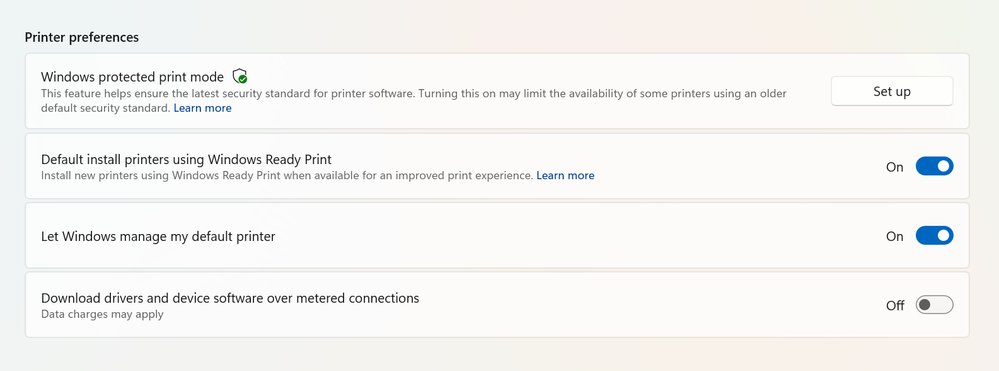
Individual users find the setting under Settings > Bluetooth & Devices > Printers & Scanners > Default install printer using Windows Ready Print. When enabled, Windows prefers the Ready Print (IPP inbox) installation. When disabled, Windows falls back to its standard driver selection logic, which includes OEM drivers.
For managed fleets, the relevant control is Group Policy. Open the Group Policy Editor and navigate to Local Computer Policy > Administrative Templates > Printers, then find Configure Windows Ready Print driver ranking. Setting it to Enabled prefers IPP-based installation; Disabled explicitly turns that preference off. This gives admins a fleet-wide lever to either accelerate the transition or defer it while legacy dependencies get resolved.
There is one interaction worth flagging. Windows Ready Print is tied to Windows protected print mode. When protected print mode is on, printers are installed exclusively through Windows Ready Print, and any device that does not support it cannot be installed at all. In that configuration you lose the ability to disable the Ready Print default. Protected print mode and the IPP-only path are coupled by design, which matters if you are evaluating the security feature and the driver change as separate decisions. They are not fully separable.
Why this matters for IT strategy
The trade-off here is the familiar one between control and overhead.
The legacy model gives you OEM drivers with full feature support: vendor-specific finishing options, proprietary management utilities, advanced color and tray handling, and the configuration depth that print-heavy organizations often depend on. The cost is operational. Each driver is a package to validate against Windows updates, a potential source of print spooler instability, and historically a recurring source of security vulnerabilities. The print subsystem has been one of the more reliable sources of patch-Tuesday entries for years, and most of that exposure lived in third-party driver code running in privileged contexts.
The Windows Ready Print model trims that surface. One inbox driver, maintained by Microsoft, communicating over a documented protocol, removes a large category of driver-management work and a meaningful slice of attack surface. For organizations running standard office printing, that is a net reduction in both labor and risk.
The catch is feature parity. IPP through the inbox driver covers common printing well, but environments with specialized output requirements, think production print shops, healthcare label printing, or finance operations dependent on specific finishing hardware, may find the inbox driver does not expose everything the OEM driver did. The right move before July 2026 is an inventory: identify which printers genuinely depend on OEM-specific features and which are doing ordinary document output. The first group is where you keep the Group Policy preference disabled until vendors close the gaps; the second group can move now with little downside.
What to do before July 2026
Treat the next year as a migration window rather than a deadline to fear. Confirm which of your printers advertise IPP support, since only those are affected by the default change. Pilot the inbox IPP driver against a representative sample, particularly any device with non-trivial finishing or color needs, and validate the features your users actually rely on. Decide on a Group Policy posture, enabled or disabled, as a deliberate choice rather than inheriting the July default by inaction. And evaluate Windows protected print mode separately, keeping in mind that turning it on commits you fully to the Ready Print path with no opt-out.
Microsoft is publishing ongoing guidance through the Windows Tech Community, and support questions can go to Microsoft Q&A for Windows. The direction of travel is clear: standards-based printing is becoming the Windows default, and the driver-per-model era is winding down. The controls shipping now exist so you can choose your own pace, but the pace is set, and the sensible response is to use the lead time to test rather than to discover the change after it lands.
Comments
Please log in or register to join the discussion