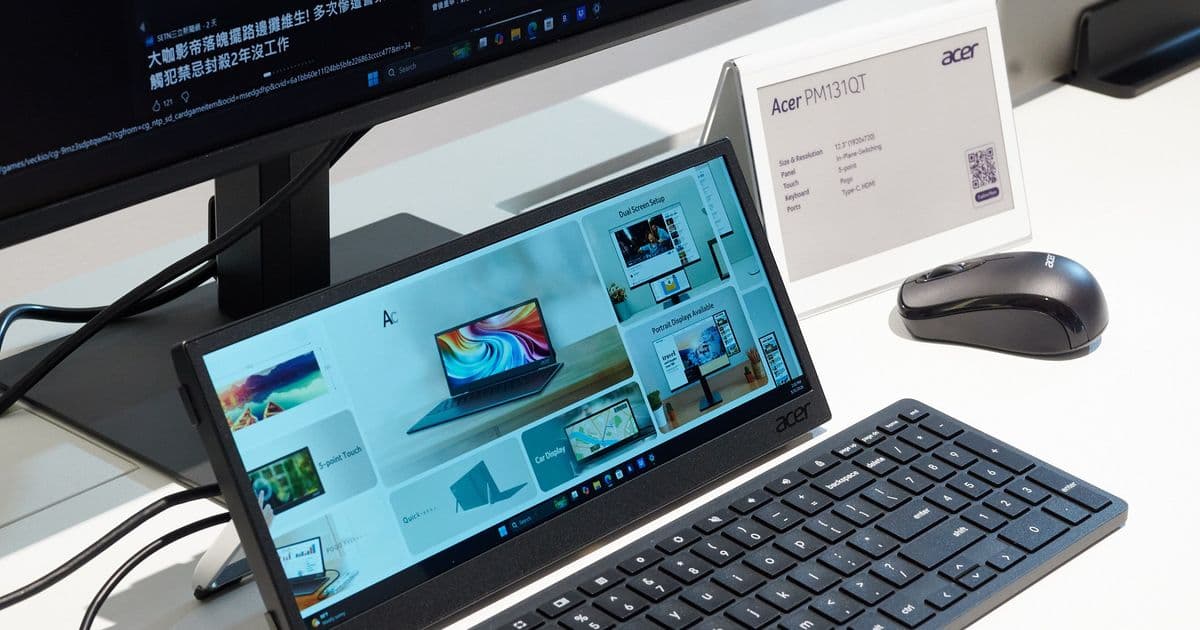
Acer unveiled the PM131QT, a 12.3‑inch 1920×720 IPS touchscreen with USB‑C and HDMI, designed as a compact secondary screen for Flight Simulator, X‑Plane, sim‑racing dashboards and specialised work tools. Expected late‑2026 launch, $230 price tag, and a built‑in tripod thread give users flexible placement options.
Acer’s ultra‑wide 12.3‑inch secondary display targets flight sims, racing rigs and niche productivity
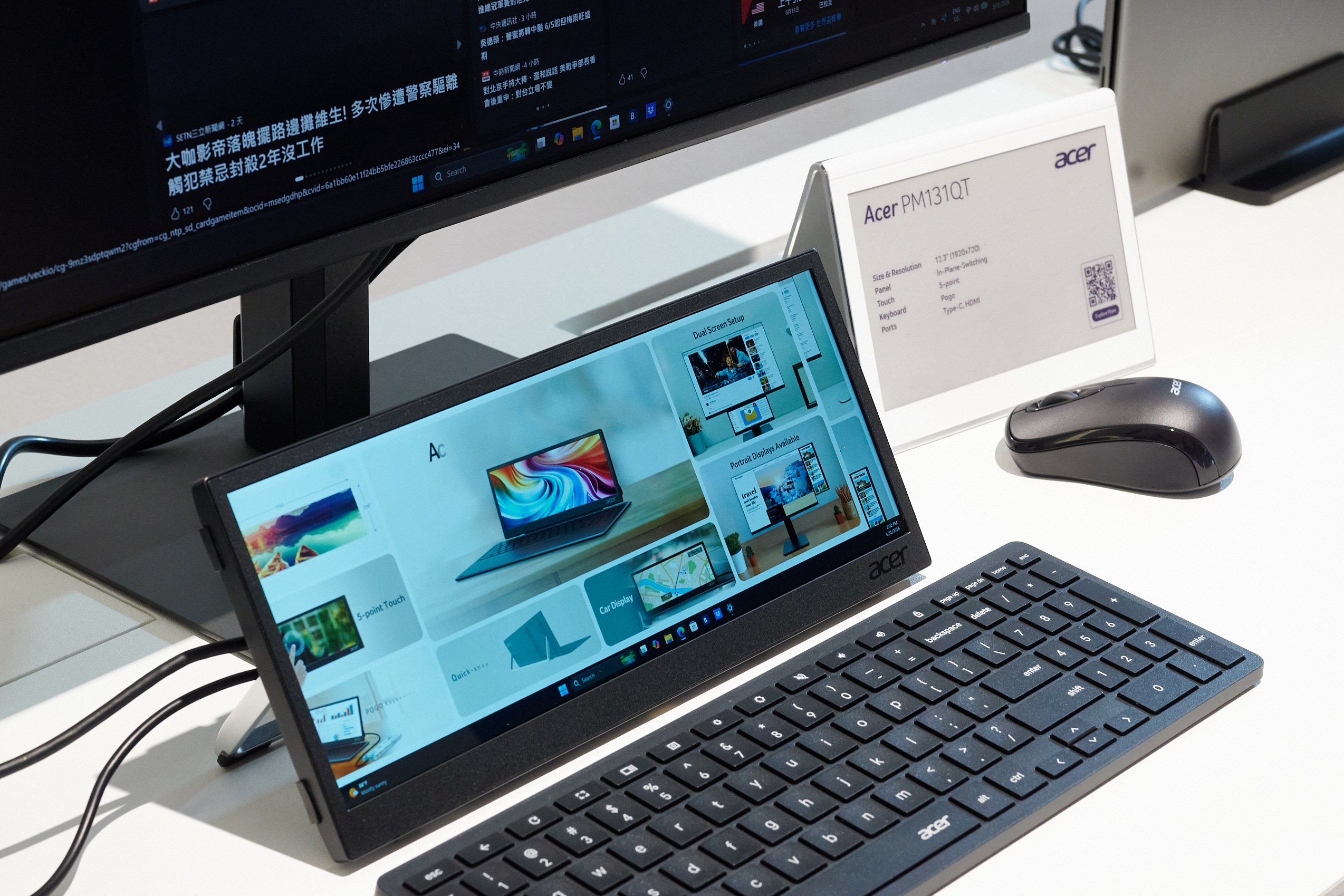
Acer used its Computex showroom in Taipei to showcase a monitor that doesn’t try to compete with 27‑inch ultrawides. The PM131QT is a 12.3‑inch panel that packs a 1920 × 720 resolution, giving it a 21:9 aspect ratio that is unusually tall for a secondary screen. The combination of a small footprint, IPS colour reproduction and touchscreen input makes it a purpose‑built add‑on for simulation enthusiasts and professionals who need a dedicated strip for auxiliary controls.
What’s new?
- Form factor – 12.3‑inch diagonal, 1920 × 720, 21:9. The width matches a full‑HD monitor while the height is only 720 px, meaning the screen sits comfortably on a desk without hogging space.
- Touch capability – Capacitive touchscreen with multi‑touch gestures, allowing direct manipulation of cockpit switches, radio knobs or UI widgets.
- Connectivity – USB‑Type‑C (DP‑Alt‑Mode + Power Delivery up to 65 W) and a standard HDMI 2.0 port. The USB‑C can also carry a video signal from laptops or tablets, simplifying cable management.
- Mounting options – Integrated stand for tabletop use, a 1/4‑20 tripod thread on the rear, and the ability to rotate into portrait mode. This flexibility lets users mount the panel on a rig, a monitor arm, or a custom cockpit frame.
- Pricing & availability – Expected launch toward the end of 2026, with a US $230 MSRP.
How it stacks up against conventional secondary monitors
| Feature | PM131QT | Typical 24‑inch 1080p monitor |
|---|---|---|
| Resolution | 1920 × 720 (21:9) | 1920 × 1080 (16:9) |
| Physical size | 12.3 in diagonal | 24 in diagonal |
| Pixel count | ~1.38 M | ~2.07 M |
| Touchscreen | Yes, capacitive | Usually no (optional) |
| Power delivery (USB‑C) | Up to 65 W | Rarely included |
| Price | $230 | $150‑$200 |
| Ideal use case | Instrument panels, telemetry, small toolsets | General‑purpose secondary display |
Because the PM131QT contains roughly 33 % fewer pixels than a standard 1080p monitor, the GPU workload for a third‑screen setup drops proportionally. In a demanding title like Microsoft Flight Simulator, moving the navigation map, checklist or ATC window to the ultra‑wide strip can free up valuable frame budget for the main view. Early tests shown at the booth indicated a 5‑7 fps uplift when the third screen was swapped for the PM131QT, simply because the graphics pipeline has fewer fragments to rasterise.
Who will benefit?
Flight simulation pilots
The main cockpit view stays on a high‑refresh, high‑resolution primary monitor. Instruments that are rarely looked at full‑screen – such as the transponder, autopilot panel, or flight plan list – can be docked on the PM131QT. Because the screen is narrow, it mimics the layout of real aircraft instrument strips, and the touch layer lets users tap virtual knobs instead of reaching for a physical panel.
Sim‑racing enthusiasts
Racing rigs often have a dedicated dashboard for telemetry, lap timers, and pit‑stop controls. The PM131QT can replace a bulky 24‑inch monitor, keeping the cockpit tidy while still delivering crisp graphics for gauges. Its ability to rotate into portrait mode also works well for vertical tachometers or shift‑light strips.
Professionals with niche toolsets
Acer markets the display toward “professional applications.” Think of CAD shortcuts, code snippets, video‑editing timelines, or a live‑chat window that needs to stay visible while the main screen is occupied. The touchscreen makes it possible to drag‑and‑drop files or interact with UI elements without moving the mouse.
Practical considerations
- Mounting – The 1/4‑20 thread means you can bolt the panel to a standard camera tripod, a monitor arm, or a custom 3‑D‑printed bracket. For cockpit builders, this is a huge advantage over a freestanding monitor that takes up desk real‑estate.
- Power – When connected via USB‑C, the monitor can both receive video and power a laptop up to 65 W, reducing cable clutter. However, the included 12 V/3 A adapter is still recommended for desktop rigs that draw more than the USB‑C budget.
- Refresh rate – The panel runs at 60 Hz, which is sufficient for instrument panels but not ideal for fast‑paced racing where 144 Hz is common. Users will likely keep the main monitor on a high‑refresh panel and treat the PM131QT as a static information strip.
- Color accuracy – Acer’s IPS panel measured ΔE < 2 in the demo, making it suitable for colour‑critical work. The factory calibration targets a 100 % sRGB gamut, which is more than enough for UI elements and video‑editing thumbnails.
Bottom line
Acer isn’t trying to replace your primary monitor with the PM131QT; it’s carving out a niche for a compact, touch‑enabled, ultra‑wide secondary screen that solves a specific ergonomic problem for simulation and specialised productivity workflows. The modest price, flexible mounting options, and lower pixel count translate into real‑world performance gains for GPU‑heavy titles. If you’re building a flight‑sim cockpit, a sim‑racing rig, or a workstation that needs a permanent strip for tools, the PM131QT is worth a look when it ships later this year.
Comments
Please log in or register to join the discussion