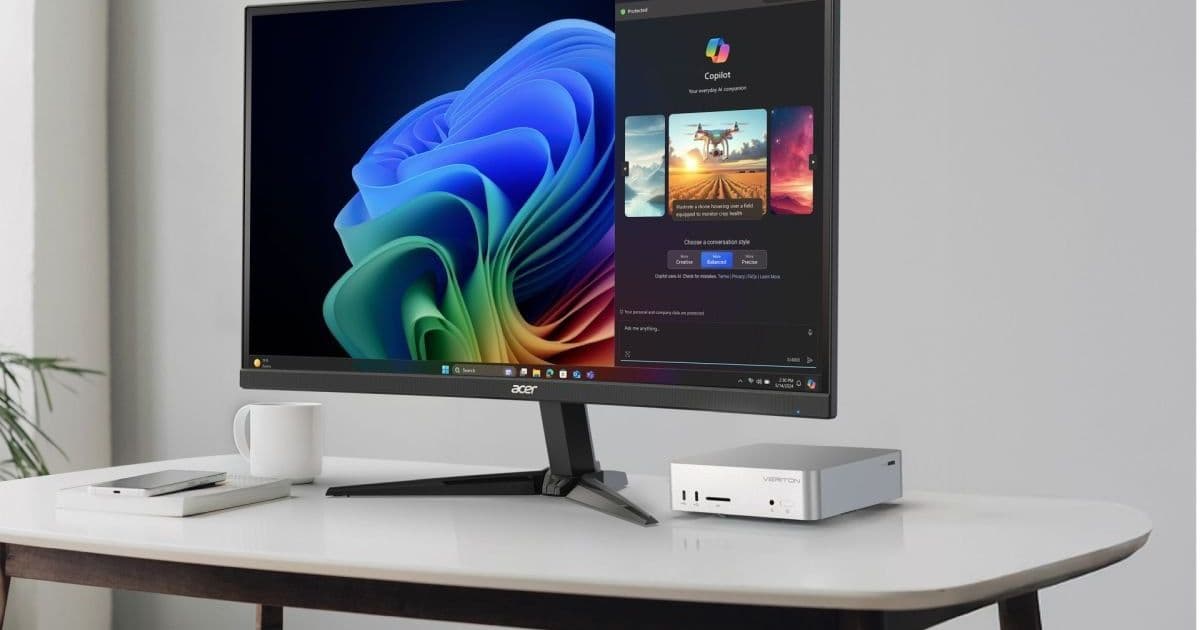
Acer’s new Veriton RA110 packs a 16‑core Ryzen AI Max+ 395 processor, 40‑core Radeon 8060S graphics, and up to 128 GB of LPDDR5x‑8533 memory into a 160 × 160 × 47 mm chassis, positioning it as a compact AI, graphics, and gaming workstation slated for late‑2026 release.
Acer Unveils the Veriton RA110 Mini Workstation Powered by Ryzen AI Max+ 395
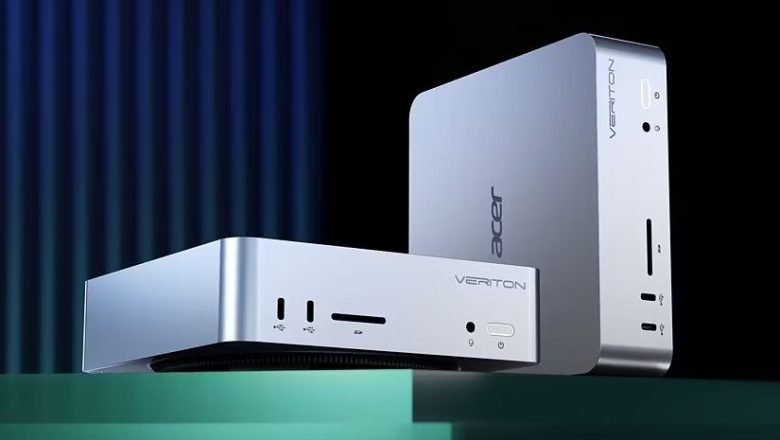
Acer has entered the high‑performance mini‑PC segment with the Veriton RA110, a device that blends desktop‑class AI compute with a footprint that barely exceeds a standard USB‑C power brick. The machine is built around AMD’s Ryzen AI Max+ 395 system‑on‑chip (SoC), a 16‑core, 32‑thread processor that integrates 40‑core Radeon 8060S graphics and a dedicated AI accelerator capable of 126 TOPS of inference throughput.
Platform specifications and requirements
| Specification | Detail |
|---|---|
| CPU | AMD Ryzen AI Max+ 395, 16 cores / 32 threads, 3.6 GHz base, 5.2 GHz boost |
| GPU | Integrated Radeon 8060S (40 compute units, discrete‑class performance) |
| Memory | Up to 128 GB LPDDR5x‑8533, 256 GB/s bandwidth |
| Storage | 2 × M.2 2280 NVMe slots (PCIe 4.0 x4) |
| AI performance | 126 TOPS, supports 200‑billion‑parameter LLMs |
| Networking | 2.5 GbE, Wi‑Fi 7 (802.11be), Bluetooth 5.4 |
| Ports | 2 × USB 4 Type‑C, 2 × USB 3.2 Gen 2 Type‑A, HDMI 2.1, 3.5 mm audio, SD card reader, DC‑in |
| Dimensions | 160 × 160 × 47 mm (6.3 × 6.3 × 1.9 in) |
| Availability | Select markets, including North America, H2 2026 |
| Pricing | TBD – comparable Ryzen AI Max+ 395 mini PCs are priced in the high‑end segment |
The RA110’s memory subsystem uses LPDDR5x‑8533, which matches the bandwidth of many high‑end laptops and offers lower power draw than DDR5, an important factor for a compact enclosure that lacks active cooling beyond a single fan and a heat‑pipe array.
Why the specs matter to developers
AI and inference workloads
The integrated AI accelerator is designed for on‑device inference rather than training. At 126 TOPS, developers can run quantized models up to 200 B parameters locally, enabling edge‑AI scenarios such as real‑time video analytics, natural‑language processing, or recommendation engines without relying on cloud APIs. The chip supports the AMD‑ONNX Runtime and TensorFlow Lite back‑ends, meaning you can compile models with standard toolchains and expect hardware‑accelerated execution out of the box.
Graphics and GPU compute
The Radeon 8060S sits in the same performance tier as a mid‑range laptop GPU (roughly comparable to an AMD Radeon RX 6600 XT). For developers targeting Vulkan, DirectX 12, or Metal (via MoltenVK), the GPU offers enough rasterization power for 1080p‑1440p gaming and modest GPU‑accelerated compute workloads. Its discrete‑class classification also means driver support for OpenCL 3.0 and AMD ROCm is available, which can be leveraged for scientific computing or custom shader pipelines.
Memory bandwidth and capacity
128 GB of LPDDR5x at 256 GB/s is a rare combination in a mini‑PC. Machine‑learning pipelines that rely on large activation maps or batch processing will benefit from the high bandwidth, while the 128 GB ceiling provides headroom for multi‑tenant environments or heavy multitasking.
Migration path for existing workloads
If you already run workloads on a desktop with a discrete GPU, moving to the RA110 involves a few considerations:
- Model conversion – Ensure your models are exported to ONNX or TensorFlow Lite and quantized to INT8 or FP16 to hit the accelerator’s sweet spot.
- Driver stack – Install the latest AMD Radeon Software for Linux (or Windows) and the ROCm stack if you need low‑level GPU compute. The drivers are available on the official AMD site.
- Storage layout – With two NVMe slots, you can separate the OS (e.g., Windows 11 or Ubuntu 24.04) from data drives, reducing I/O contention during AI inference.
- Thermal profiling – The chassis relies on a passive heatsink plus a single 92 mm fan. Use tools like HWInfo or AMD Ryzen Master to monitor temperatures under sustained load and consider a modest under‑clock if you encounter thermal throttling.
- Cross‑platform testing – For developers maintaining both iOS/Android apps that offload AI to the cloud, the RA110 can act as a local testbed. Deploy the same model to the device using the AMD Mobile SDK for Android or the Metal Performance Shaders bridge on macOS, then compare latency and power consumption.
How the RA110 fits into the broader mini‑PC market
Acer’s offering sits between ultra‑compact Intel NUC‑style boxes and the larger AMD Halo mini workstations. Its size (just under 2 inches tall) makes it suitable for edge deployments—think digital signage, point‑of‑sale terminals, or rack‑mountable 1U servers—while still delivering a desktop‑grade AI engine.
Competitors such as the AMD Ryzen AI Halo and Intel NUC 13 Extreme provide similar compute but generally lack the LPDDR5x bandwidth or the integrated AI accelerator. For developers whose primary need is on‑device inference, the RA110’s dedicated AI block offers a clear performance advantage.
What to watch for
- Pricing – Early‑bird pricing has not been disclosed. Expect a premium price point, likely above $1,500 for a fully specced unit.
- Software ecosystem – AMD is still expanding its AI SDKs. Keep an eye on the AMD Developer portal for updates to the MIVisionX and Radeon AI toolkits.
- Availability – The launch is slated for the second half of 2026 in select markets. Pre‑order windows may open early 2026, so developers interested in early access should monitor Acer’s announcements.
Bottom line
The Acer Veriton RA110 packs a surprising amount of horsepower into a space the size of a large USB‑C charger. With a 16‑core Ryzen AI Max+ 395, 40‑core Radeon 8060S graphics, up to 128 GB of ultra‑fast LPDDR5x, and a dedicated AI accelerator capable of 126 TOPS, it targets AI‑centric workloads, compact gaming rigs, and high‑performance edge devices. For developers who need a portable, powerful platform to prototype AI inference, GPU compute, or both, the RA110 represents a compelling, if premium‑priced, option.
For more details on the Ryzen AI Max+ 395 and related development tools, see the official AMD product page and the accompanying developer documentation.
Comments
Please log in or register to join the discussion