Pages, Keynote, and Numbers receive significant updates for iOS 26, iPadOS 26, and macOS Tahoe, featuring a new Liquid Glass design language and exclusive Apple Creator Studio features that transform document creation and collaboration.
Apple has released major updates to its iWork productivity suite, bringing Pages, Keynote, and Numbers to version 15.1 with a comprehensive redesign and new features that align with iOS 26's visual language and the newly launched Apple Creator Studio subscription service.
Liquid Glass Design Transformation
The most immediately noticeable change across all three apps is the adoption of Apple's new Liquid Glass design language. This aesthetic overhaul brings translucent elements, fluid animations, and a more immersive interface that matches the visual direction of iOS 26 and iPadOS 26. The design creates a sense of depth and interactivity, with interface elements that respond dynamically to user input and environmental context.
Platform-Specific Deployment Strategy
Apple has taken a notably different approach to deploying these updates across its platforms. On iOS and iPadOS, the updates arrive as standard App Store updates to the existing iWork applications, ensuring all users receive the new Liquid Glass interface and core improvements. However, on macOS Tahoe, Apple has implemented a more complex strategy by releasing entirely separate app downloads specifically for Apple Creator Studio subscribers.
This bifurcation means Mac users can maintain both the standard iWork apps and the Creator Studio versions simultaneously, allowing them to choose between free functionality and premium features based on their needs. This approach provides flexibility for users who may want to test Creator Studio features without fully committing to the subscription model.
Universal Features for All Users
Despite the emphasis on Creator Studio exclusivity, Apple has included several meaningful updates that are available to all iWork users regardless of subscription status:
- Liquid Glass design: The complete visual refresh that modernizes the interface across all platforms
- New editable shapes: Enhanced shape tools with improved customization options
- Menu bar support in iPadOS 26: Better integration with iPad's desktop-like interface when using external displays or keyboard accessories
Apple Creator Studio Exclusive Features
The majority of substantial new functionality is locked behind the Apple Creator Studio subscription, which positions the service as a comprehensive creative toolkit rather than just a document editor. For subscribers, the updates introduce several professional-grade features:
Content Creation and Design
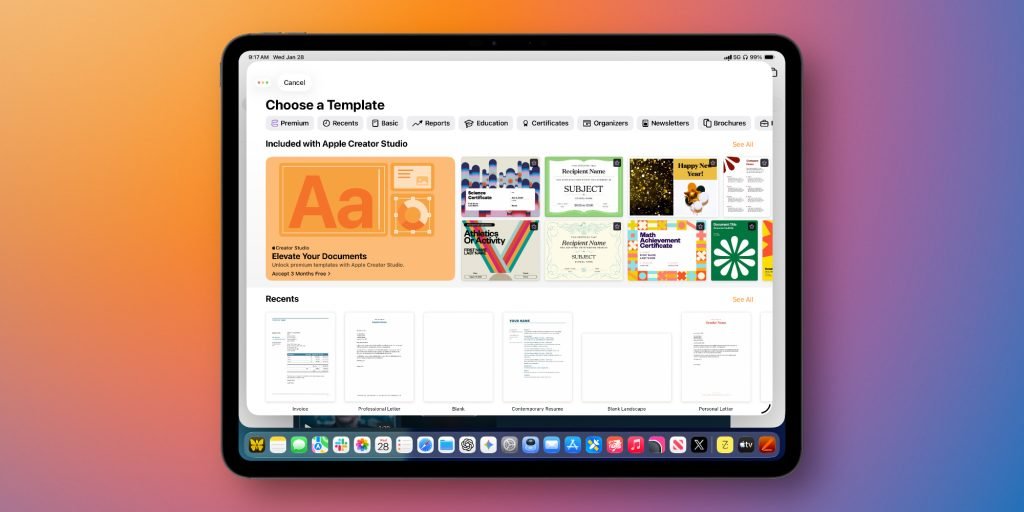
- Professionally-designed templates: An exclusive collection of high-quality templates for various document types
- Content Hub integration: Access to curated photos, graphics, and illustrations directly within the apps
- Apple-curated collections: Pre-organized content sets for faster inspiration and workflow
- Built-in image creation: Generate stunning images and graphics without leaving your document
- AI-powered editing: Apply quick edits and style adjustments using artificial intelligence
- Super Resolution: Increase clarity and detail of existing images and graphics
- Auto Crop: AI-generated suggestions for optimal image framing
Enhanced Collaboration
- Expanded file sharing: Support for iCloud collaboration on files up to 4GB in size
- Pattern recognition: Intelligent data suggestions and formula generation
Numbers-Specific Features
- Magic Fill: Advanced data suggestion capabilities that recognize patterns and generate appropriate content or formulas
Keynote Beta Features
Keynote subscribers gain access to several experimental features currently in beta:
- Outline-to-slides conversion: Transform text outlines into complete slide presentations automatically
- AI-generated presenter notes: Context-aware notes based on presentation content
- Layout optimization: Automatic cleaning of slide layouts, spacing, alignment, and typography
Strategic Implications for Apple's Ecosystem
This update represents a significant strategic move by Apple to monetize its productivity software beyond the initial hardware purchase. By creating a clear value proposition for Creator Studio through exclusive features and professional-grade tools, Apple is establishing a recurring revenue stream while maintaining the accessibility of its core iWork apps.
The decision to maintain separate app versions on macOS while updating iOS and iPadOS versions universally suggests Apple is testing different deployment strategies across platforms. This approach may reflect the different usage patterns and expectations of desktop versus mobile users, or it could be a way to gauge subscriber interest before committing to a unified strategy.
Impact on Professional Workflows
For creative professionals and power users, the Apple Creator Studio integration transforms Pages, Keynote, and Numbers from basic productivity tools into comprehensive creative platforms. The combination of AI-powered features, enhanced collaboration capabilities, and integrated content libraries significantly reduces the need to switch between multiple applications during document creation.
The Super Resolution feature alone could be particularly valuable for marketing teams and content creators who frequently work with existing imagery that needs enhancement. Similarly, the AI-powered layout optimization in Keynote could save significant time for presentation designers who currently rely on manual adjustments.
User Adoption Considerations
The success of this strategy will largely depend on how Apple prices the Creator Studio subscription and whether the exclusive features justify the ongoing cost for existing iWork users. The ability to maintain both standard and Creator Studio versions on macOS provides a low-risk way for users to evaluate the premium features before committing.
For educational institutions and enterprise customers who have traditionally relied on iWork's free availability, Apple will need to carefully balance the value proposition to avoid alienating these important user segments while building a sustainable subscription model.

The iOS 26 updates to Pages, Keynote, and Numbers represent Apple's most significant investment in its productivity suite in years, signaling a renewed focus on professional creative workflows and subscription-based services. Whether this strategy will resonate with users remains to be seen, but the technical execution and feature set suggest Apple is serious about competing in the premium productivity software market.
Comments
Please log in or register to join the discussion