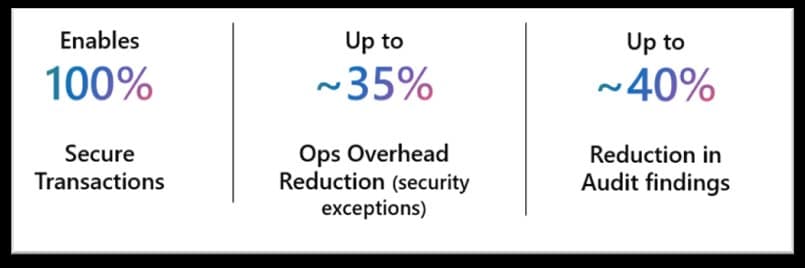
Microsoft announces General Availability of Managed Identity support for Azure Files over SMB, enabling secure, keyless application access while maintaining compatibility with existing user authentication models.
Microsoft has announced the General Availability of Managed Identity support for Azure Files over SMB, marking a significant advancement in secure enterprise storage access. This feature eliminates the need for storage account keys, passwords, or credential distribution, addressing critical security concerns in modern application architectures.
The Problem with Traditional Storage Access
Traditional identity models for shared storage have long posed operational and security challenges for enterprises. Account keys stored in configuration files, hardcoded credentials in application code, and domain-joined infrastructure all introduce significant risks:
- Credential leakage through misconfigured access or code repositories
- Lack of identity attribution making audit trails incomplete
- Excessive privilege when shared keys are compromised
- Operational overhead from key rotation and credential management
These issues directly conflict with Zero Trust principles and least privilege access models that modern enterprises strive to implement.
What's New in GA
With Managed Identity support now generally available, Azure Files enables applications and virtual machines to authenticate directly to file shares using Microsoft Entra ID identities. This approach provides several immediate benefits:
- No secrets required - Applications authenticate using their managed identity
- Built-in auditability - Every access request is attributed to a specific identity
- Automatic credential rotation - No manual key management needed
- Simplified compliance - Meets regulatory requirements for identity-based access
AKS Workload Identity Integration
The announcement includes preview support for AKS Workload Identity, extending managed identity capabilities to the pod level rather than the cluster level. This granular approach enables:
- Pod-level identity isolation - Each pod uses its own federated identity
- Least-privilege access - Secure RBAC controls per application
- Seamless scaling - Identities persist through pod redeployment
- No credential injection - Eliminates secrets from container images
Available with AKS 1.35, this feature is particularly valuable for financial services organizations requiring strict compliance and regulatory adherence for stateful workloads.
Unified Access Model
A key innovation is the co-existence of application identities and end-user access on the same storage account. Both managed identities and user accounts authenticate via Microsoft Entra ID, sharing a common authorization model. This unified approach enables scenarios like:
- Developers debugging applications using the same file share
- Admins managing content for automated workflows
- Hybrid environments with mixed user and application access
Simplified Enablement
The Azure portal now features a dedicated Managed Identity property for storage accounts, making configuration straightforward:
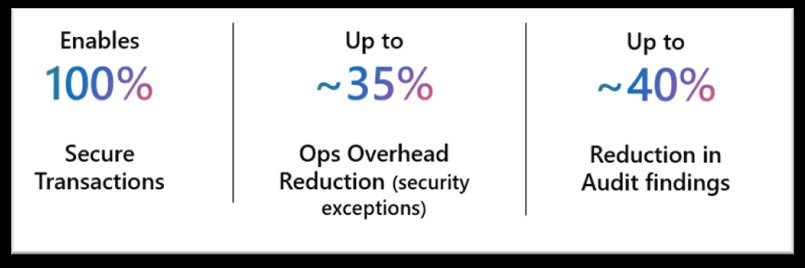
This single configuration enables identity-based SMB access while maintaining compatibility with existing user access patterns and governance models.
Getting Started
Organizations can begin using Managed Identities with Azure Files immediately at no additional cost. The feature supports both HDD and SSD SMB shares across all billing models. Complete setup guidance is available in the official documentation.
For enterprises looking to strengthen their security posture while simplifying storage access management, Managed Identity support for Azure Files represents a significant step toward eliminating secrets from the storage access lifecycle.
For questions or support, contact the Azure Files team at [email protected].
Comments
Please log in or register to join the discussion