
Microsoft reports threat actors increasingly abuse external Teams collaboration to impersonate IT staff and trick employees into granting remote access, using legitimate tools to evade detection while stealing sensitive data.
Microsoft has issued a warning about a growing threat where attackers are increasingly abusing Microsoft Teams' external collaboration features to impersonate IT or helpdesk personnel and trick employees into granting remote access to their systems.

According to Microsoft's security researchers, these attacks typically begin when threat actors contact targets through cross-tenant Teams chats, posing as legitimate IT staff members who claim they need to address account issues or perform security updates. The attackers' goal is to convince employees to initiate remote support sessions using legitimate tools like Windows Quick Assist, which provides the attackers with direct control over the victim's machine.
The Multi-Stage Attack Chain
Microsoft has documented a sophisticated nine-stage attack chain that demonstrates how these intrusions unfold:
Stage 1: Initial Contact Attackers reach out via external Teams chat, impersonating IT personnel and creating a sense of urgency around account or security issues.
Stage 2: Remote Access Establishment Victims are persuaded to start a remote assistance session using legitimate tools like Quick Assist, giving attackers direct control.
Stage 3: Reconnaissance Once inside, attackers use Command Prompt and PowerShell to assess the environment, checking user privileges, domain membership, and network reachability.
Stage 4: Payload Deployment Attackers drop malicious payloads in user-writable locations such as ProgramData and execute them through legitimate, signed applications using DLL side-loading techniques.
Stage 5: Command and Control HTTPS-based communication with command-and-control servers blends into normal outbound traffic, making detection difficult.
Stage 6: Persistence Attackers establish persistence through Windows Registry modifications to maintain access across reboots.
Stage 7: Lateral Movement Using Windows Remote Management (WinRM), attackers move laterally across the network, targeting domain-joined systems and high-value assets like domain controllers.
Stage 8: Additional Tool Deployment More remote management software tools are deployed onto reachable systems to expand the attacker's capabilities.
Stage 9: Data Exfiltration Attackers use tools like Rclone to collect and transfer sensitive data to external cloud storage, employing filters to target only valuable information and reduce transfer volume.
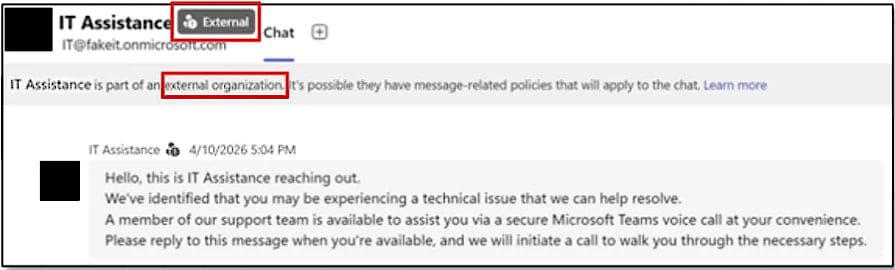
Malicious message sent to targets Source: Microsoft
Why These Attacks Are So Effective
The primary challenge in detecting these attacks lies in the heavy use of legitimate applications and native administrative protocols. Because attackers rely on trusted tools like Quick Assist, WinRM, and signed applications, their activities often blend seamlessly with normal IT support operations.
Microsoft notes that follow-on malicious activity is particularly difficult to discern from legitimate operations, making these intrusions especially dangerous for enterprise environments.
Microsoft's Recommended Mitigations
To combat this growing threat, Microsoft recommends several key security measures:
- Treat external Teams contacts as untrusted by default
- Restrict or closely monitor remote assistance tools like Quick Assist
- Limit WinRM usage to controlled systems only
- Pay attention to Teams security warnings that flag communications from outside the organization
- Be vigilant about potential phishing attempts in external Teams messages
The Broader Context
This warning comes amid increasing concerns about social engineering attacks that exploit trusted collaboration platforms. Microsoft Teams, with its widespread adoption in enterprise environments, has become an attractive target for attackers looking to bypass traditional security controls.
The use of legitimate tools for malicious purposes represents a growing trend in cyberattacks, where adversaries leverage the very tools that security teams rely on for legitimate operations. This "living off the land" approach makes detection significantly more challenging and requires organizations to rethink their security strategies.
Organizations should review their Teams configuration settings, implement strict controls around remote assistance tools, and ensure employees are trained to recognize and report suspicious communications, even when they appear to come from within the organization's collaboration platform.
Comments
Please log in or register to join the discussion