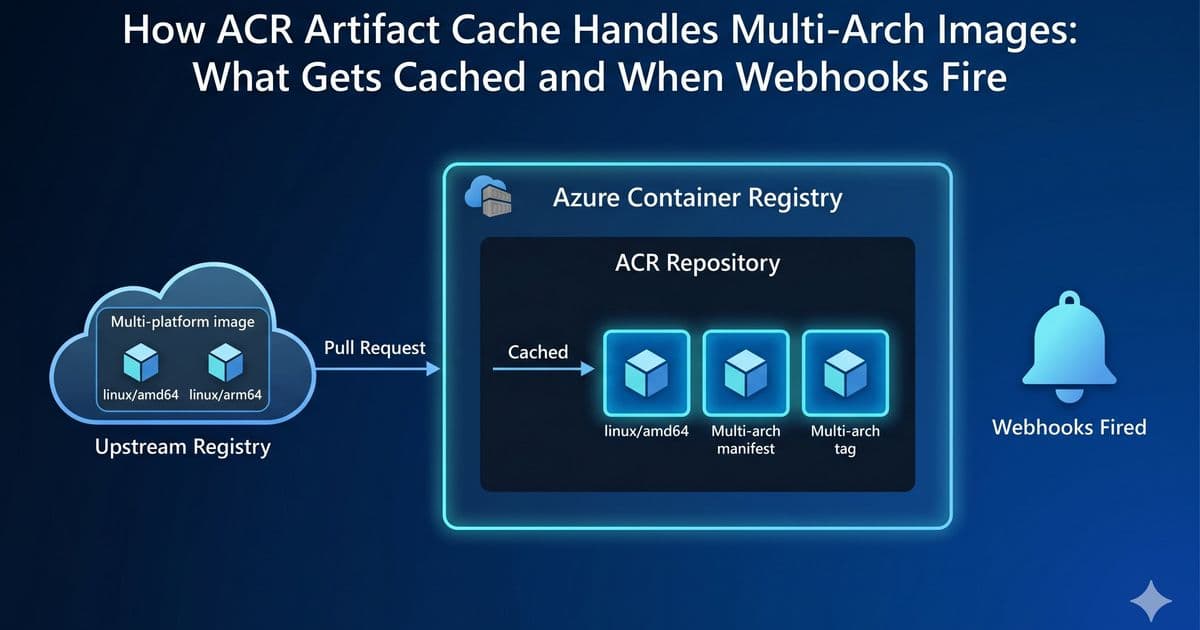
Azure Container Registry's Artifact Cache behaves differently for multi-architecture images than previously understood, caching only the manifest list and the specific platform requested. This detailed analysis explains exactly what gets cached, when webhooks fire, and how to determine when storage charges begin.
Azure Container Registry Artifact Cache: Decoding Multi-Arch Image Caching and Webhook Triggers
Container registries have become fundamental to modern application deployment, and caching strategies play a crucial role in optimizing performance and reducing costs. Microsoft's Azure Container Registry (ACR) Artifact Cache feature, designed as a pull-through caching solution, has specific behaviors for multi-architecture images that teams need to understand to effectively implement their cloud-native strategies.
What Actually Gets Cached in Multi-Arch Scenarios?
When teams work with multi-architecture container images through ACR's Artifact Cache, a common misconception is that all architectures get cached simultaneously. The reality is more nuanced and has significant implications for performance optimization and cost management.
When pulling a multi-arch image through Artifact Cache, ACR follows a specific pattern:
- The manifest list (which references all platforms) is immediately cached
- Only the platform manifest for the specific architecture requested is cached
- Other architecture manifests remain uncached until explicitly requested
This "partial closure copy" approach preserves the multi-arch index while being storage-efficient, caching only what's immediately needed.
Webhook Behavior: The Signal for Local Cache Completion
ACR's push webhooks serve as critical indicators for when an image has been fully cached locally. For a single-platform pull of a multi-arch image, ACR fires exactly three push webhook events:
- Two events for the manifest list (one tagged, one untagged)
- One event for the platform-specific manifest
Notably, no webhooks fire for blob/layer copies—only for manifest pushes that are asynchronously copied and locally stored.
Practical Implications for Multi-Cloud Strategies
Understanding this caching behavior has several strategic implications:
Cost Management
Storage charges begin applying only when the async copy completes and the image is locally stored. The webhook events signal precisely when this happens, allowing teams to:
- Accurately predict when storage costs will begin
- Implement cost monitoring based on actual cache completion
- Optimize cache rules based on actual usage patterns
Performance Optimization
The caching approach means:
- Initial pulls for a specific architecture are served from upstream
- Subsequent pulls for the same architecture are served locally
- Pulls for different architectures trigger additional caching
This pattern makes Artifact Cache particularly effective for homogeneous environments where most containers run on the same architecture.
Migration Considerations
For organizations migrating workloads between cloud providers or on-premises environments, this behavior affects:
- Cache warm-up strategies
- Bandwidth consumption patterns
- Registry synchronization timing
Implementation Guidance
Teams implementing Artifact Cache with multi-arch images should:
Pre-compute platform digests from upstream manifest lists to identify which architecture a webhook corresponds to
Handle webhook ordering carefully as events may not arrive in strict order and retries can produce duplicates
Deduplicate events by ID or digest in webhook handlers
Monitor for both manifest list and platform manifest events to get complete visibility into cache status
Comparative Analysis: ACR vs. Other Registry Solutions
ACR's approach differs from some other registry solutions:
- Docker Registry: Some implementations cache all manifests referenced by a manifest list immediately
- Harbor: Offers configurable caching strategies that can be set to cache all or specific architectures
- Amazon ECR: Uses similar pull-through caching but with different event signaling mechanisms
ACR's selective caching approach reduces initial storage overhead but requires more careful orchestration for environments with mixed architectures.
Technical Deep Dive: The Experiment That Revealed the Behavior
The Azure team conducted a controlled experiment to definitively demonstrate the caching behavior:
- Setup: Created a scoped webhook to capture push events during cache population
- Configuration: Established a cache rule mapping Microsoft Artifact Registry to a local ACR namespace
- Execution: Pulled a multi-arch image with a specific platform flag
- Observation: Captured and analyzed all webhook events generated
The results clearly showed three webhook events for a single-platform pull, with no events for uncached architectures.
Strategic Recommendations
Based on this behavior, organizations should:
- Implement architecture-specific cache rules when working with multi-arch images in heterogeneous environments
- Design webhook handlers that account for both manifest list and platform manifest events
- Consider caching strategies based on actual architecture usage rather than assuming all architectures will be needed
- Monitor webhook events as the primary indicator of cache completion rather than pull request timing
Conclusion
ACR's Artifact Cache implements an intelligent caching strategy for multi-architecture images that balances storage efficiency with performance requirements. By understanding exactly what gets cached and when webhooks fire, teams can optimize their container registry strategies, manage costs more effectively, and build more reliable multi-cloud deployments.
For organizations implementing ACR in production environments, this nuanced understanding of caching behavior is essential for designing effective monitoring, alerting, and automation workflows around container image management.
Learn more about Azure Container Registry Artifact Cache | Explore ACR webhook documentation | Azure Container Registry GitHub repository
Comments
Please log in or register to join the discussion