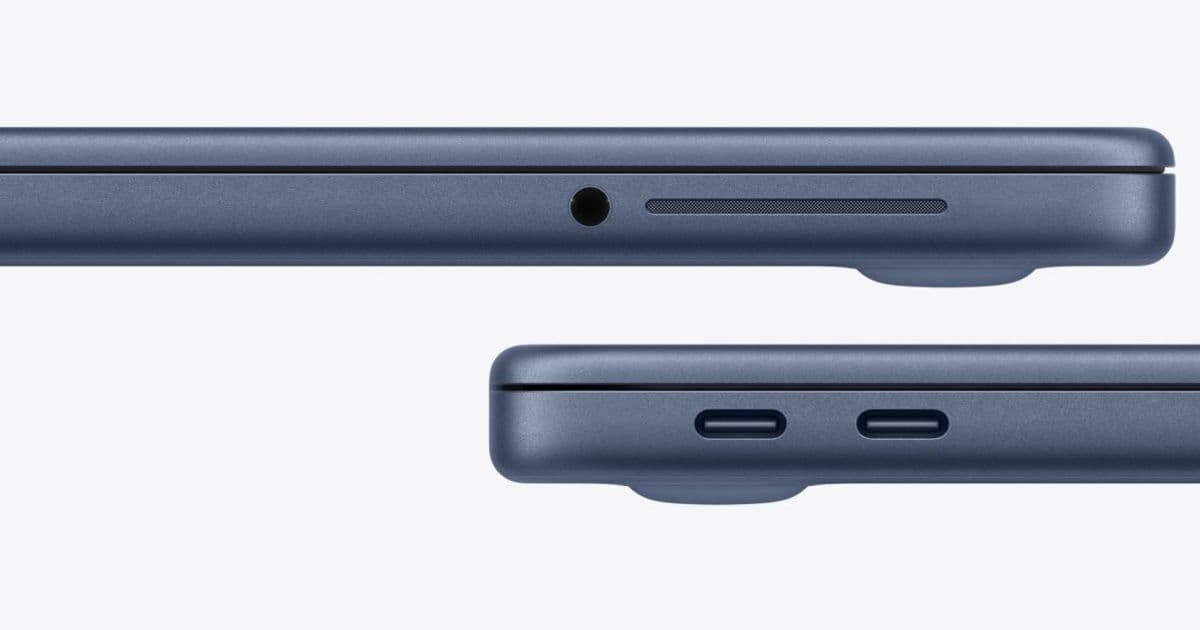
Apple's new MacBook Neo features two USB-C ports with different capabilities, and macOS will warn you if you connect a display to the wrong one. Here's what you need to know about this unique port configuration.
Apple's new MacBook Neo has a unique USB-C port configuration that's already generating buzz among potential buyers and reviewers. The laptop features two USB-C ports that look identical but have vastly different capabilities, and macOS will actually warn you if you connect a display to the wrong port.
Two Ports, Not Two Equal Ports
The MacBook Neo's port setup is straightforward but requires attention. The rear USB-C port supports both USB 3 and DisplayPort, making it the only port capable of driving an external display. The second USB-C port, however, is limited to USB 2 speeds and cannot output video at all.
This means you'll get up to 10Gb/s transfer speeds from the rear port, while the second port is capped at just 480Mb/s. Both ports can handle charging and data transfer, but there's a catch: if you're doing both simultaneously, you'll want to use the second port for charging and reserve the rear port for data-intensive tasks.
The Warning System
If you attempt to connect a display to the USB 2-only port, macOS will display an on-screen notification suggesting you plug it into the other port instead. This warning system is Apple's solution to what could otherwise be a frustrating user experience.
As John Gruber at Daring Fireball reported, Apple's product marketing team described getting a second USB port on the MacBook Neo as "a significant engineering achievement" given the constraints of the A18 Pro SoC. The company clearly prioritized having two ports over making them identical.
Display Support Limitations
Beyond the port confusion, MacBook Neo's external display support is more limited than you might expect. The laptop can drive "one external display with up to a native resolution of 4K at 60Hz" according to Apple's specifications.
If you try to enable scaled resolutions higher than the native resolution of your external display, you may lose access to some refresh rate or HDR modes in display preferences. This means MacBook Neo can't take full advantage of 5K monitors like the Apple Studio Display, which costs $1000 more than the MacBook Neo itself.
However, BenQ recently released a new glossy 5K 27-inch display for $999, which might be an attractive option for users who don't need the full Apple Studio Display experience.
Practical Implications
The port configuration has several practical implications for MacBook Neo users:
- Data transfer: Always use the rear port for external drives or other high-bandwidth devices
- Charging while transferring: Use the second port for charging when doing data-intensive work
- Display connections: Only the rear port works for external monitors
- Port location: The rear port is where you'd traditionally find the charging port on Apple laptops
What This Means for Buyers
MacBook Neo is clearly designed for users who primarily work on the laptop itself and occasionally need external display support. If you're someone who regularly uses multiple monitors or requires high-speed data transfer through USB-C, you'll need to be mindful of which port you're using.
The warning system should help prevent frustration, but it does add a layer of complexity that MacBook users haven't had to deal with before. As reviews start rolling in next week when the MacBook Neo arrives in stores on March 11, expect to see plenty of screenshots and memes featuring the macOS port warning notification.
For now, if you're pre-ordering a MacBook Neo, just remember: when it comes to displays, there's only one right port, and macOS will tell you if you get it wrong.
Comments
Please log in or register to join the discussion