Microsoft has built a system-level audio splitter into Windows 11 that pushes one synchronized stream to two Bluetooth LE Audio devices at once. The catch: it only runs on recent Copilot+ and Intel Core Ultra 200 hardware, and Microsoft is gating it behind a staged rollout.
Sharing audio from a laptop has always been a compromise. You either split the headphone jack with a passive Y-cable and watched the volume drop, or you installed some third-party mirroring tool that introduced lag and dropped connections. Microsoft has now removed the middleman by adding a native audio broadcaster to Windows 11. The feature, called Shared Audio, splits the output stream at the system level and sends synchronized sound to two separate Bluetooth devices at the same time.
This is not a software hack layered on top of the audio stack. It hooks into Bluetooth Low Energy (LE) Audio, the newer transport standard that replaces the aging Bluetooth Classic A2DP profile most headphones still use. That distinction matters, because it dictates exactly which laptops and which earbuds can actually run it.
What's new
Shared Audio lives in two places: the Settings app for pairing, and the Quick Settings tray for the actual broadcast. The workflow is straightforward once your hardware qualifies.
First, pair both wireless devices before you start a session. Press Windows Key + I to open Settings, then go to the Bluetooth & devices tab. Put your first set of headphones into pairing mode, click Add device, and select them from the discovered hardware list. Repeat the same steps for the second headset. Both accessories need to show an active connection status in the device panel before you continue.
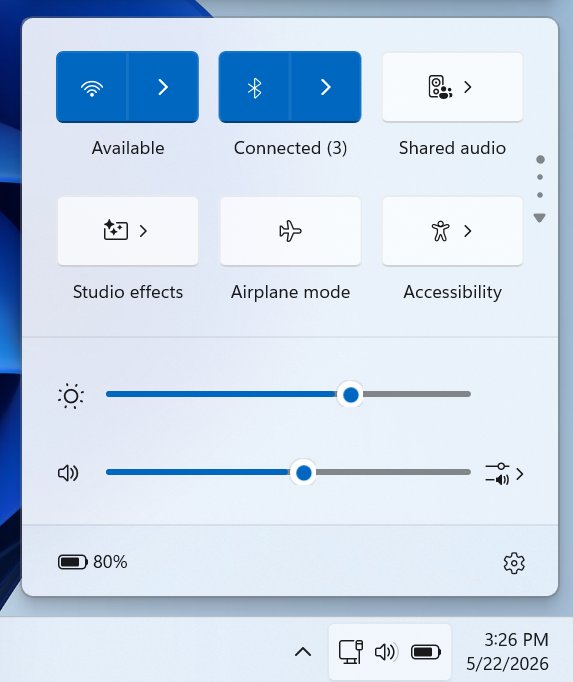
With both devices connected, click the speaker icon in the bottom-right corner of the taskbar to open the Quick Settings tray. Select the Shared audio option, which opens a configuration panel that automatically detects and lists your connected hardware. Tick the checkboxes next to both target headsets and click Share to start the broadcast. A status icon appears on the taskbar to confirm the stream is live and to give you a shortcut back to the configuration overlay.
{{IMAGE:3}}
Each listener gets independent volume control. You can adjust levels with the software sliders inside the menu or with the physical buttons on each headset, so one person can crank a movie soundtrack while the other keeps it low. There is one trade-off worth flagging: the routing pipeline temporarily locks out Bluetooth headset microphone inputs. During a shared session, Windows falls back to your laptop's built-in microphone array for any voice calls.
{{IMAGE:4}}
How it compares
Compared to the splitter-and-cable era, the gap is significant. Passive splitters cut signal strength and tie both listeners to the same physical length of wire. Earlier software solutions like Stereo Mix routing or apps that hijacked virtual audio cables were unreliable and rarely kept both streams in sync. Shared Audio handles synchronization at the protocol level, which is the entire point of LE Audio's Auracast-style broadcast model.
Apple has offered Share Audio on iPhones and iPads for years, so Microsoft is playing catch-up here rather than breaking new ground. The difference is that Microsoft is tying its implementation strictly to LE Audio hardware instead of supporting older AirPods-style Bluetooth devices. That keeps the experience clean but sharply narrows the pool of compatible gear at launch.
Who it's for, and the hardware you need
This is where the practical limits show up. Because the feature bypasses Bluetooth Classic in favor of LE Audio, it requires Windows 11 build 26100.8522 or newer plus specific internal components.
On the PC side, compatible machines include Copilot+ laptops running Qualcomm Snapdragon X Elite or Snapdragon X Plus chips, such as the Microsoft Surface Laptop 7, Surface Pro 11, Samsung Galaxy Book4 Edge, and Dell XPS 13 9345. Newer systems built on Intel Core Ultra Series 200 silicon also qualify. If your laptop predates these platforms, the feature simply will not appear.
The headphone requirements are just as strict. You need broadcast-ready LE Audio endpoints, which currently include the Samsung Galaxy Buds2 Pro, Galaxy Buds3, Galaxy Buds3 Pro, and Sony LinkBuds S. Modern LE Audio hearing aids from manufacturers like ReSound and Beltone are supported too, which makes this genuinely useful for accessibility scenarios where one user needs a hearing aid feed and another wants standard earbuds.
There is one more gate even if your hardware checks every box. Microsoft is deploying Shared Audio through a Controlled Feature Rollout (CFR), a server-side staging method that keeps the tile hidden behind a configuration flag until Microsoft remotely activates it for your device. So you can be on the right build, with the right chip and the right earbuds, and still wait for the option to show up. Documentation for the feature and the full Bluetooth compatibility list is available through Microsoft's support pages.
For anyone already inside the Copilot+ and Galaxy Buds ecosystem, this is a clean, no-cable way to share a screen and its sound on a flight or a couch. For everyone else, it is a preview of where Windows audio is heading once LE Audio becomes standard across the hardware most people actually own.
Comments
Please log in or register to join the discussion